Case study 02· Mortgage advice for seafarers
Mortgages for Yacht Crew: A mortgage desk that fits in a pocket.
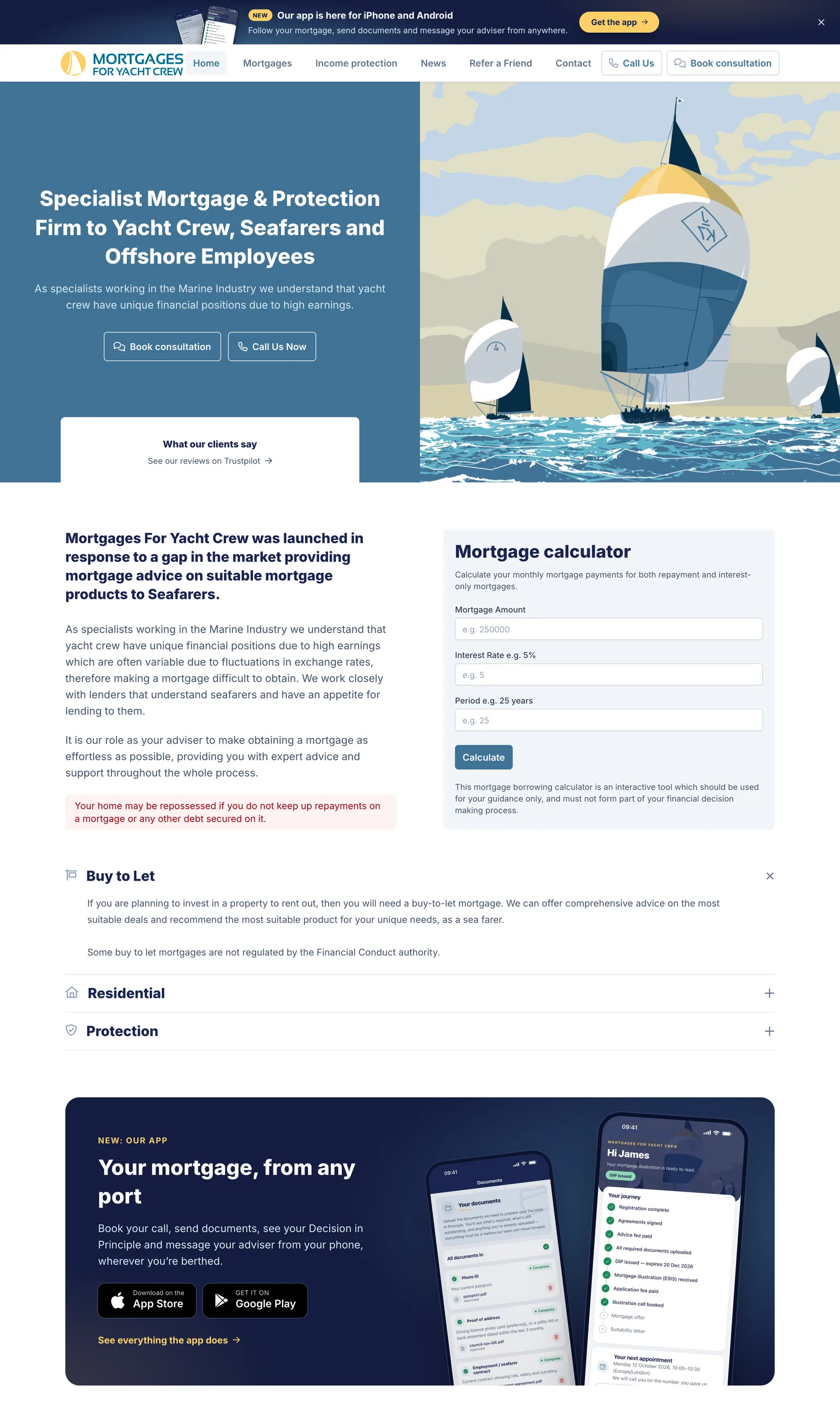
A website, a companion app for iPhone and Android and a staff back office for a specialist mortgage adviser. Clients book calls, sign paperwork, send documents and message their adviser from wherever they are berthed, and the system does the chasing.
- Client
- Mortgages for Yacht Crew
- Sector
- Mortgage and protection advice for yacht crew, seafarers and offshore workers
- Engagement
- Ongoing since 2023
- Scope
- Website, mobile app, staff back office, booking, payments and automation
- Design
- Front-end design by Dan Patching Creative Design

Overview
A small team. Clients in every time zone.
Mortgages for Yacht Crew arranges UK mortgages and protection for people who work at sea. Their income is irregular, often paid in foreign currency, and they are rarely in the country, which is exactly why mainstream lenders and brokers struggle with them.
A mortgage runs on paperwork and timing: agreements to sign, documents to supply, a decision in principle that expires, an offer with a deadline. For a client on a yacht in the Caribbean, every one of those steps can mean email attachments, missed calls and a lot of chasing by a small advisory team.
We have built the firm’s platform since 2023. In 2026 it gained a companion app and a back office reshaped around the mortgage journey, so the client always knows what happens next and the team spend their time advising rather than reminding.
- Kinds of notification sent automatically
- 37
- By email, push and in the app
- Jobs that run on a schedule
- 12
- Reminders, clean-up, reports, health checks
- Client events that land in the staff queue
- 16
- So nothing waits in an inbox
- Automated tests behind it all
- 676
- Covering web, API and booking rules
The public site
A site that starts the conversation.
The website’s job is to turn a curious deckhand into a booked call. The mortgage calculator gives a real monthly figure and, in exchange, captures who is asking. Every enquiry, from any form, lands in one place for the team.
The Mortgages for Yacht Crew team manage pages, news and their published fees themselves. The charging table in the footer is generated from the same fee records the back office uses, so the two can never disagree.
- Repayment and interest-only mortgage calculator
- Consultation booking, contact and refer-a-friend forms
- Enquiries acknowledged automatically by email
- One link that sends each phone to the right app store
- Pages, news and fees edited by the team
The companion app
The whole mortgage, on the client’s phone.
Released in 2026 for iPhone and Android, built with React Native and Expo from one TypeScript codebase. It is the client’s side of the same Laravel application the team work in, so both always see the same thing.
-
A journey, not a login
The home screen is a checklist of the mortgage itself: registered, agreements signed, fee paid, documents in, decision issued, offer made. It updates live as the team move things on.
-
Signed with a finger
Terms of business and fee agreements are read and signed in the app. Each signature is stored with a fingerprint of the exact wording, the time and the device, and a PDF copy is produced automatically.
-
Fees paid in the app
Advice and application fees are taken by card through Stripe, and the journey moves forward the moment payment clears.
-
Documents from a cabin
Passport, proof of address and contracts are photographed or picked from files. The client sees what is outstanding, what has been approved and what needs another go.
-
Buying together
A joint applicant is invited by email and can read and sign their share of the paperwork from a secure link, without creating an account.
-
After the keys
An overpayment calculator, filled in from the client’s real mortgage, shows how much sooner it could be paid off. Rate-end reminders start a product review in a tap.
In the app
Six screens, one mortgage
-
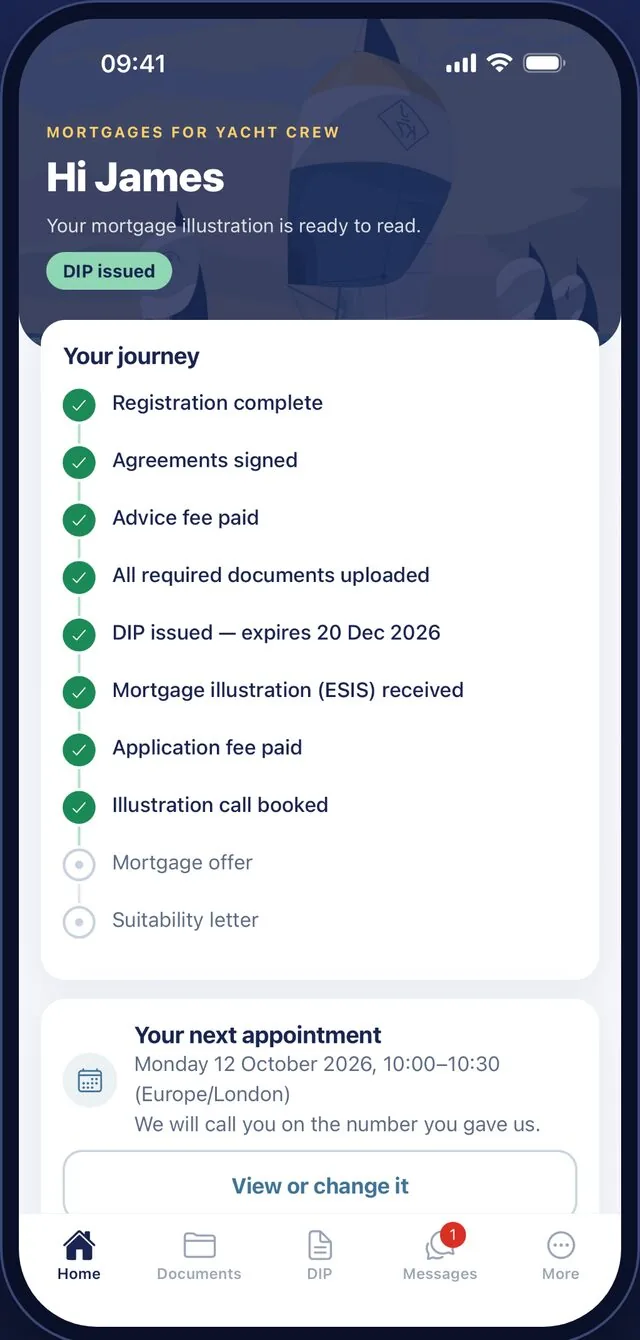
The journey, step by step -
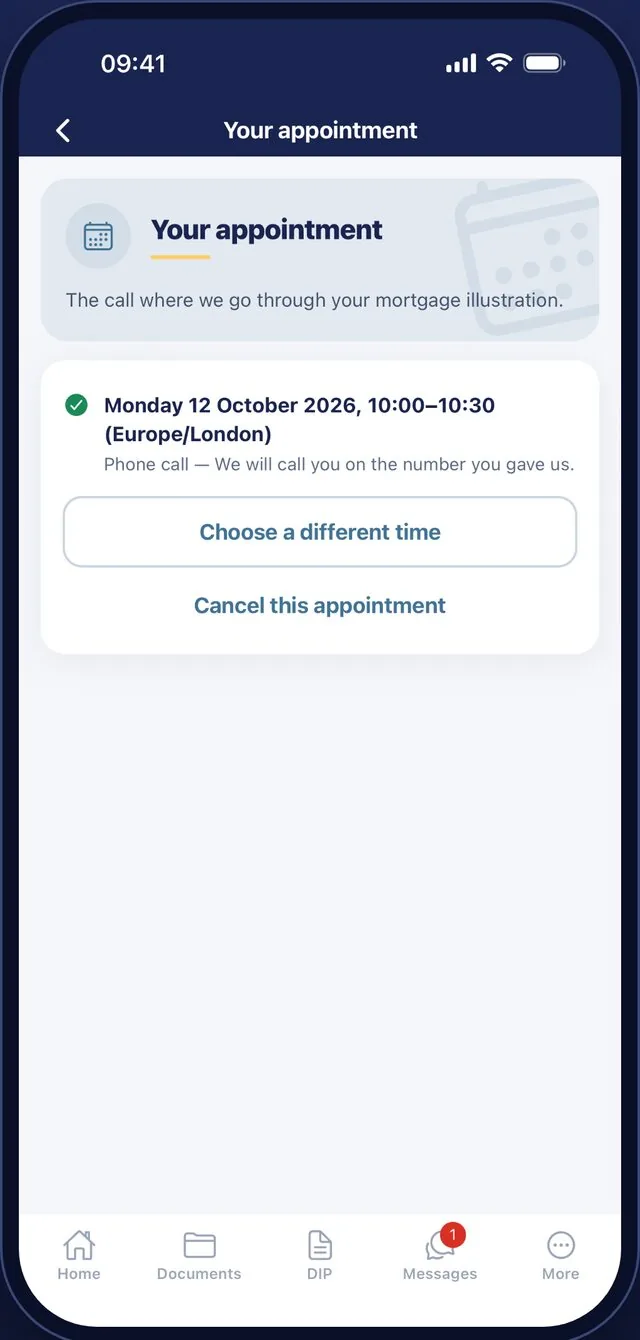
Book and move calls -
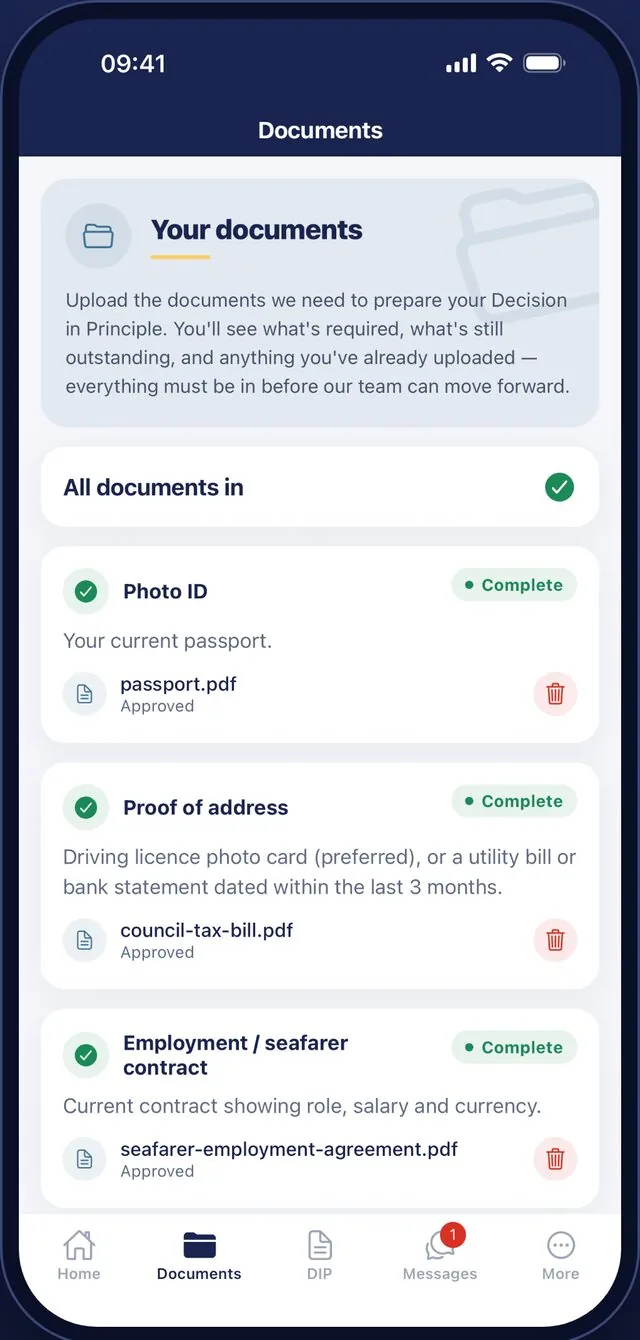
Documents, with their status -
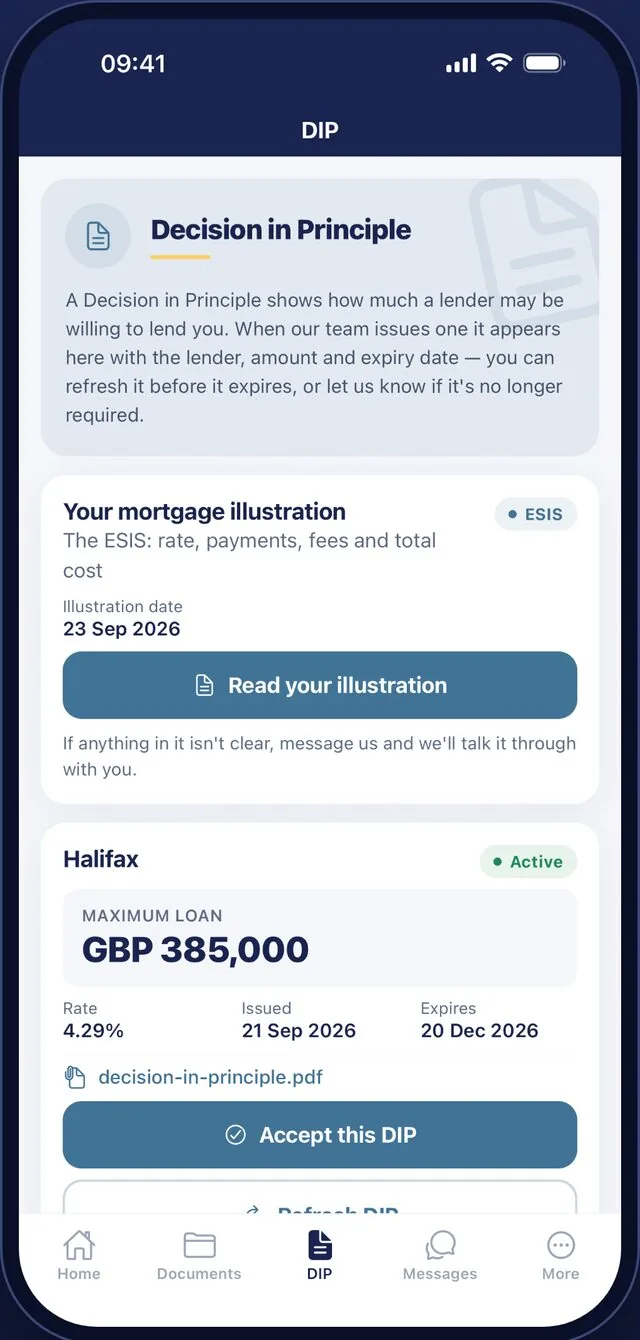
Decision in principle -
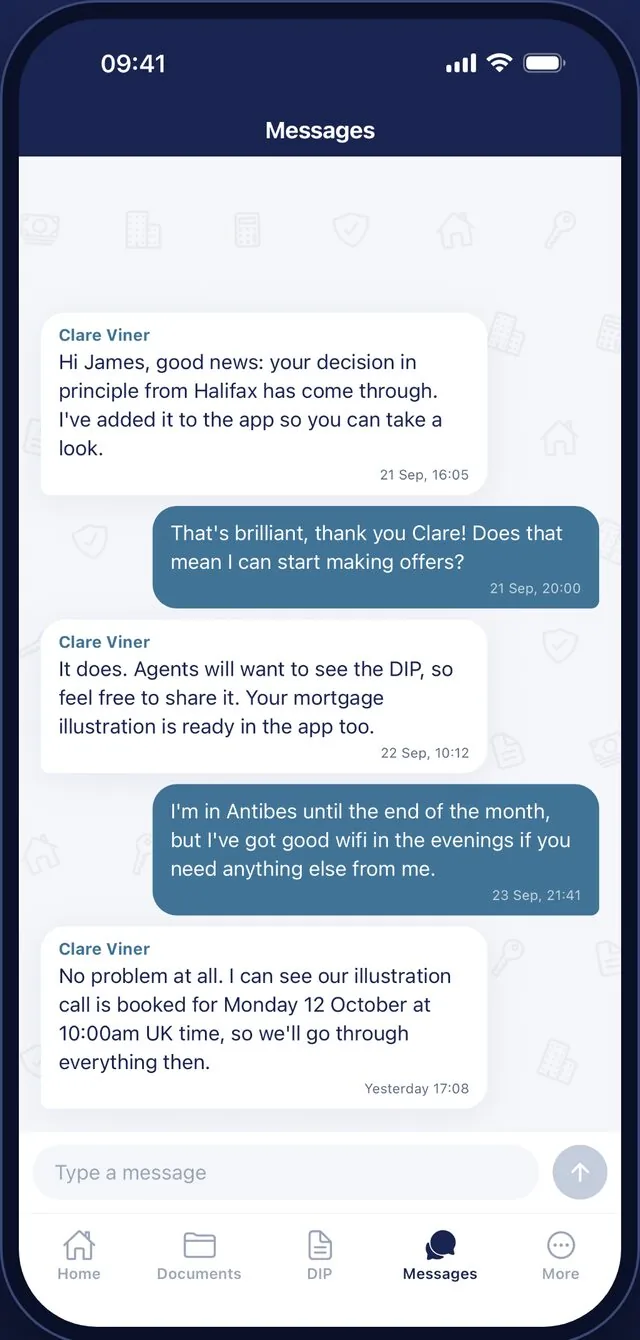
Messages with the adviser -
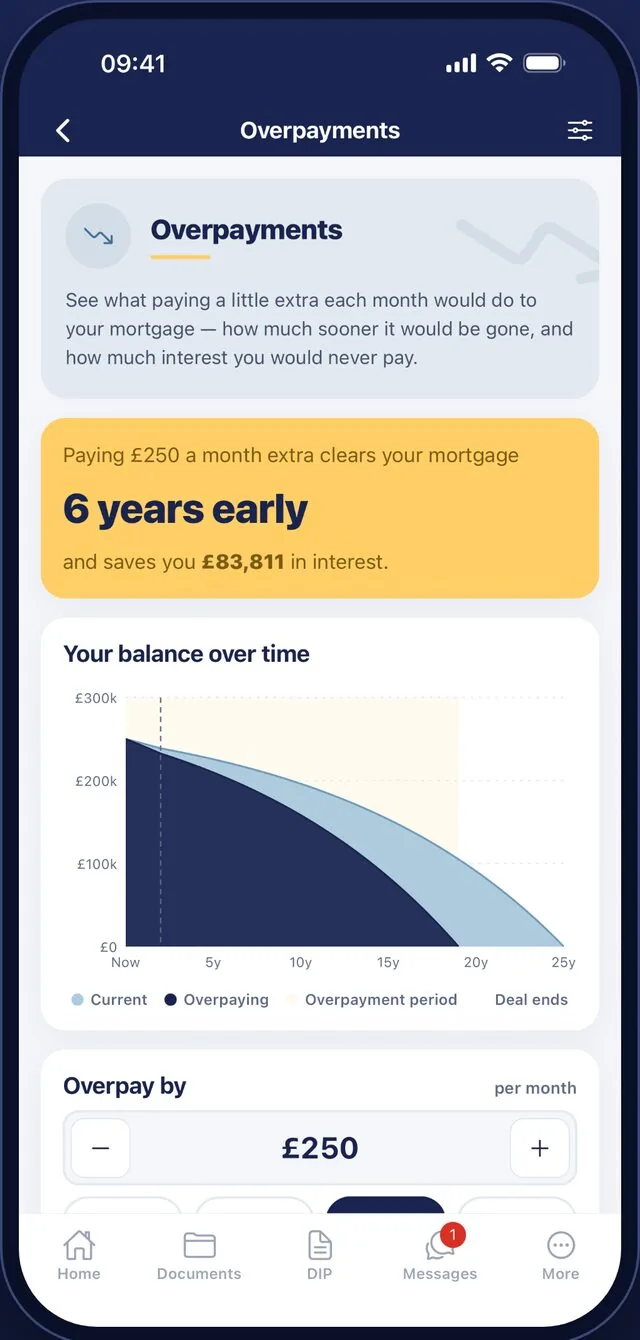
What overpaying would save
The client’s file
Every mortgage, on one page.
What the client sees as a checklist in the app, the team see as a single record in the back office. These screens show the demonstration client used to test the app.
-
01
The case at a glance
One record holds where the mortgage has got to, the service the client chose, the fee they agreed and what has actually been paid. Changing the stage here updates the client’s app straight away.
- Fees are fixed at the moment they are agreed, so a later price change never reaches an existing client
- Card payments from the app are matched against the fee automatically
- A joint applicant can be added at any point
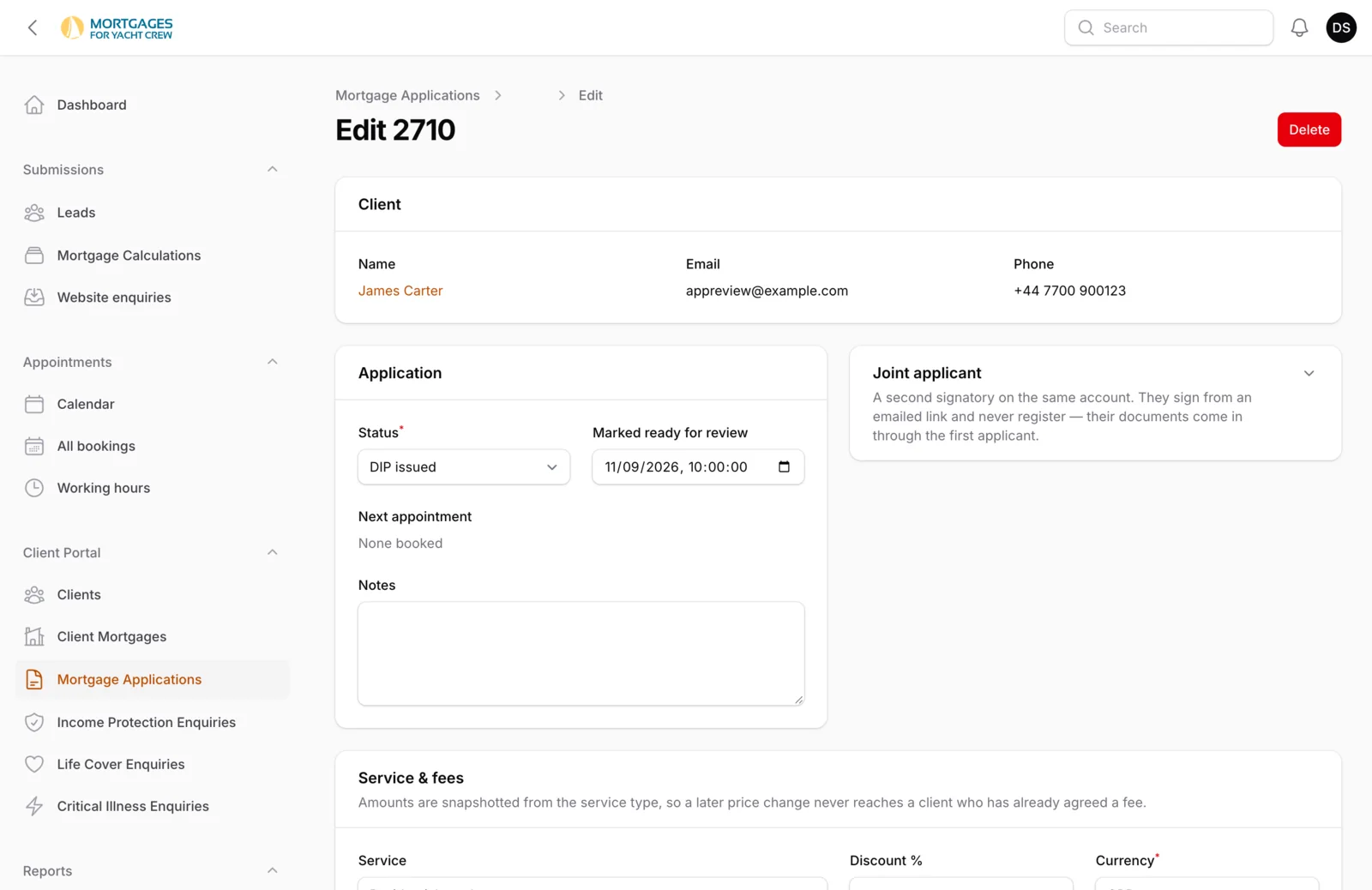
-
02
Signatures that stand up
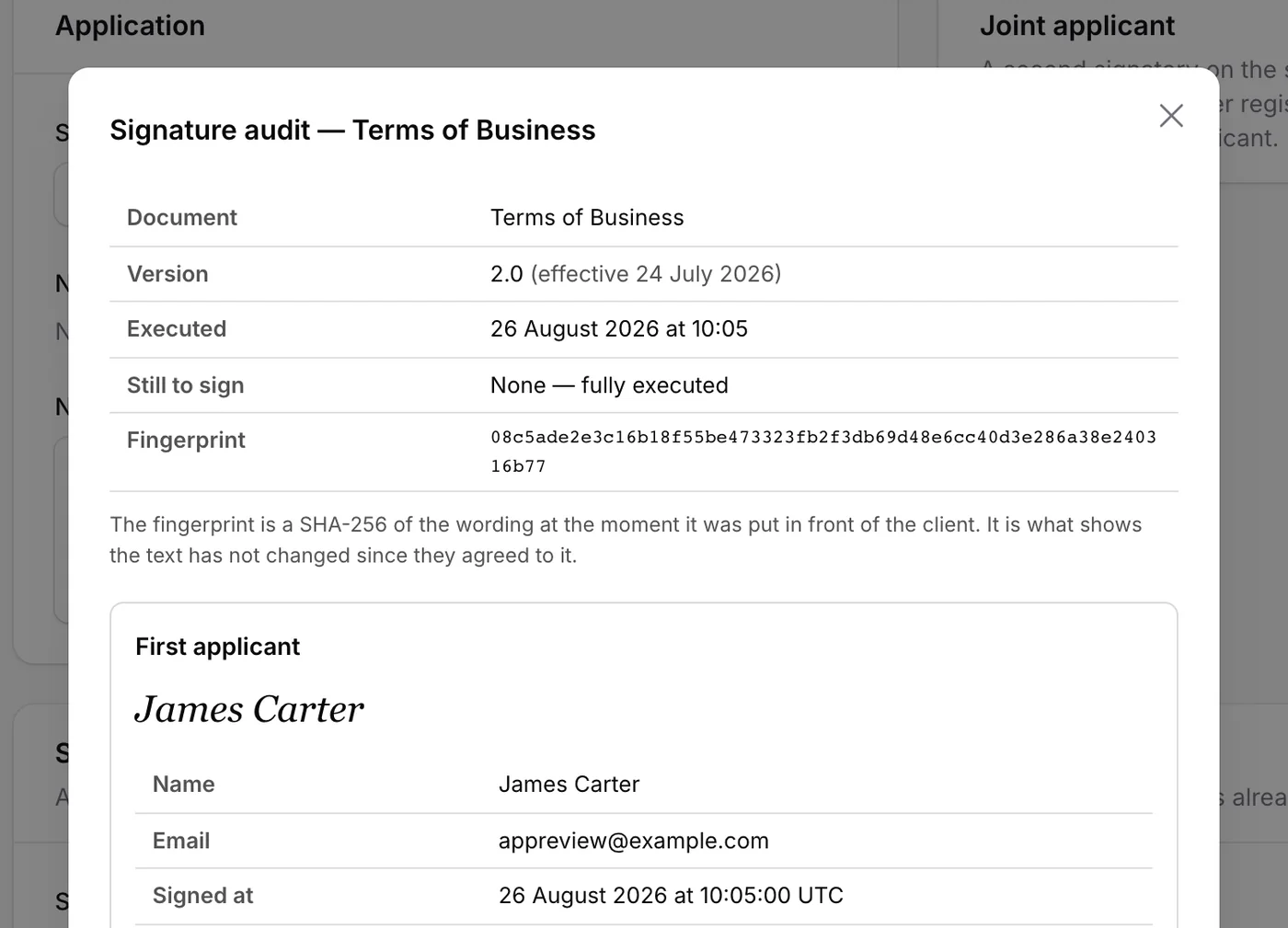
Agreements signed in the app appear on the file with a full audit behind each one: which version of the wording was shown, when it was signed, how the client was identified, and a fingerprint proving the text has not changed since.
- A signed PDF is generated without anyone asking
- New versions of an agreement are tracked separately
- No third-party e-signature service or per-envelope fee
-
03
Documents, reviewed in a click
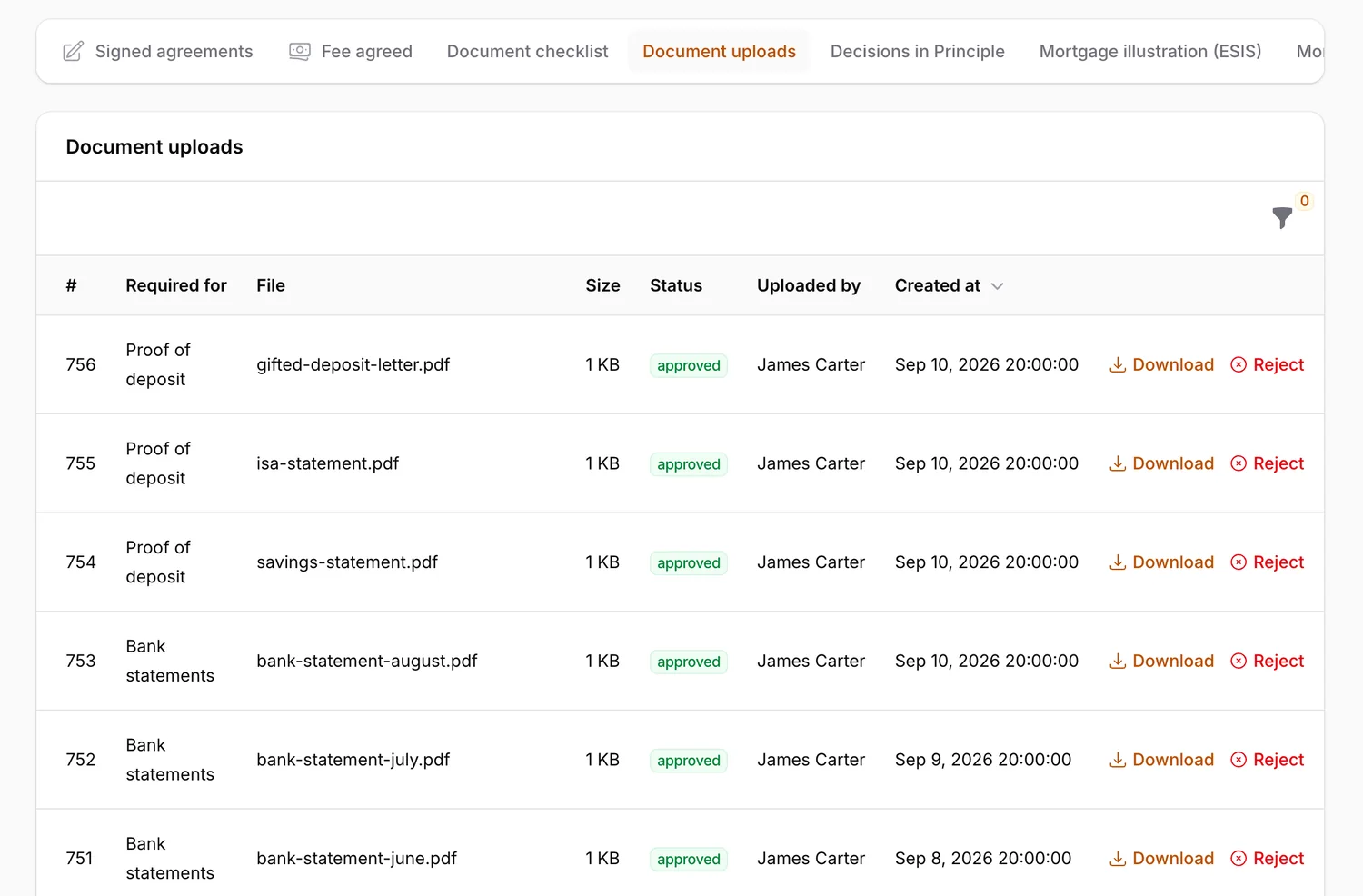
Everything the client uploads from their phone arrives here against the requirement it answers. The team download it, approve it or reject it, and the client’s app updates to match. The checklist ticks itself off as each requirement is met.
- Payslips, bank statements, ID and proof of deposit
- A rejection tells the client straight away
- One “all approved” message when the set is complete
-
04
The decision, issued to the app
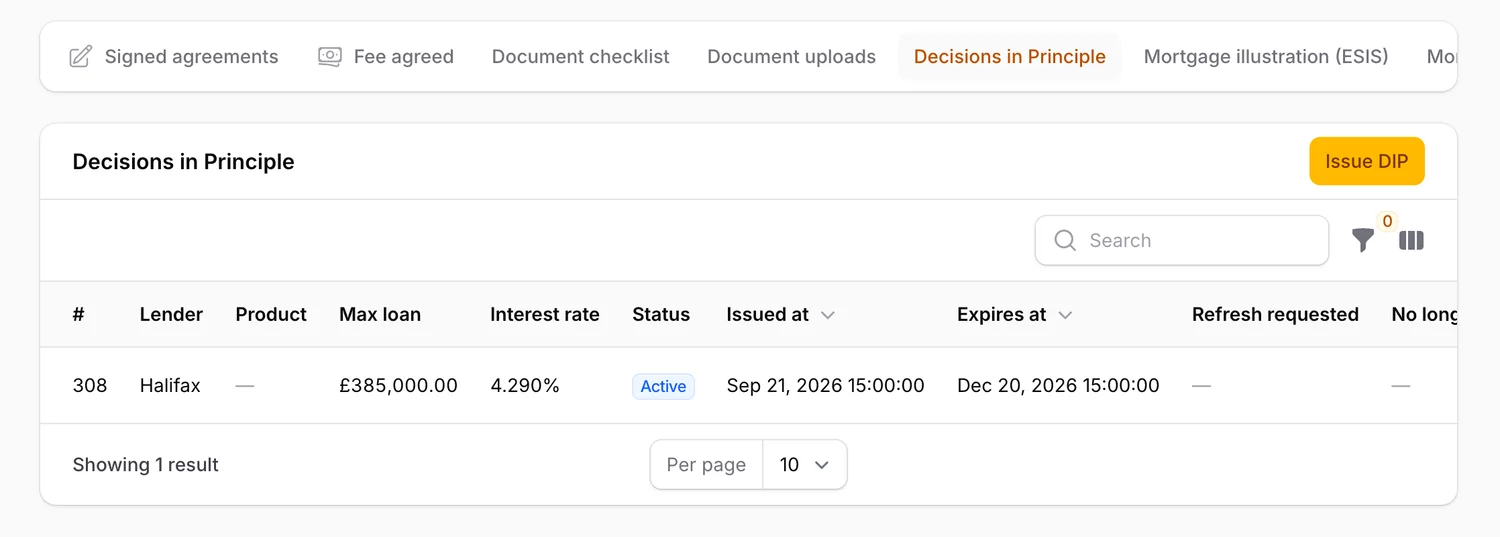
When a lender agrees in principle, the adviser records the lender, the maximum loan, the rate and the expiry date, and attaches the PDF. The client is notified and can accept it from their phone. From there the system watches the expiry date so nobody has to.
- A new decision replaces the old one cleanly
- Clients can ask for a refresh when it is close to expiring
- Illustrations, offers and suitability letters follow the same pattern
-
05
The conversation, in context
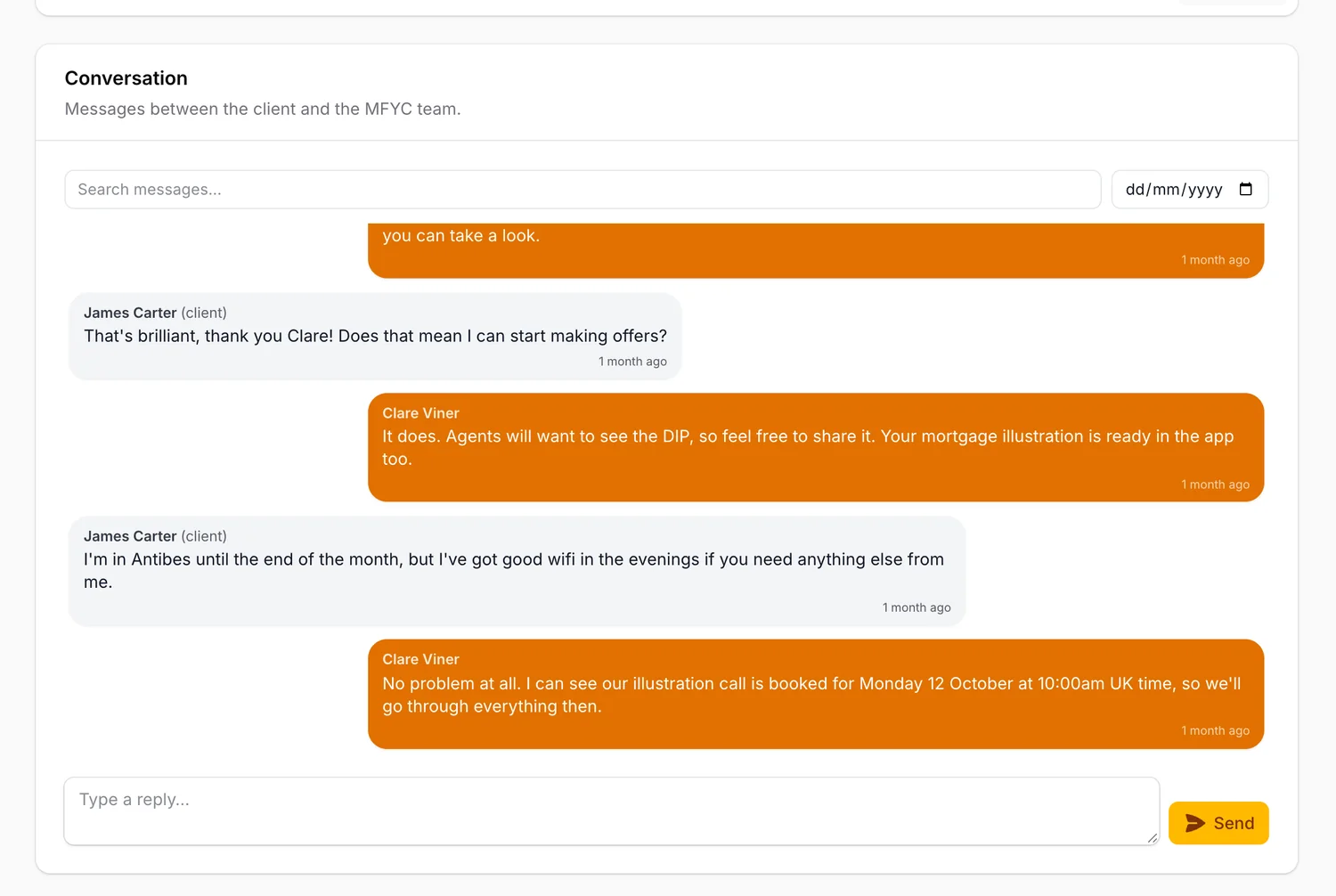
Messages from the app sit on the same file as everything else, so a reply is written with the whole case in view. The thread can be searched and filtered by date, and each new message raises an item in the team’s queue until someone answers.
- Delivered to the client’s phone in real time
- Push and email notifications if the app is closed
- Unanswered messages are escalated automatically
The diary
Booking, built in.
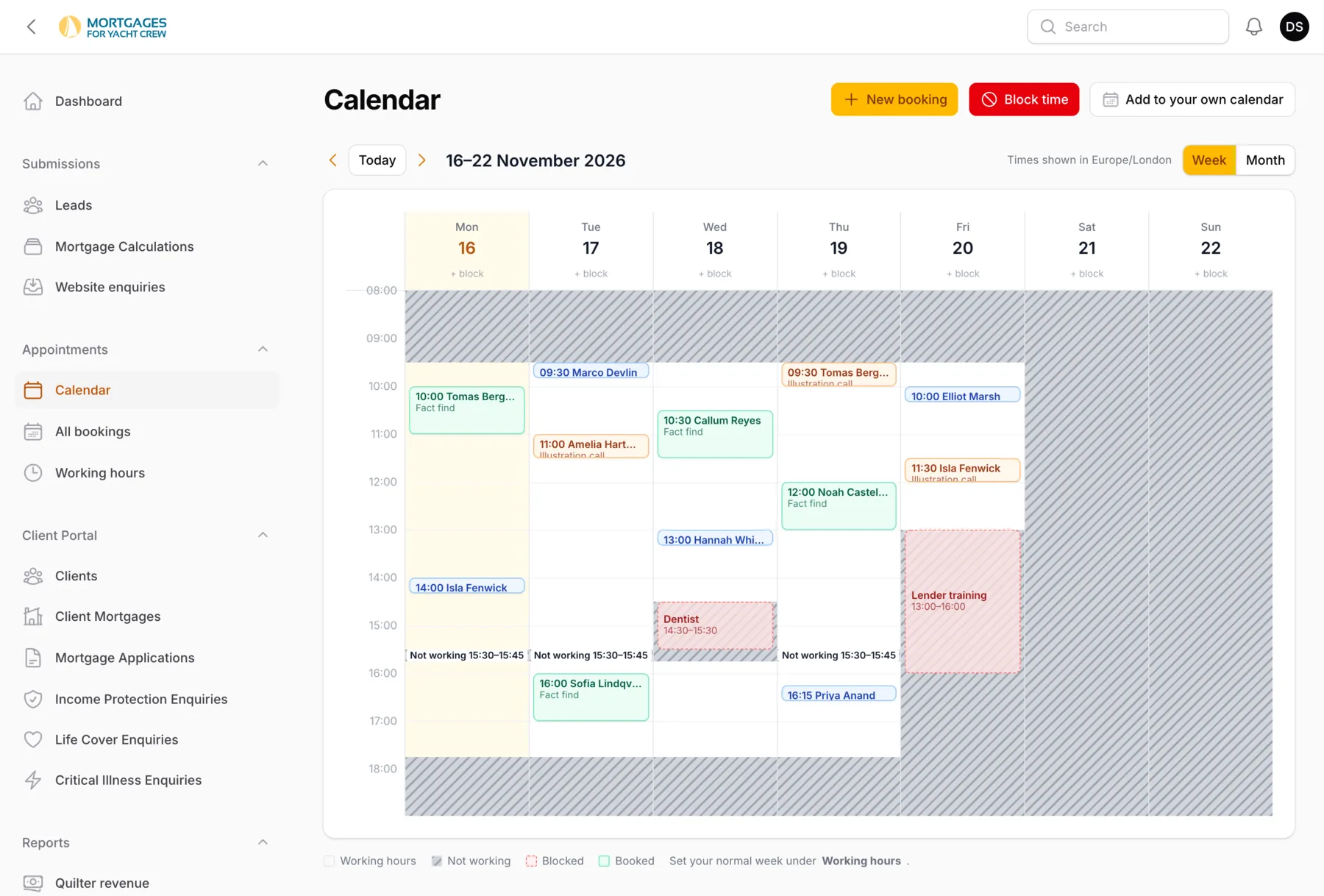
Clients book their own calls from the app, in their own time zone, and the team see the week in one place. The names shown are invented.
-
Only genuinely free slots
The app offers clients times that respect working hours, time off, notice periods and the gap needed between calls.
-
Knows the mortgage
Each kind of call has its own length and colour, and some can only be booked once the relevant fee is paid.
-
Plays well with others
Every booking carries a calendar invitation, and the team can subscribe from Google, Outlook or Apple Calendar.
The back office
One queue for the team. One link for the client.
Two pieces of connective tissue that make the app and the back office feel like one product.
Staff dashboard
A to-do list that writes itself.
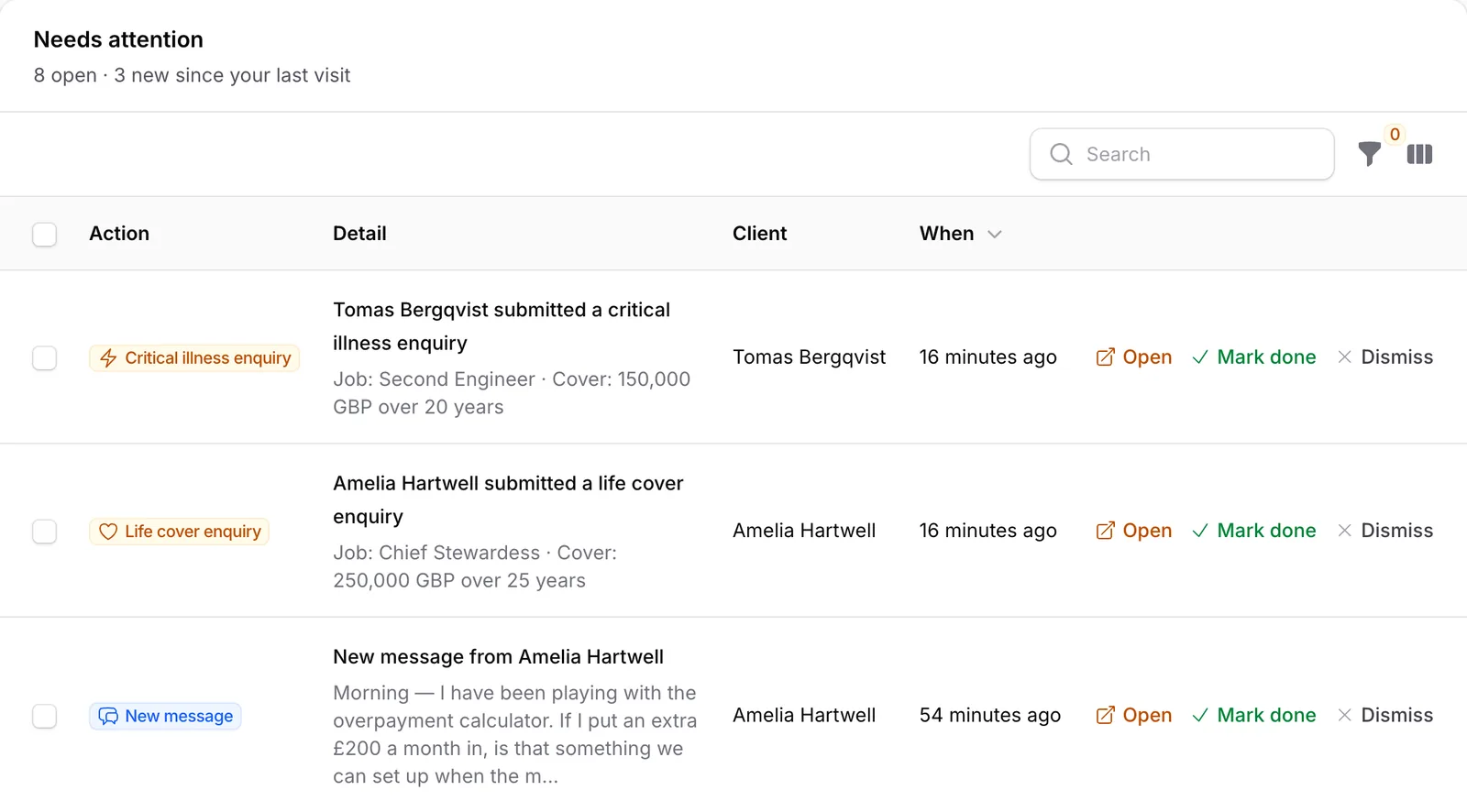
When a client does something that needs a person, it appears in a shared “Needs attention” queue: a message, a fee paid, documents ready for review, a booking cancelled, an enquiry about life cover. The team open it, mark it done or dismiss it.
- Sixteen kinds of client event feed the queue
- Repeat events merge into one item instead of piling up
- Replying to a message clears its item automatically
- Shows what is new since each person last looked
- Sits beside this week’s appointments on the dashboard
Website and app
The website knows the app exists.
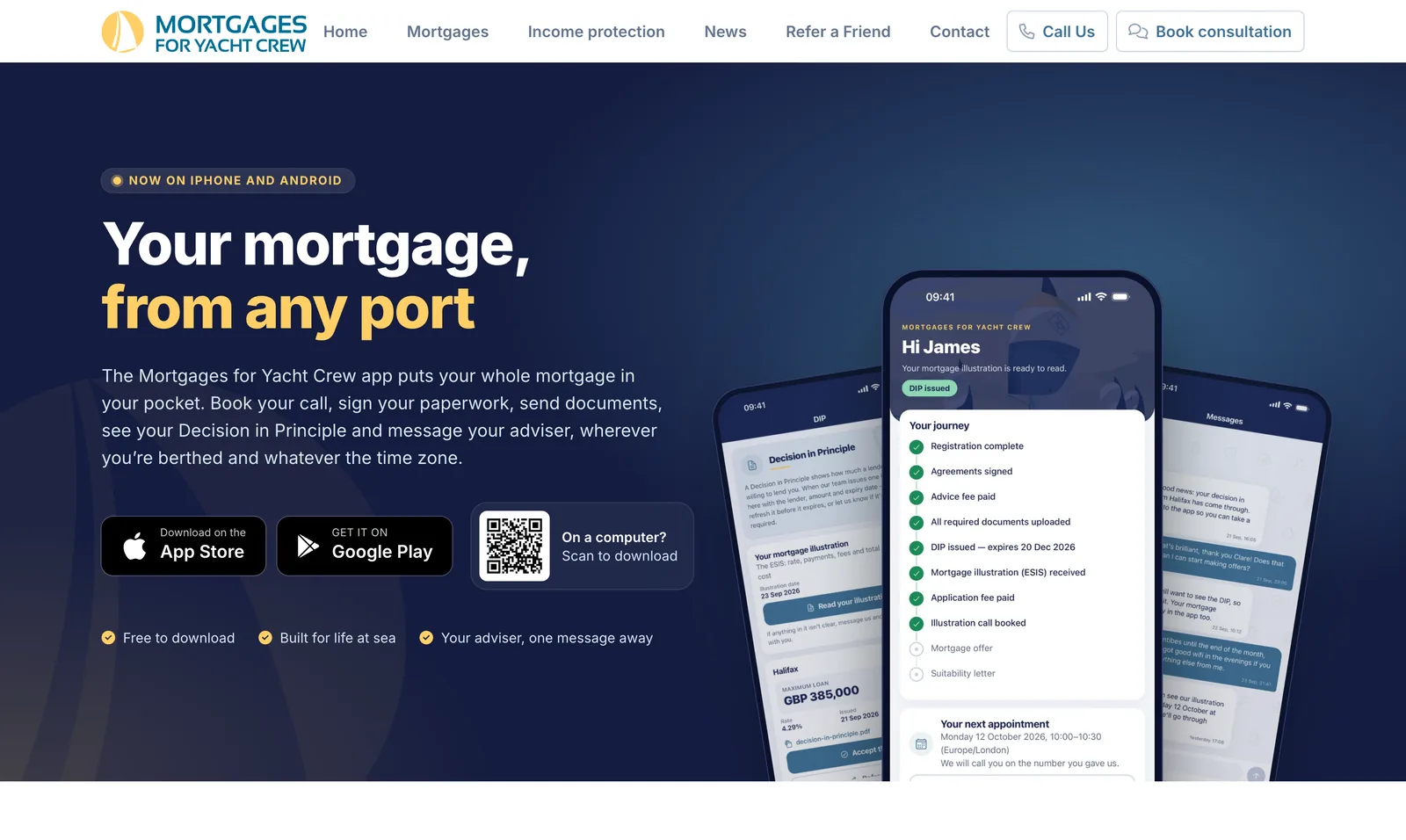
The site promotes the app with its own page, a QR code for people browsing on a computer, and a single link that sends an iPhone to the App Store and an Android phone to Google Play. Links in emails open the right screen in the app if it is installed, and a helpful web page if it isn’t.
- Existing clients are invited in at the stage their case has already reached
- Invitations can be sent one at a time or in bulk
- Rate-end reminder emails land on a review page that opens the app
- Account deletion on request, as both app stores require
Automation
One mortgage, first click to offer. Count the steps a person does.
The adviser’s time goes on advice. Follow one client through and almost everything else, the confirming, reminding, chasing and filing, is done by the system.
- Automated · 7
- People · 2
-
Automated
A calculation becomes a lead
A stewardess runs the mortgage calculator from a marina. Her figures are saved and the team are emailed. If she later fills in another form, it joins the same record: one lead per person, gathered from eight different sources.
-
People
An adviser picks it up
A member of the team claims the lead and makes the first call. This is a conversation about someone’s home, and it stays a human one.
-
Automated
The next call books itself
She chooses a slot in the app. A confirmation arrives with a calendar invitation, then reminders a day and an hour before. If a booking that needs a fee is never paid for, the slot is released for someone else within the hour.
-
Automated
Paperwork without paper
She reads and signs the agreements on her phone and pays the advice fee by card. The signed PDF is generated in the background, with a record of exactly what was agreed, when, and on which device.
-
Automated
Documents chase themselves
Outstanding documents are chased after three days, then a week, then fortnightly. If the team reject a file she hears straight away. When everything is approved she gets one message saying so, not five.
-
People
The adviser finds the mortgage
With a complete file, the adviser researches the market and secures a decision in principle from a lender.
-
Automated
The decision keeps its own deadline
The decision appears in her app with a push notification. As its expiry approaches she is reminded, starting thirty days out. If it lapses, it is marked expired overnight, and she can ask for a refresh in a tap.
-
Automated
No message goes unanswered
A message from a client opens an item in the staff queue. If nobody has replied after fifteen minutes the team get an email, then again after an hour, after four hours, and daily. The first reply clears it.
-
Automated
And years later, it remembers
Six months before her fixed rate ends, the reminders start and the team are prompted to review her options, so she never drifts onto a higher rate by accident.
On the clock
Quietly running, around the clock.
A dozen jobs run on a schedule. These are the ones a client or the team would notice.
-
02:00
Expired decisions
Decisions in principle that have passed their expiry date are marked expired.
-
02:30
Yesterday’s diary
Appointments that have taken place are closed off.
-
09:00
Decisions running out
Clients are reminded as a decision in principle nears its expiry, from thirty days down to one.
-
09:30
Rates coming to an end
Clients are reminded from six months before their rate ends, and the team are prompted to review.
-
10:00
Missing documents
A nudge for anything still outstanding, easing off the longer it has been.
-
5 min
Appointment reminders
A day before and an hour before each call. If the server has been down, it catches up.
-
5 min
Unanswered messages
Client messages waiting for a reply are escalated to the team by email.
-
Hourly
Unpaid holds
Slots held by bookings that were never paid for go back into the diary.
-
Fri
Weekly sales report
The week’s sales funnel and commission, emailed at 8 o’clock on Friday morning.
Also in the back office
The rest of the working day.
Around the diary and the queue, the back office holds everything else the practice runs on.
-
Every case in one record
Agreements, decisions, documents, fees, messages, illustrations, offers and suitability letters, each on its own tab of the client’s application.
-
Leads worth following
Claim, release, change status or refer to a partner. Bulk emails only go to people who have consented, with a one-click unsubscribe.
-
Emails the team can edit
More than seventy templates, each with placeholders and a “send test to me” button. Wording changes never need a developer.
-
Commission, reconciled
The weekly commission statement is uploaded as a PDF. The system reads every line and refuses the file if they don’t add up to its own totals.
-
Chat in context
Messages from the app appear inside the client’s application, so a reply is always written with the whole case in view.
-
It watches itself
Hourly health checks confirm the scheduler and background workers are alive, and errors are reported to us as they happen.
Technology
Current tools, carefully chosen.
A single Laravel application serves the website, the back office (built on Filament) and the app’s API. The app is a client of that API, so there is one source of truth for every mortgage.
-
Laravel
Application
-
PHP
Language
-
Livewire
Site & back office
-
Alpine.js
Drag interactions
-
Tailwind CSS
Styling
-
MySQL
Database
-
Stripe
Payments
-
REST API
App backend
-
React Native
Mobile app
-
Expo
Builds & updates
-
TypeScript
App language
-
iOS & Android
Both stores
- Stripe payments
- Push notifications
- Live updates over websockets
- Calendar feeds & invitations
- Mailchimp
- Google reCAPTCHA
- Trustpilot
- Stackwatch monitoring
Your project
Have a process that should run itself?
If your team spends its days chasing, re-keying and reminding, there is probably software to be built. We’d be glad to talk it through.