Case study 06· Campsite & glamping, Kent
Nethergong Camping: Every pitch, pizza and sauna, booked and paid for online.
A bespoke booking system for Nethergong Camping, a campsite near Canterbury with 63 tent pitches and 25 glamping units. Guests book and pay online, split a group booking into individual payment links and pre-order everything from wood-fired pizza to the sauna. Behind it, a back office the team runs the whole season from, and the reminders that chase what is owed.
- Client
- Nethergong Camping, Upstreet, near Canterbury
- Sector
- Camping, glamping and on-site food and activities
- Engagement
- Since 2021, built and supported by us
- Scope
- Online booking, customer accounts, order forms, payments, back office, automated email, reports
- Platform
- Laravel and Livewire, on three subdomains: book, account and admin
Overview
A busy campsite, run from one screen.
Nethergong Camping sits in the countryside outside Canterbury: open fields of tent pitches, fifteen bell tents, four shepherd’s huts, a Romany wagon and a row of vintage caravans. In summer most weekends sell out, and guests fill their evenings with wood-fired pizza, campfires and the sauna.
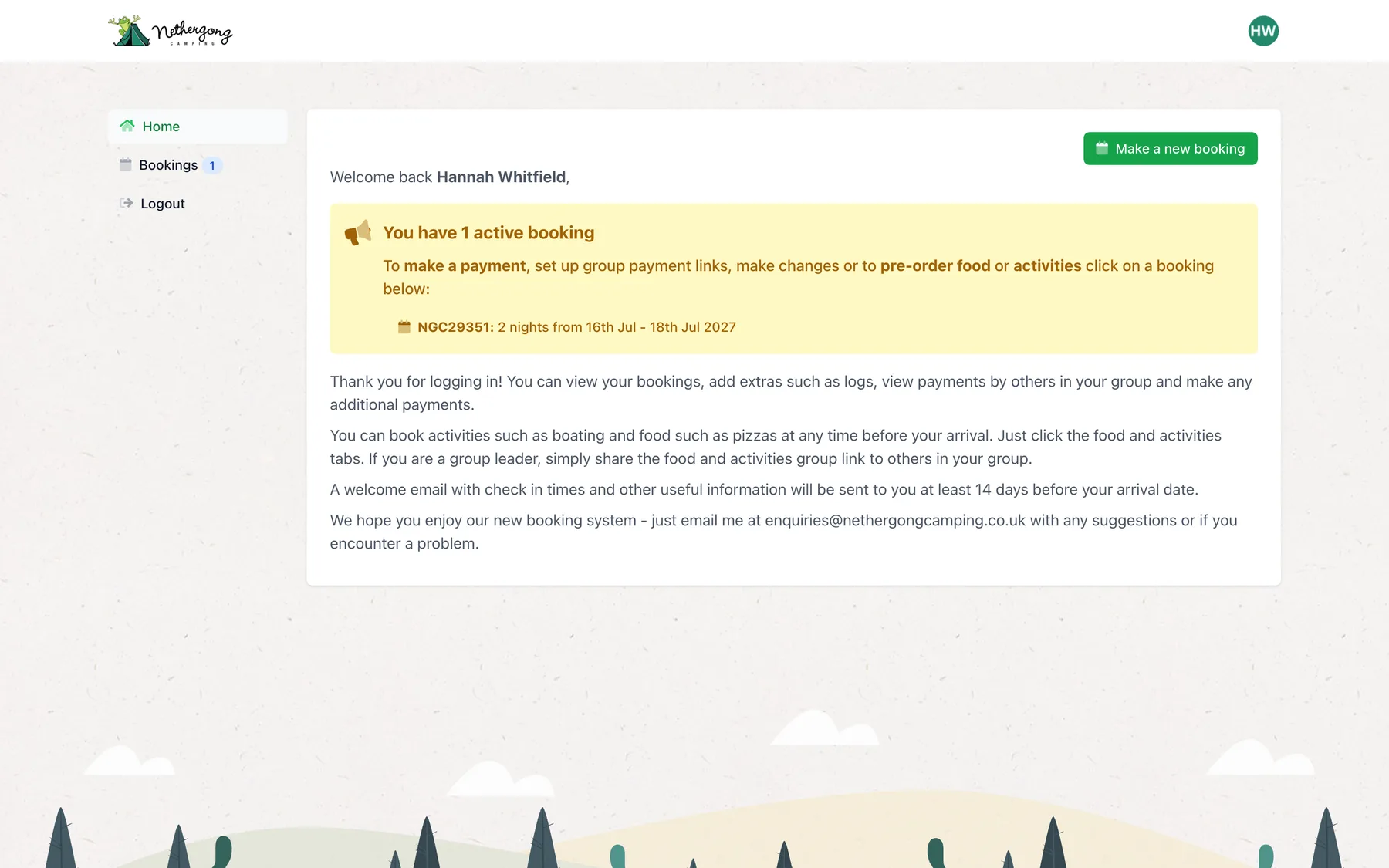
Before 2021 bookings came through forms on the campsite’s WordPress site. We replaced them with a booking system of its own: guests book and pay online, then come back to their account to sort out who is staying, split the cost and order food and activities.
The team run the season from the back office: availability, bookings, payments, order forms, emails and reports. Chasing unpaid balances happens on its own.
- Bookings held in the system
- 16k+
- Including earlier stays brought across
- Food and activity orders placed online
- 14k+
- Nearly 7,000 of them for pizza
- Payment links created for group bookings
- 7k+
- Each guest pays their own share
- Order forms, from pizza to bushcraft
- 12
- Five of them run by partners
The back office
The whole season, at a glance.
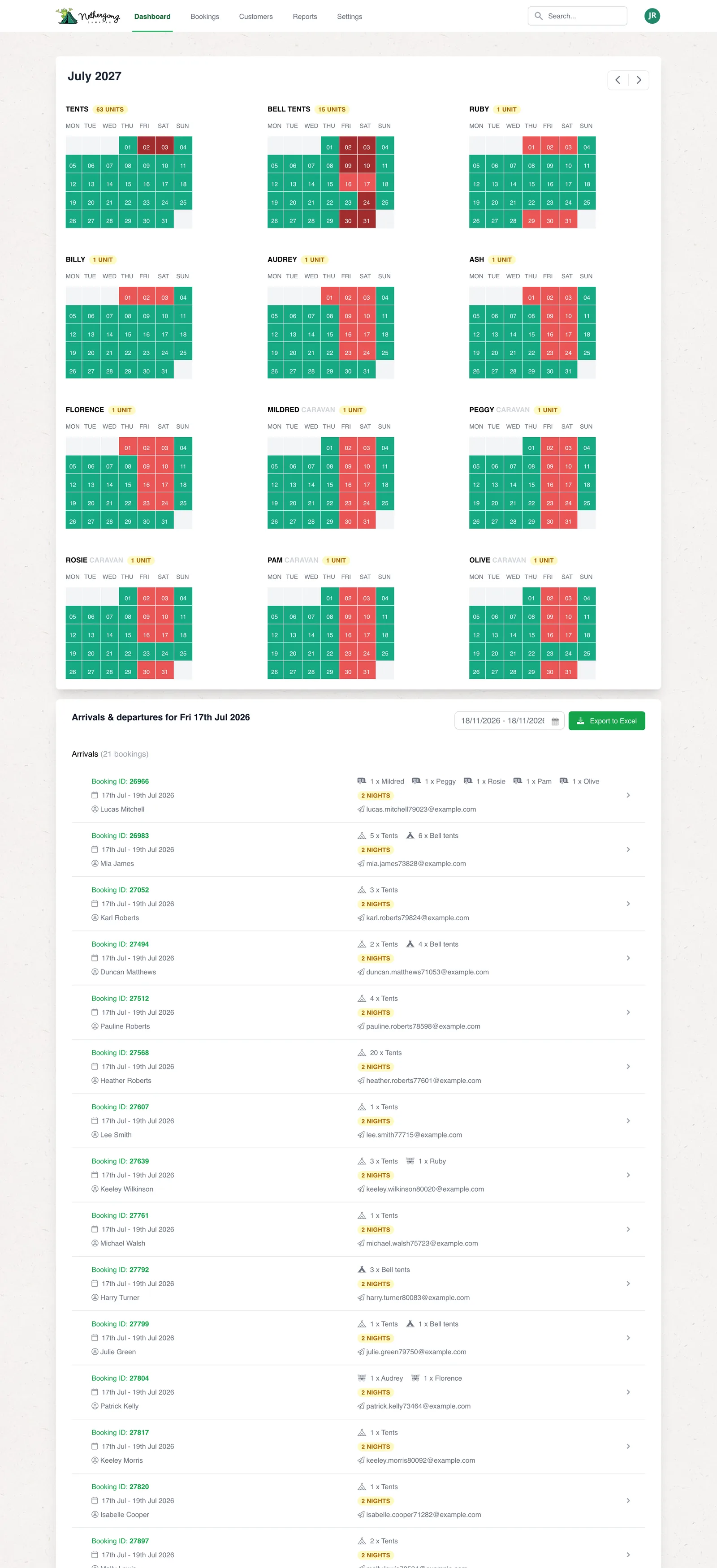
The dashboard opens on a month of availability for every kind of accommodation, from 63 tent pitches down to each individually named hut and caravan. Green has room, red is full, and a click on any day shows who is staying.
Underneath is the arrivals and departures list for any date range, which exports to Excel for the gate, and the announcement shown on the booking pages, edited in place.
- Availability for every unit, month by month
- Arrivals and departures for any dates, exported for the gate
- Search across bookings and customers from every page
- Bookings, customers, reports and settings a click away
- A reports-only login for people outside the team
Booking online
Pick the dates, pay, and it’s booked.
The booking pages are built around the question guests actually ask: what is free when I want to come? Everything else follows from the dates.
-
01
Availability first
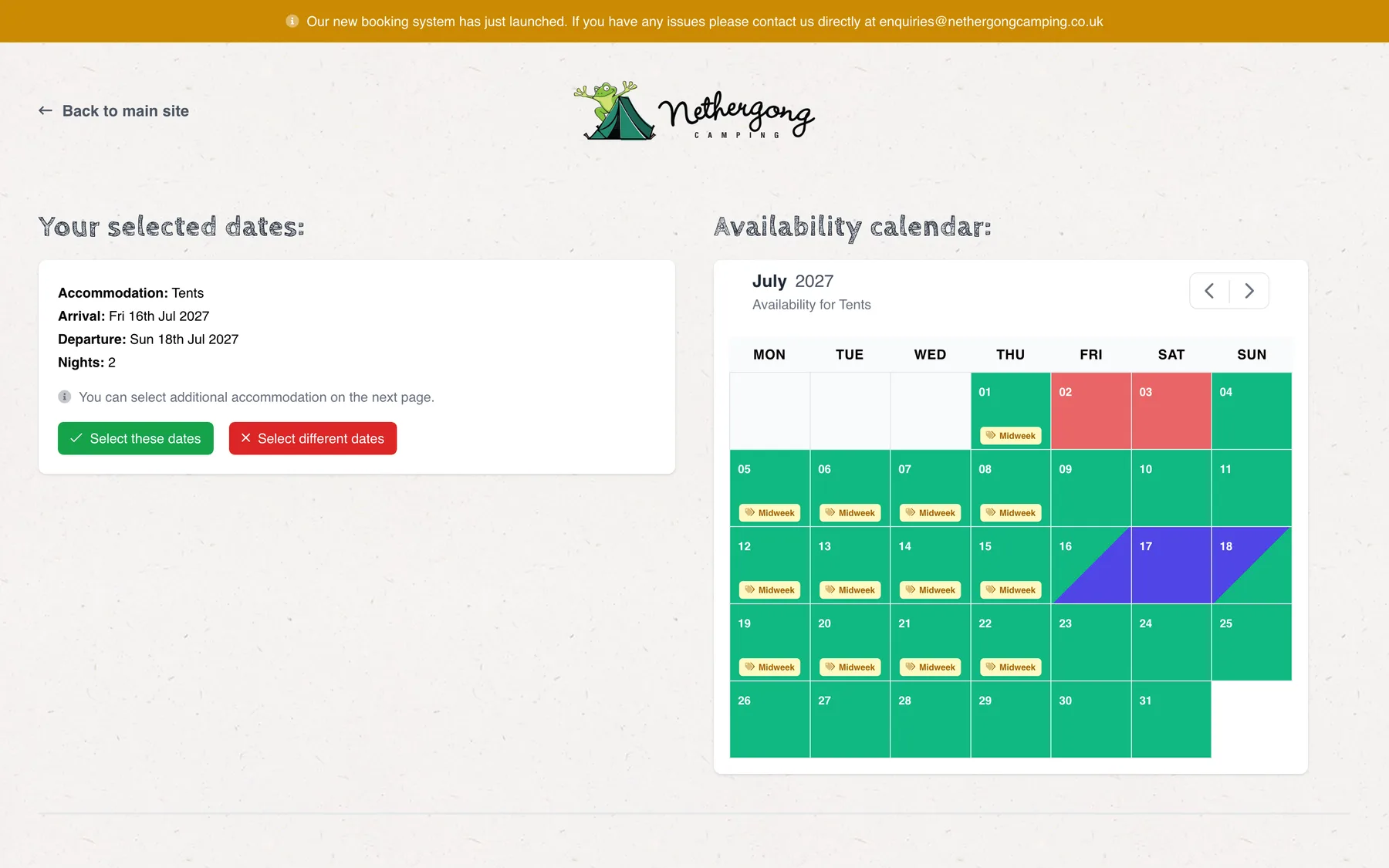
Choose a kind of accommodation and the calendar shows, night by night, where there is room. Midweek nights carry their offer price, and minimum stays and arrival days are checked as dates are picked.
- Live availability for each unit type
- Midweek nights priced individually
- Minimum stays and arrival days enforced
-
02
Add to the stay
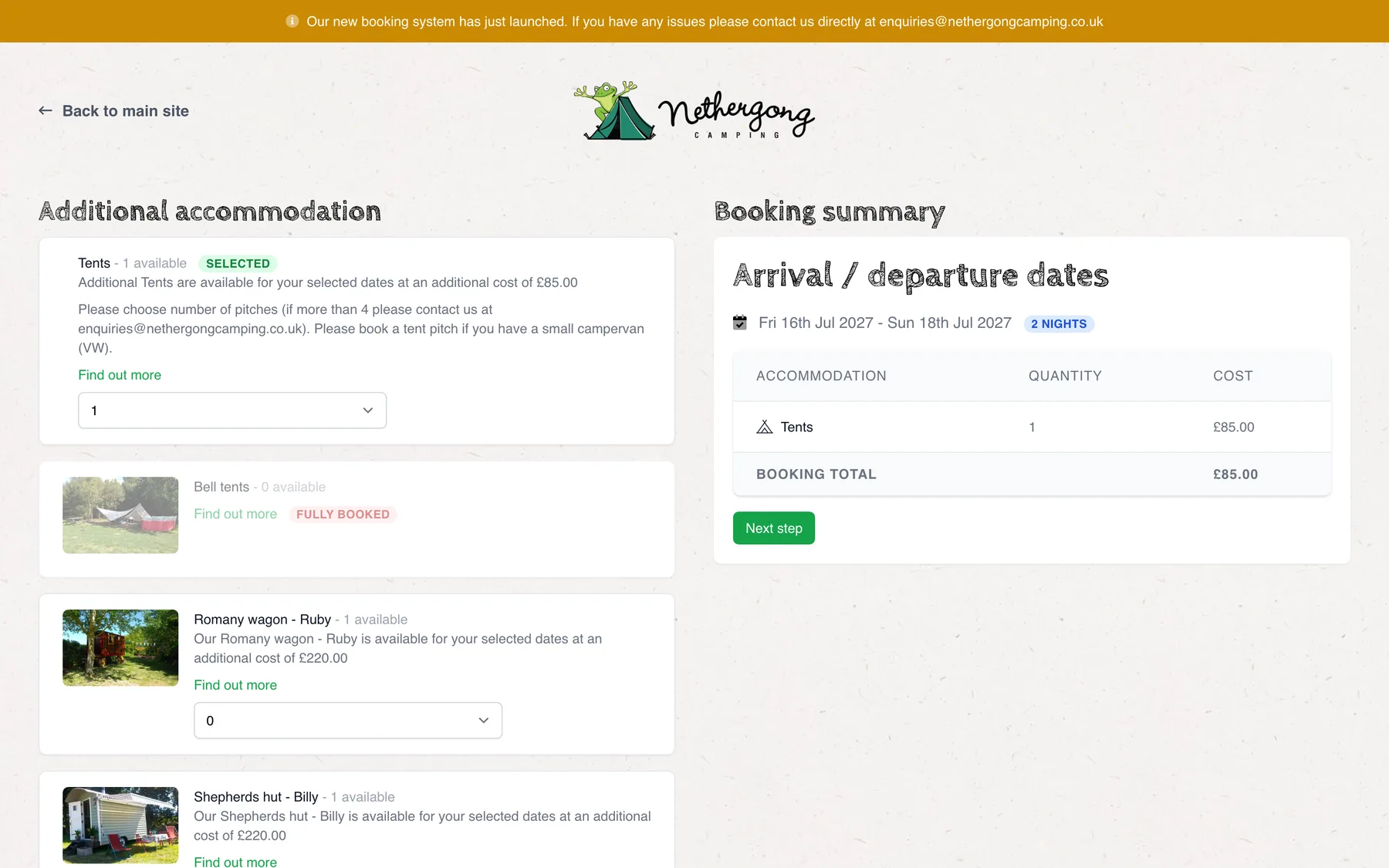
The next step offers everything else free on those dates, each with its price for the stay. A bell tent for the grandparents, a second pitch for friends: it all goes on one booking, with a running total beside it.
- Only what is free on the chosen dates
- Fully booked units shown, but not offered
- One booking total, before any details are asked for
-
03
Opening day, for regulars first
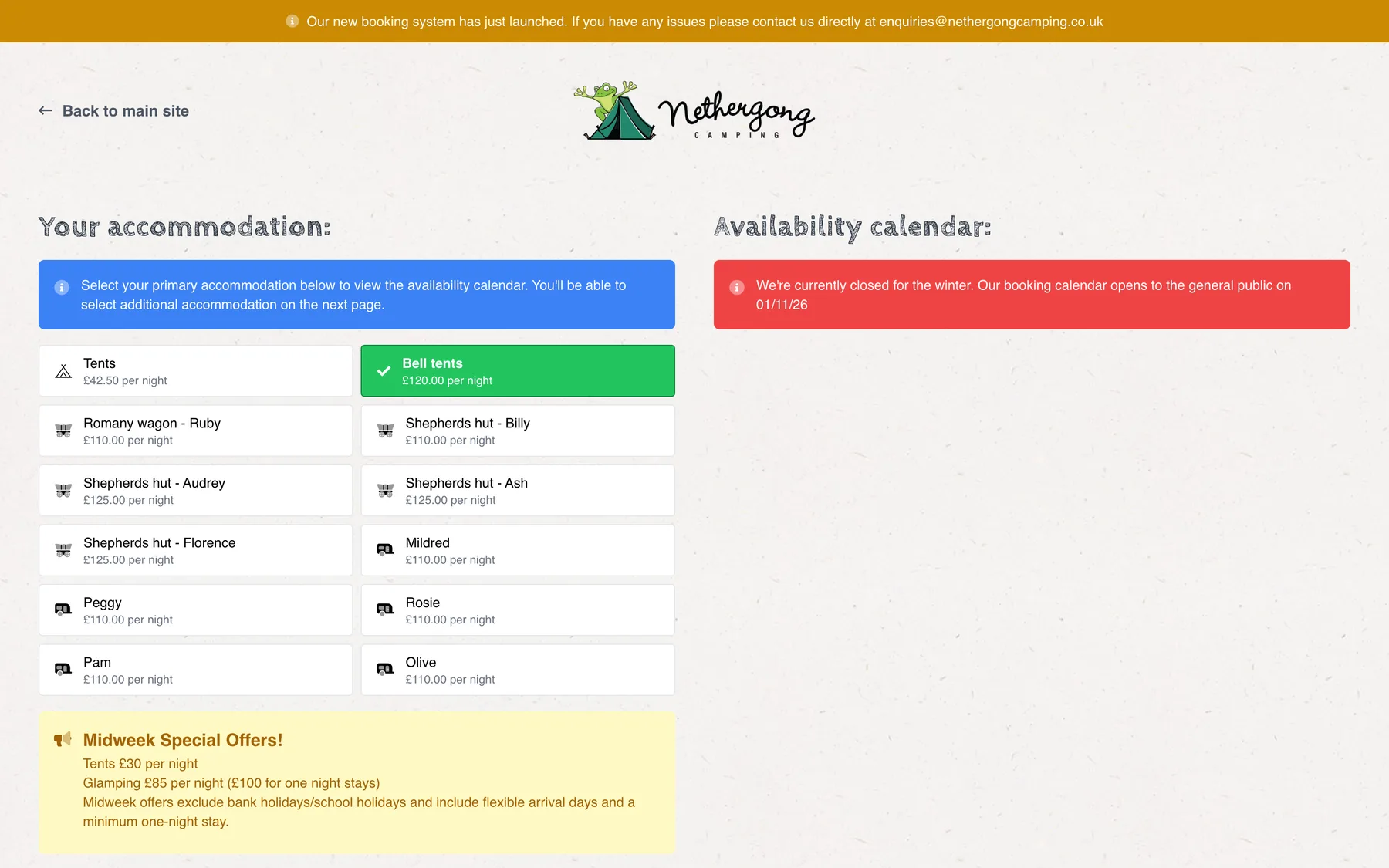
Out of season the public calendar is closed, with a message saying when it opens. Past guests get a priority link by email first, so the people who come back every year can get their favourite weekend.
- Season dates and calendar switched on in settings
- A priority booking link for returning guests
- The closed message is edited by the team
-
04
An account to come back to
Booking creates the guest’s account, and the card payment is taken on the page by Square. From then on everything about the stay lives in that account: who is staying, what has been paid, and what they have ordered.
- Card payments taken on the page by Square
- A welcome email with login details
- Change requests go straight to the office
Group bookings
One booking, everyone pays their share.
Groups are a big part of Nethergong’s summer: eight tents of friends, a family reunion, a fortieth. Someone books the lot, then has to collect the money. The system does that collecting for them.
-
01
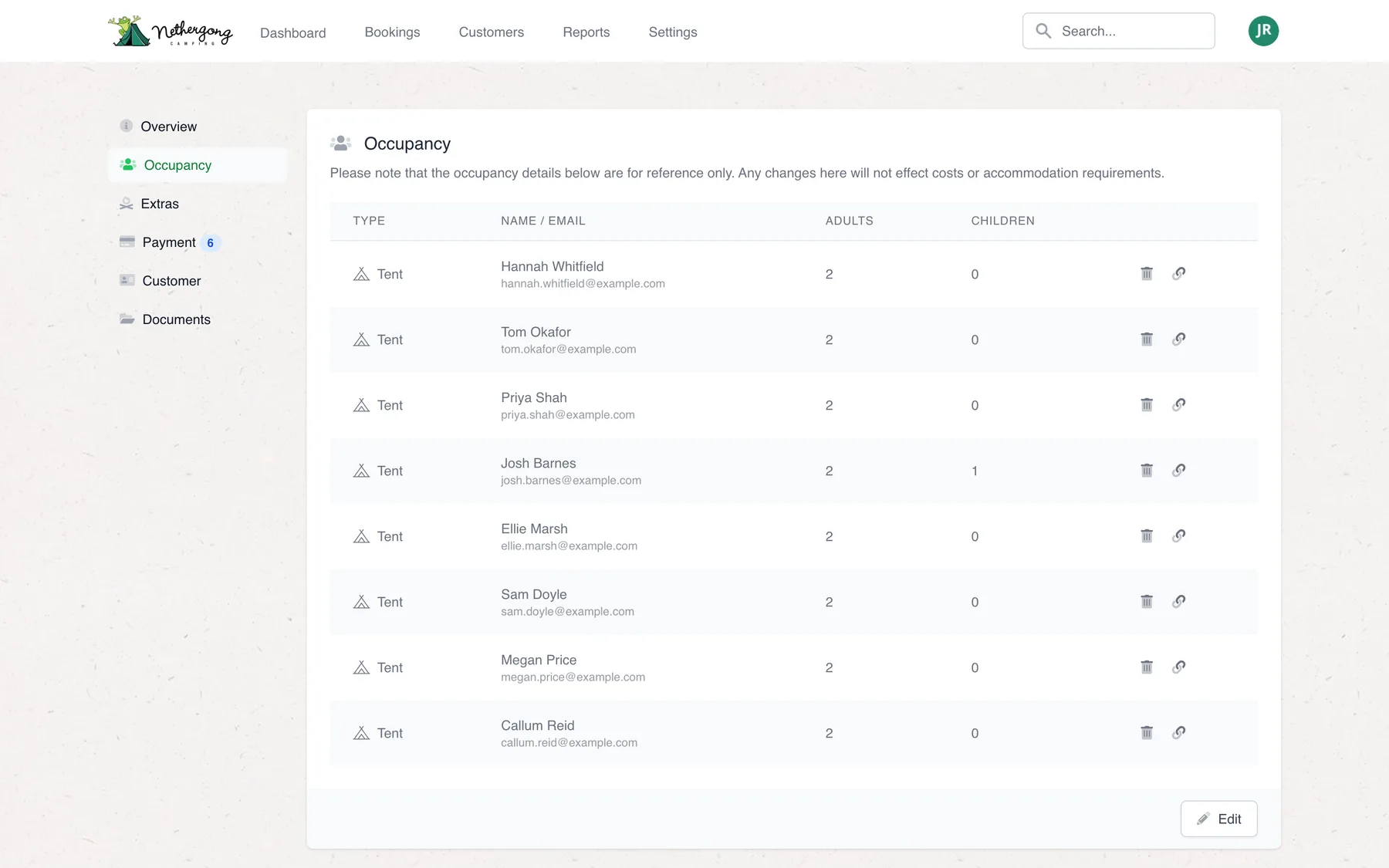
Who is staying
The lead booker lists everyone in the group: who is in which tent, how many adults and children. Beside each name is a link icon that turns that line into a payment request.
- Names, emails and party sizes per unit
- Editable by the lead booker or the office
- One click from a name to a payment link
-
02
A price for each person
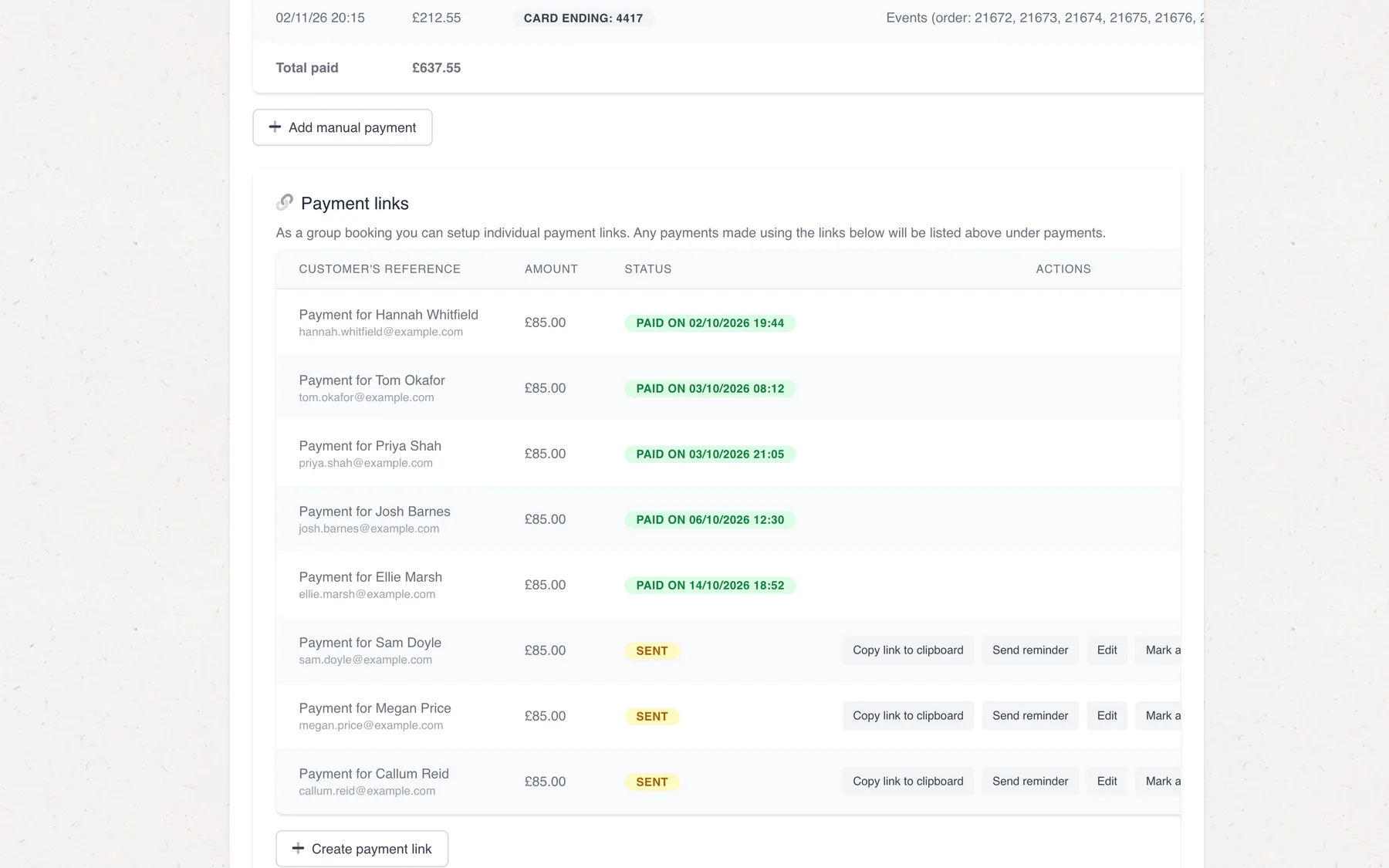
The link is priced for that guest’s part of the stay: each night at its own rate, with supplements added for extra adults or children. It is emailed straight away, and the office can copy, edit, resend or mark it paid.
- Priced night by night, midweek offers included
- Editing a link keeps the address already sent
- Paid links show when they were paid
-
03
The organiser can do it too
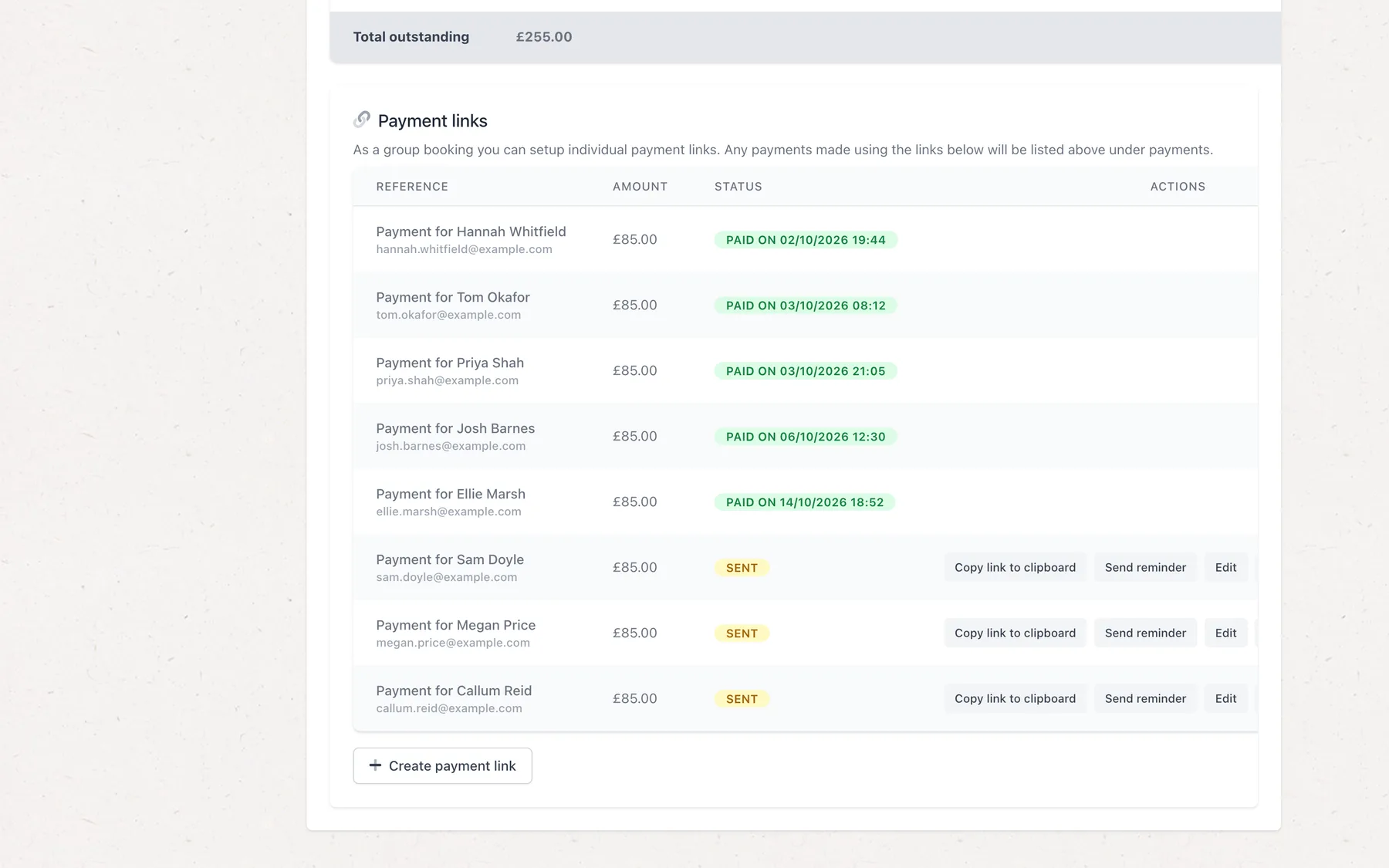
Lead bookers see the same panel in their own account. They can create links, chase friends who have not paid and watch the balance come down, without phoning the office.
- Create and resend links from the account
- Balance outstanding always up to date
- Every payment listed with who made it
-
04
A button that says how much
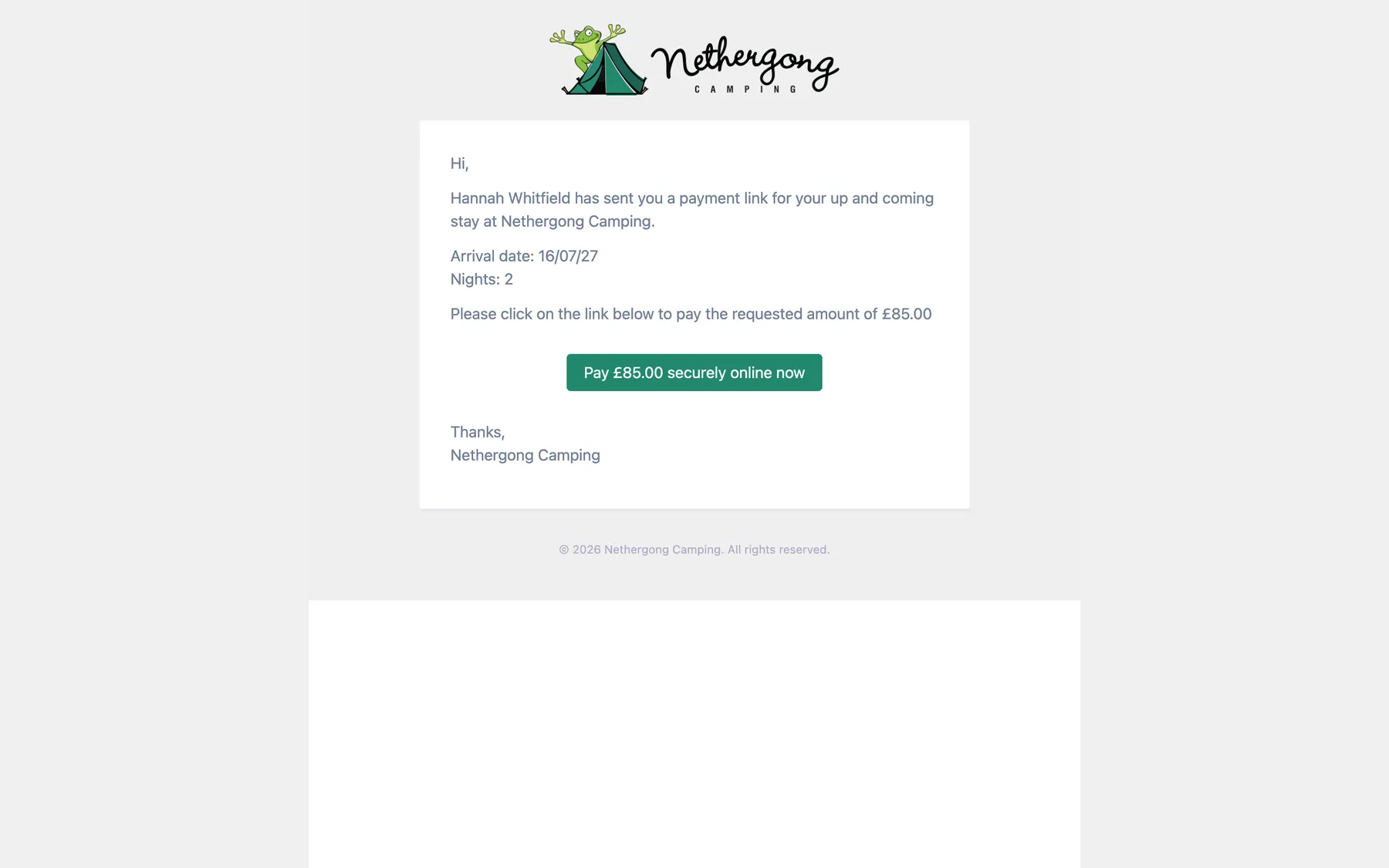
The guest gets an email naming the lead booker, the dates and the amount, with one button to pay. When they do, the link is marked paid and the payment lands on the booking, where the organiser and the office can both see it.
- No account needed to pay a link
- Paid links update the balance straight away
- Wording edited by the team, not us
Automation
Nobody has to remember to chase.
Balances are due eight weeks before arrival. Between the booking and that date, the system sends every reminder, records every payment and tells the right people, so the office only steps in when someone needs a person.
- People · 3
- Automated · 4
-
People
A guest books and pays
The booking is held back until Square confirms the payment, so an abandoned checkout never blocks a pitch. Then it appears, with a confirmation email and a welcome email with login details.
-
People
The organiser splits the bill
One click on each name sends that guest a payment link for their share. The office can do the same for anyone who would rather not.
-
Automated
Paid links tidy up after themselves
When a guest pays, the payment is recorded against the booking and the link is marked paid, so the balance everyone sees is always current.
-
Automated
Twelve weeks out: payment is due
At eight every morning the system looks for confirmed bookings arriving in exactly twelve weeks with money still owing, and emails each one its balance, its due date and a link to pay.
-
Automated
Ten weeks, then eight
The same check runs at ten weeks and again at eight, the due date, each with its own wording. Anyone who has paid is skipped, and nobody is sent two reminders in one day.
-
People
The office nudges the stragglers
Any unpaid link can be resent with one click from the booking, and the office can see at a glance who in a group has not paid.
-
Automated
Every run is written down
Each morning’s run is logged under the email it sent: when it ran, how many reminders went out, and when it runs next.
Emails
The team writes the emails. The system sends them.
Every automated email is a template in the back office, with its schedule beside it. Changing the wording of a reminder, or when it goes, needs no developer.
Templates
Written in a normal editor
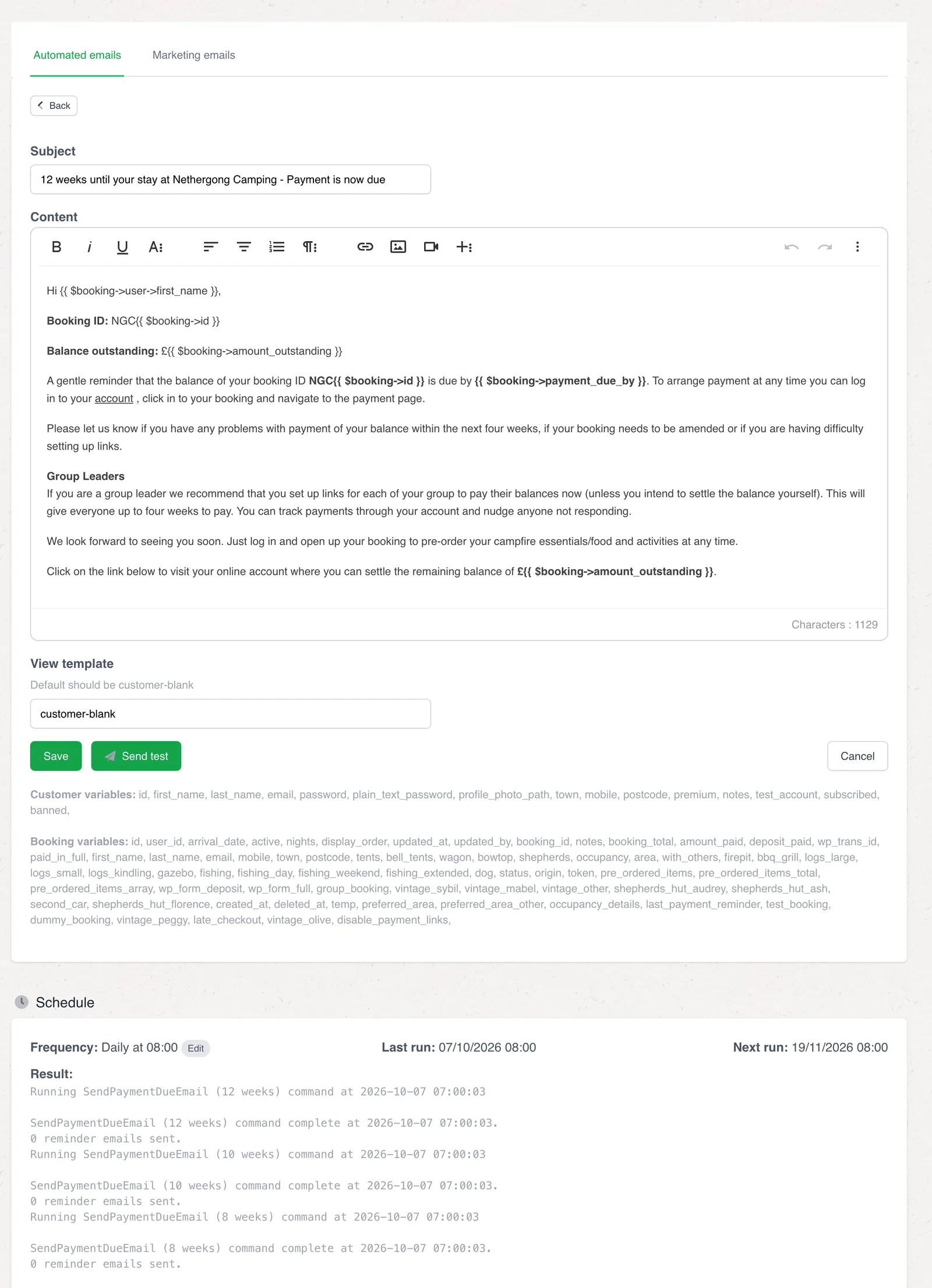
Each template is edited in a rich-text editor, with merge fields for the guest’s name, the booking, the balance and the due date. A test can be sent to yourself, filled in with your own latest booking.
- Merge fields listed under the editor
- Send a test before it goes live
- Schedule, last run and next run shown alongside
Reminders
Polite, specific and on time
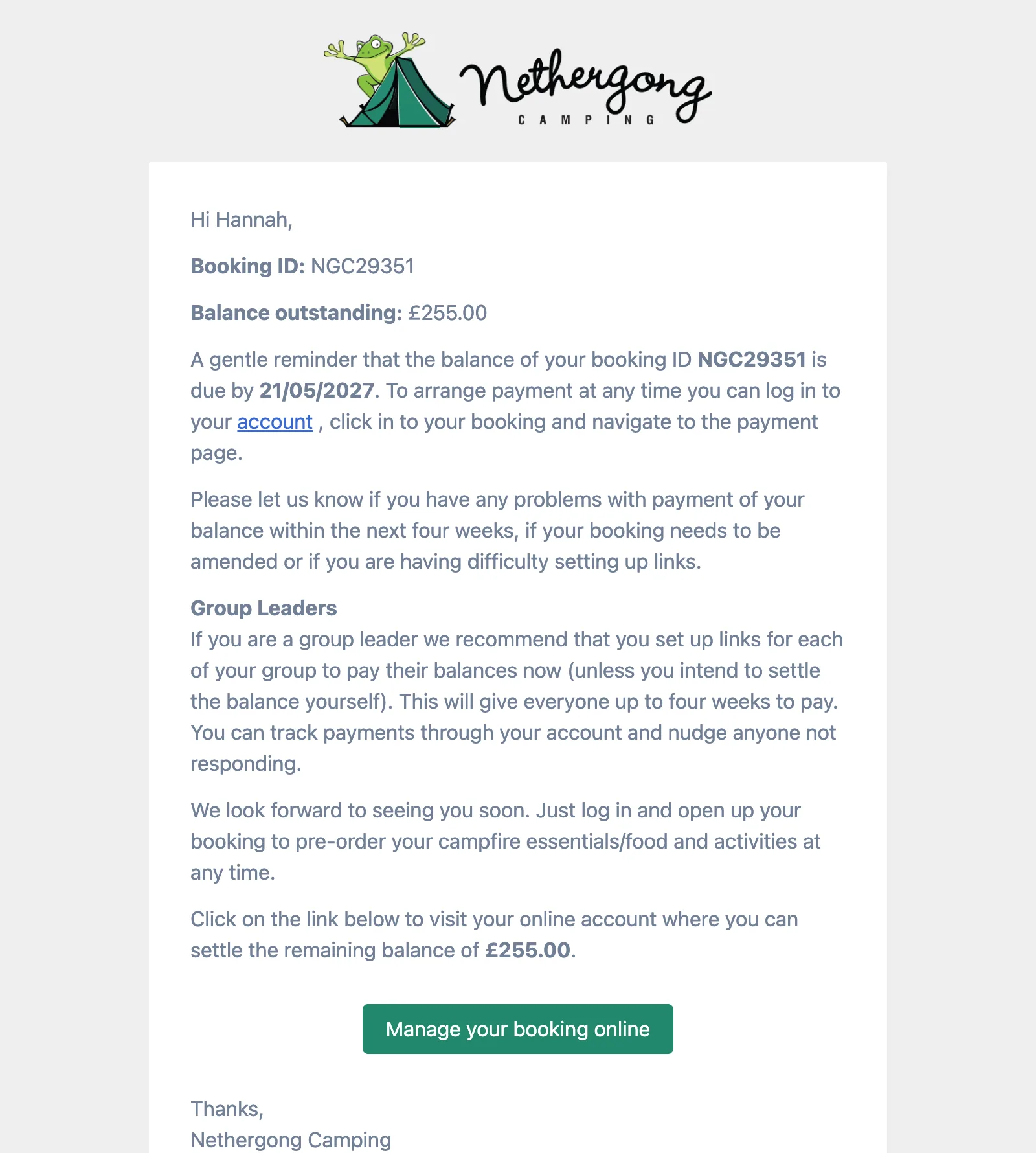
The reminder names the balance and the date it is due, explains how group leaders can collect from their friends, and ends with a button into the guest’s account. Up to three go out for each booking that still owes money.
- Balance and due date filled in for each booking
- Advice for group leaders built in
- One button into the account to pay
Marketing
Newsletters with receipts
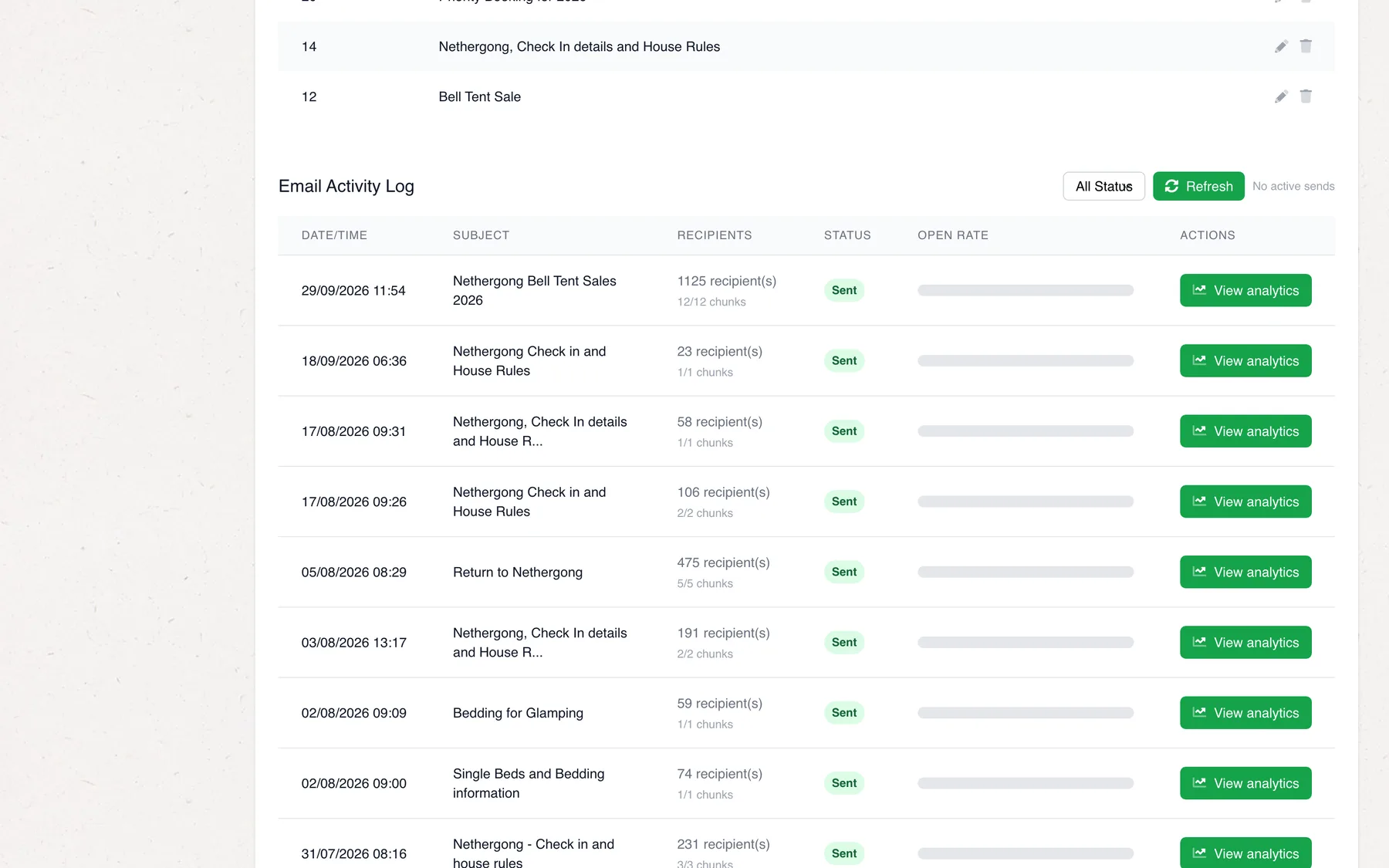
The same back office sends campaigns to past guests, from the priority booking email to check-in details for a weekend. They go out in batches through SendGrid, and opens, clicks and unsubscribes come back to each campaign.
- Sent in batches, tracked per recipient
- Open rates and recipient lists per send
- Unsubscribes honoured automatically
Order forms
Twelve things to book, besides the pitch.
Guests pre-order food and book activities from their account, against their stay. Each form is set up by the team: its dates, times, menu, prices, limits, and who gets paid.
- Partner: paid directly to them
-
Wood-fired pizza
Evening slots every half hour from 4pm, with a cap on pizzas per night so the oven keeps up.
- Timeslots
- Nightly cap
- ~7,000 orders
-
Bakery
Croissants, bread and eggs for the morning, ordered by the day before.
- Next-day cut-off
- 2,000+ orders
-
BBQ packs
Family and large packs of meat for the grill, ordered two days ahead.
- Two-day cut-off
-
Campfire essentials
Fire pits, logs, kindling and charcoal, ordered for any night of the stay.
- Any night
- 2,800+ orders
-
Sauna & cold plunge
Hourly sessions, with the early afternoon kept free, with a lower rate per person for a private group booking.
- Hourly slots
- Tiered prices
-
Rowing boats
Morning slots, with the boats left in each slot counted live as people book.
- Live availability
- 1,700+ orders
-
Silent disco
Headsets for a group’s evening, limited to three transmitters a night, with top-ups for extra headsets.
- Nightly limit
- Top-ups
-
Partner
Adult yoga
Saturday sessions with a visiting teacher, booked like anything else.
- Own Stripe account
-
Partner
Children’s yoga
An 8.15am class for younger campers.
- Own Stripe account
-
Partner
Bushcraft
Morning sessions with a local outdoor education provider.
- Own Stripe account
-
Partner
Fishing lessons
Hour-long lessons through the afternoon, with the same provider.
- Own Stripe account
-
Partner
Photography walks
A two-hour guided photography walk, from 10.15am.
- Own Stripe account
Pre-ordering
Order dinner before you pack the car.
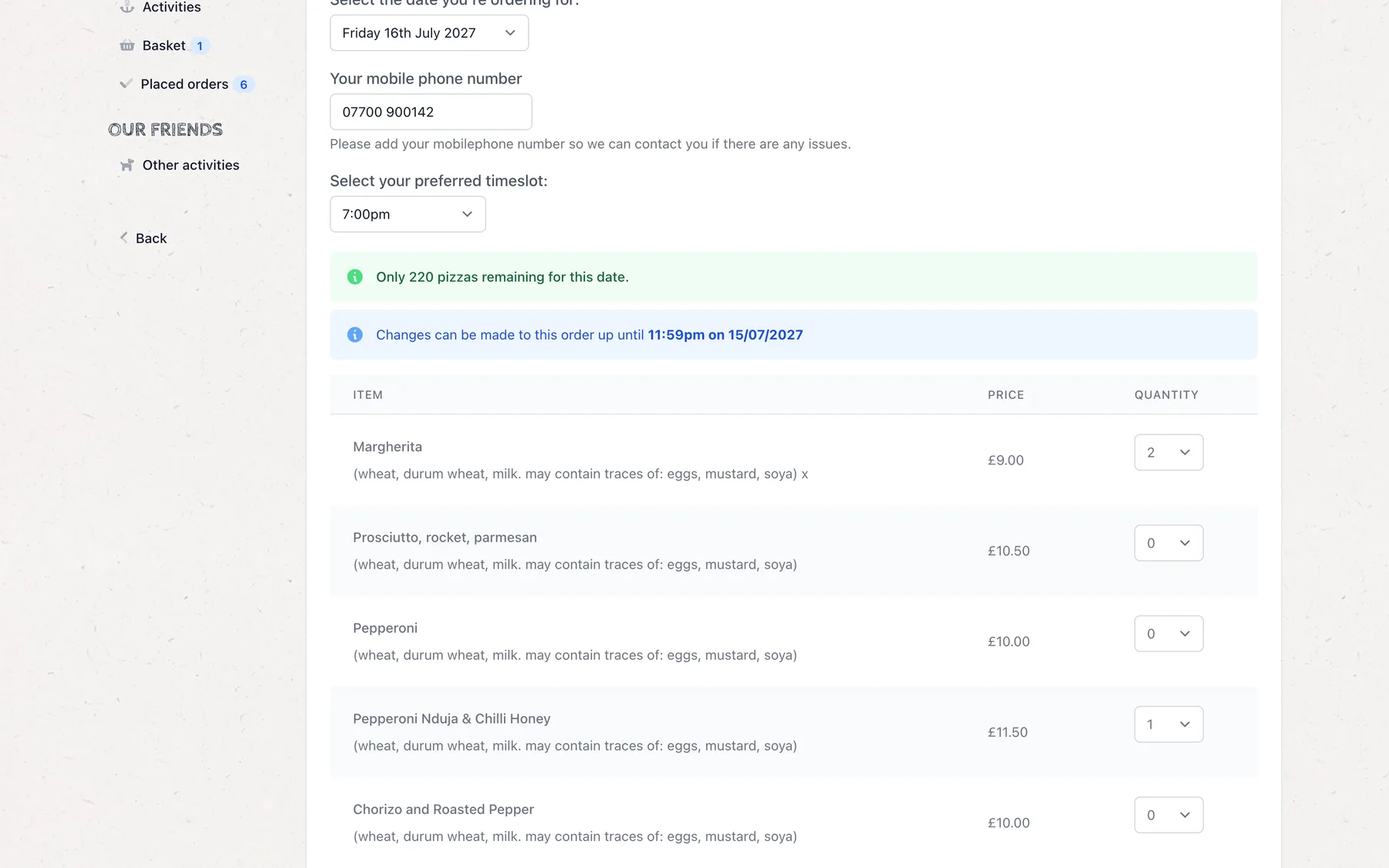
Every form works the same way from the guest’s side: pick a night of the stay, pick a time, choose what you want. The form only offers what is actually possible.
-
01
Only dates that work
The date list holds only the nights of the guest’s stay that the form runs. It shows how many are left that night, and until when an order can be changed.
- Opens a set number of days ahead
- Closes at the team’s cut-off
- Allergens listed against each item
-
02
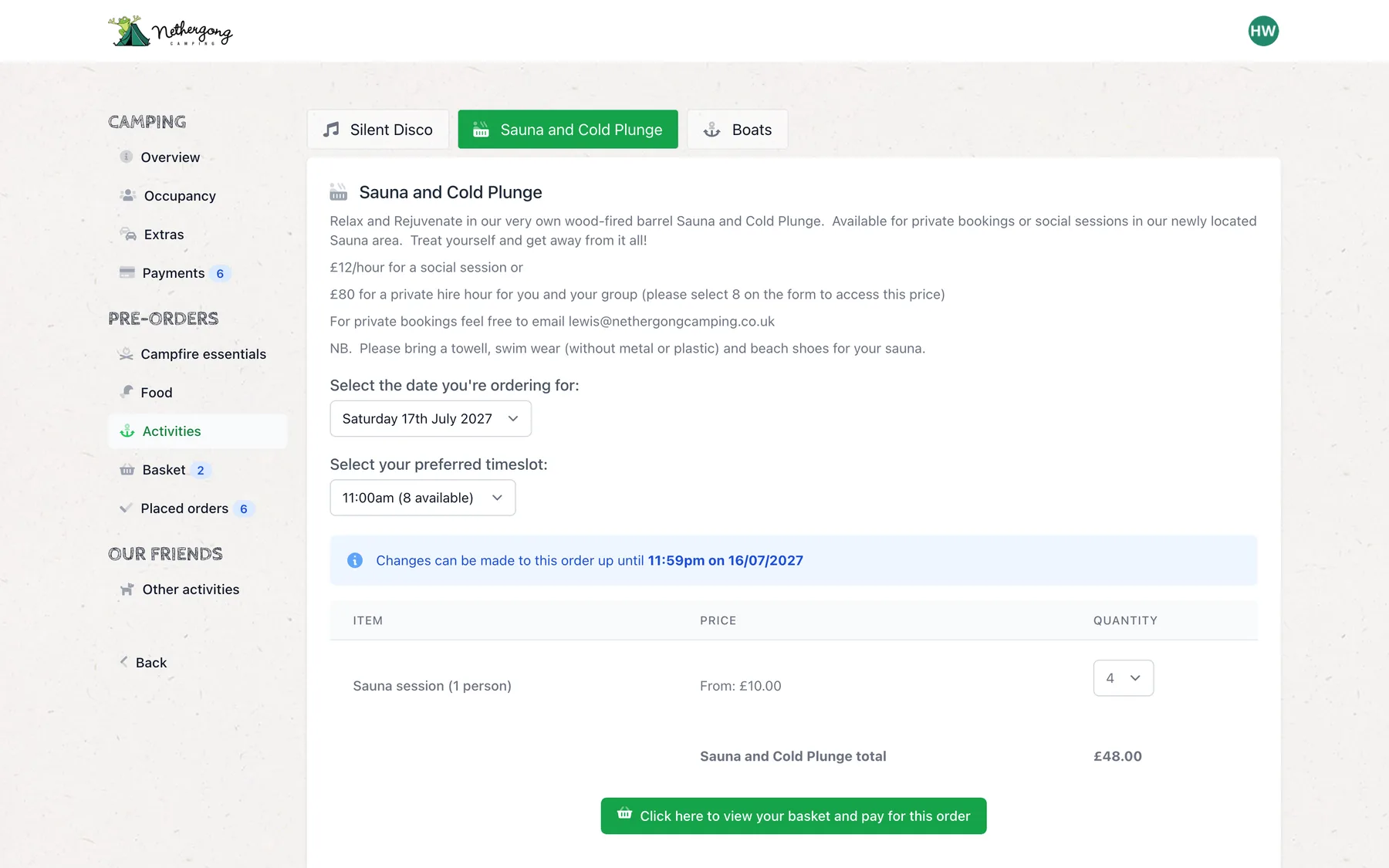
Times with room in them
Timeslots come from each form’s opening hours, minus any the team have closed, and each says how many places it has left. Prices can step down as more people join a session.
- Slots built from opening hours
- Places left shown on every slot
- Tiered pricing for bigger groups
-
03
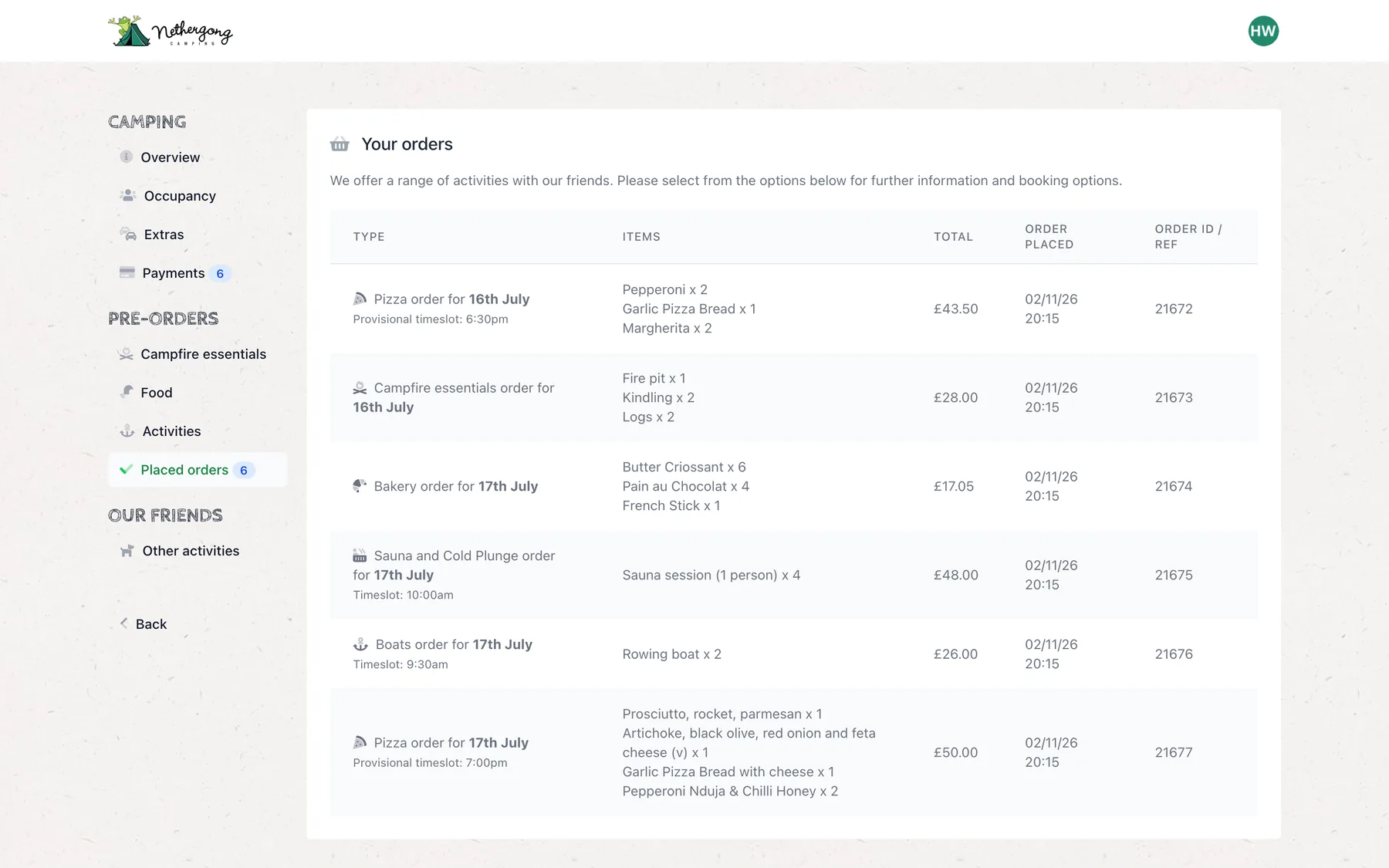
One basket, one payment
Orders from every form collect in one basket and are paid together. Placed orders are listed with their nights and times, the guest gets a confirmation, and partners get their own copy.
- Food and activities paid in one go
- Partner bookings paid straight to the partner
- Confirmation emails to guest and supplier
-
04
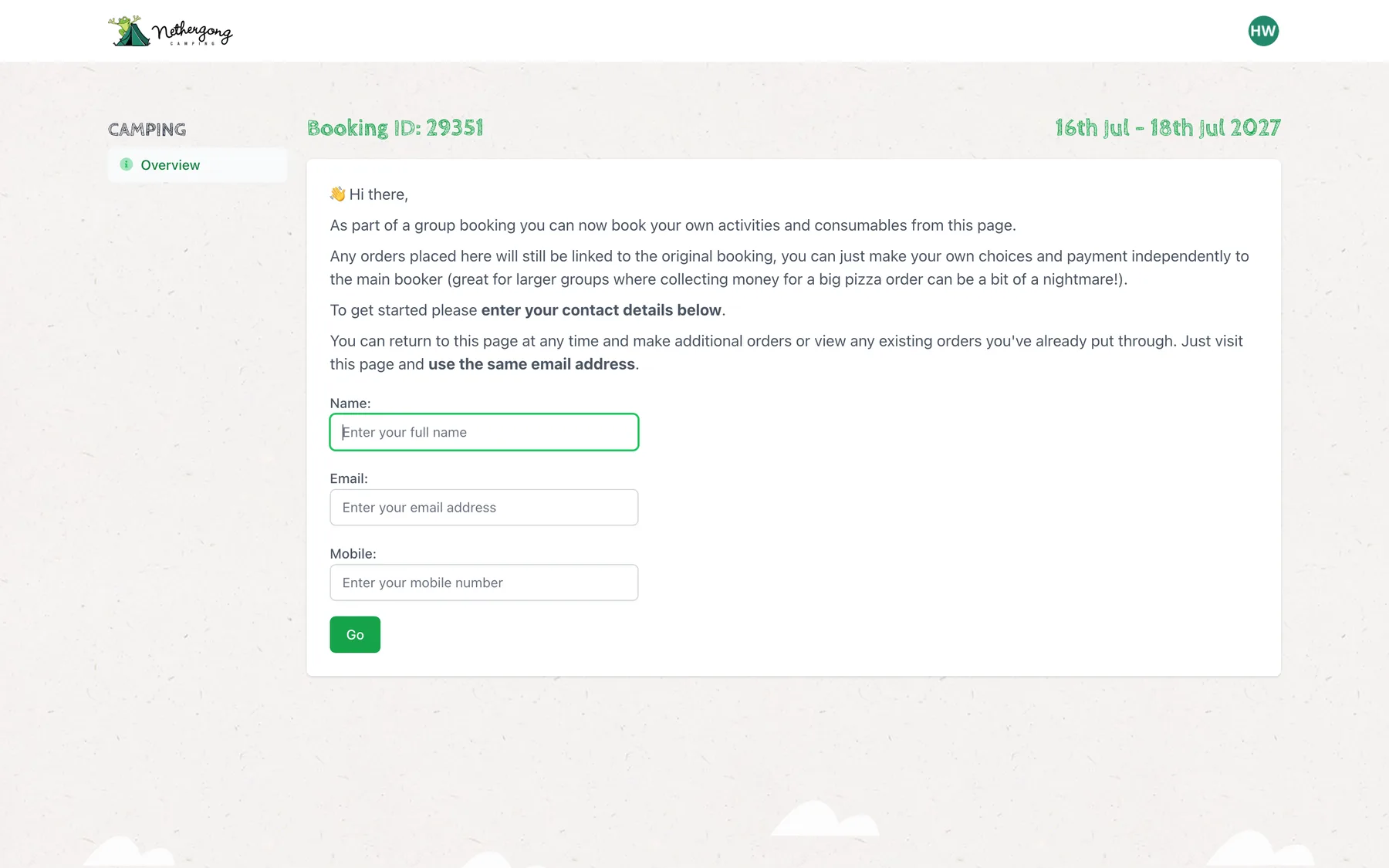
Everyone in the group can order
The organiser shares a link with the group. Anyone with it can order their own dinner against the booking, without an account, and pays for it themselves.
- No account needed, just name, email and mobile
- Orders land on the group’s booking
- The lead booker doesn’t pay for everyone’s pizza
Behind the forms
Set up by the team, in the back office.
Adding a new activity for the summer is a job for the campsite, not for us. Each form has four tabs: the details, the dates, the items, and who it is run by.
Dates & caps
A limit for every night
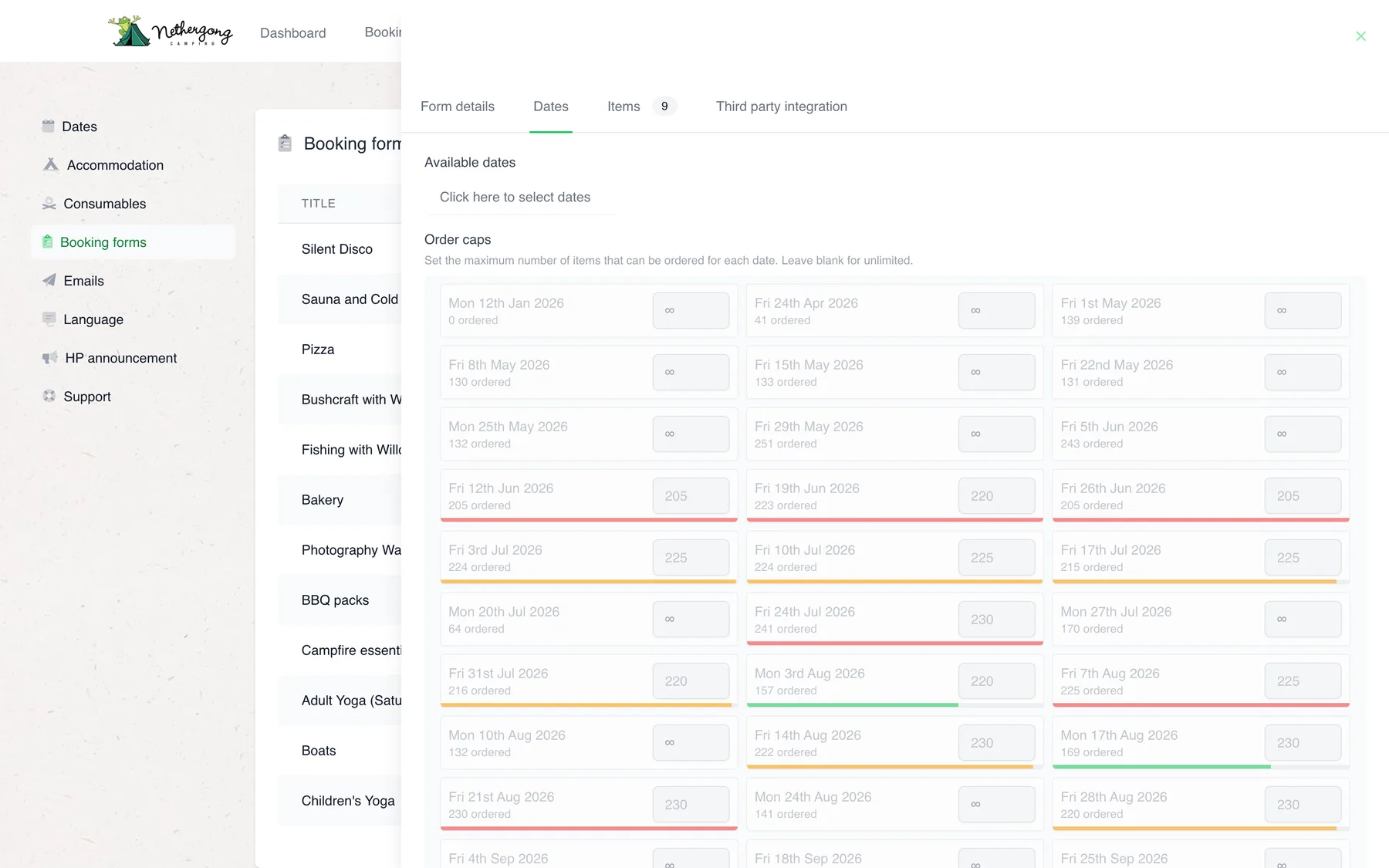
The team pick the dates a form runs on a calendar and set a cap for any of them. Each date shows how many have been ordered against its cap, turning amber and red as it fills.
- Dates picked on a calendar
- Per-date caps, checked again at checkout
- Order windows and cut-offs per form
Items
The menu, in a table
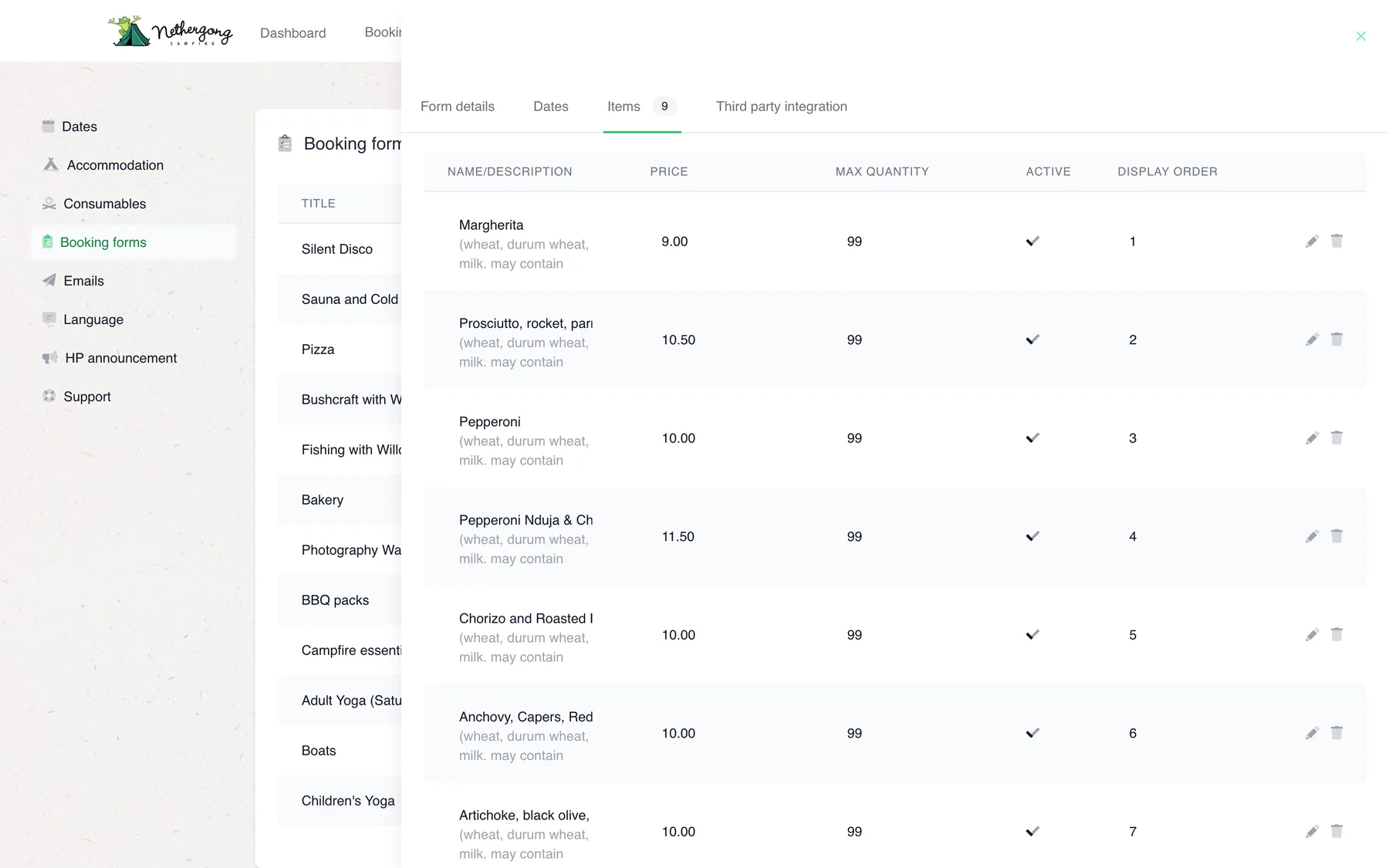
Each form’s items have a description, a price, a maximum per order, an on/off switch and an order on the page. Prices can be tiered, so a session gets cheaper per person as the group grows.
- Allergens in each item’s description
- Switch an item off when it runs out
- Tiered prices by quantity
Partners
Their activity, their money
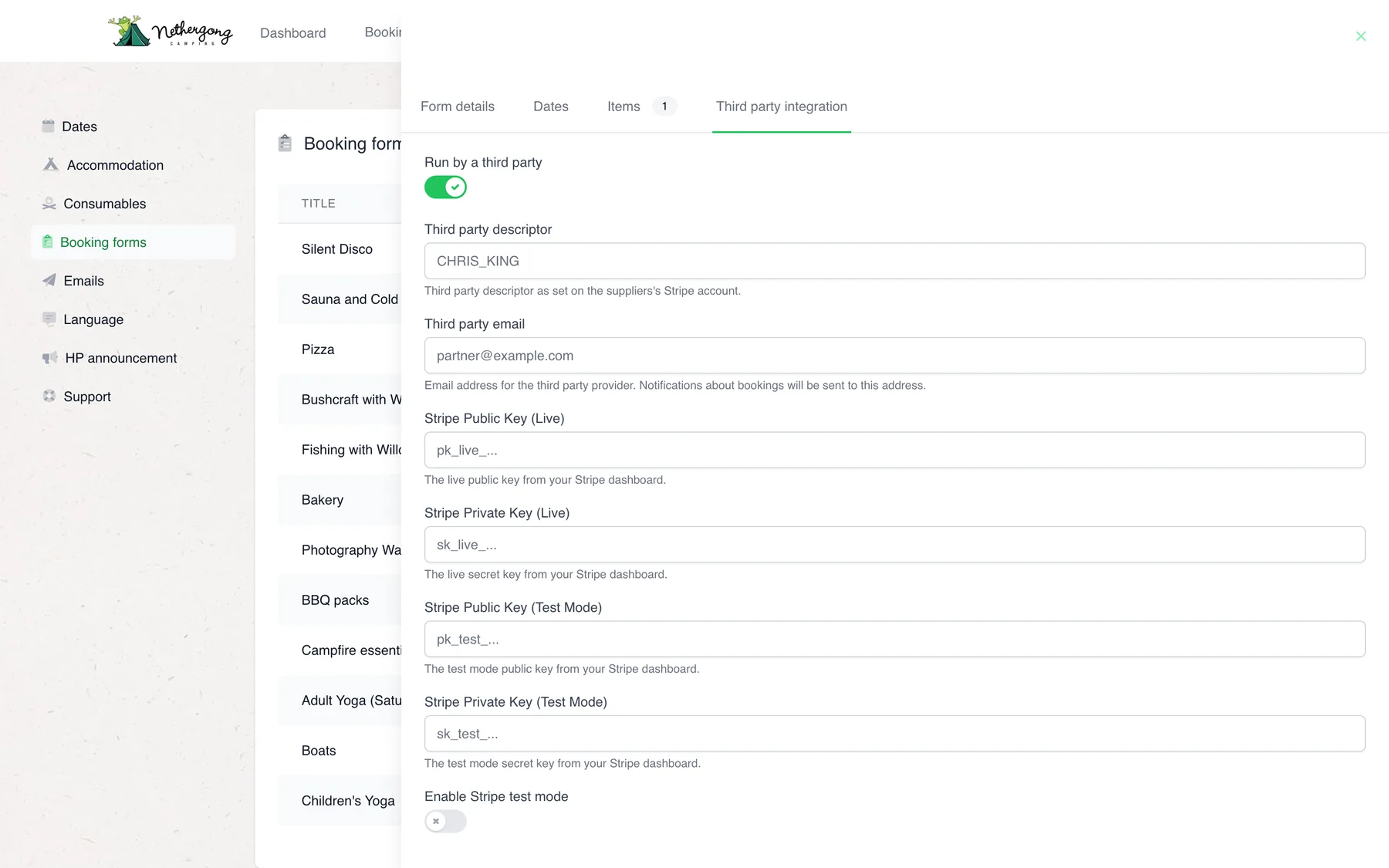
A form can be handed to a partner: their yoga class or bushcraft session is booked through Nethergong, but paid straight into their own Stripe account, and they are emailed every booking. The campsite never handles the money.
- Payments go to the partner’s own Stripe account
- The partner is emailed each booking
- A test mode for setting up new partners
Who hears what
Every email, sent for a reason.
A campsite booking touches a lot of people: the guest, their friends, partners and the office. Each event tells only the people who need to know.
-
A booking is paid for
Confirmed only once Square has taken the payment. Until then it is hidden.
Sent to The guest Plus login details for a new account
-
A payment link is created
By the office or the lead booker, for one guest’s share of the stay.
Sent to That guest With a button to pay
-
A balance is still owed
Twelve, ten and eight weeks before arrival, checked every morning at eight.
Sent to The lead booker With the balance and due date
-
Food or an activity is ordered
Paid in the basket, or straight to a partner through Stripe.
Sent to The guest, and any partner Each with their own confirmation
-
A guest asks for a change
Sent from the booking in their account, with their details filled in.
Sent to The office inbox With the booking attached
-
A banned customer tries to book
They are logged out and shown a polite error. Nothing is saved.
Sent to The office inbox With their notes and the dates they tried
-
Written by the team
Every customer email is a template in the back office, with merge fields and a test send.
-
Sent once
A booking is confirmed, and emailed, only the first time its payment lands. A refreshed payment page can’t send it twice.
-
Logged
Scheduled sends record each run and its results under the template they used.
Gallery
More of the back office
-
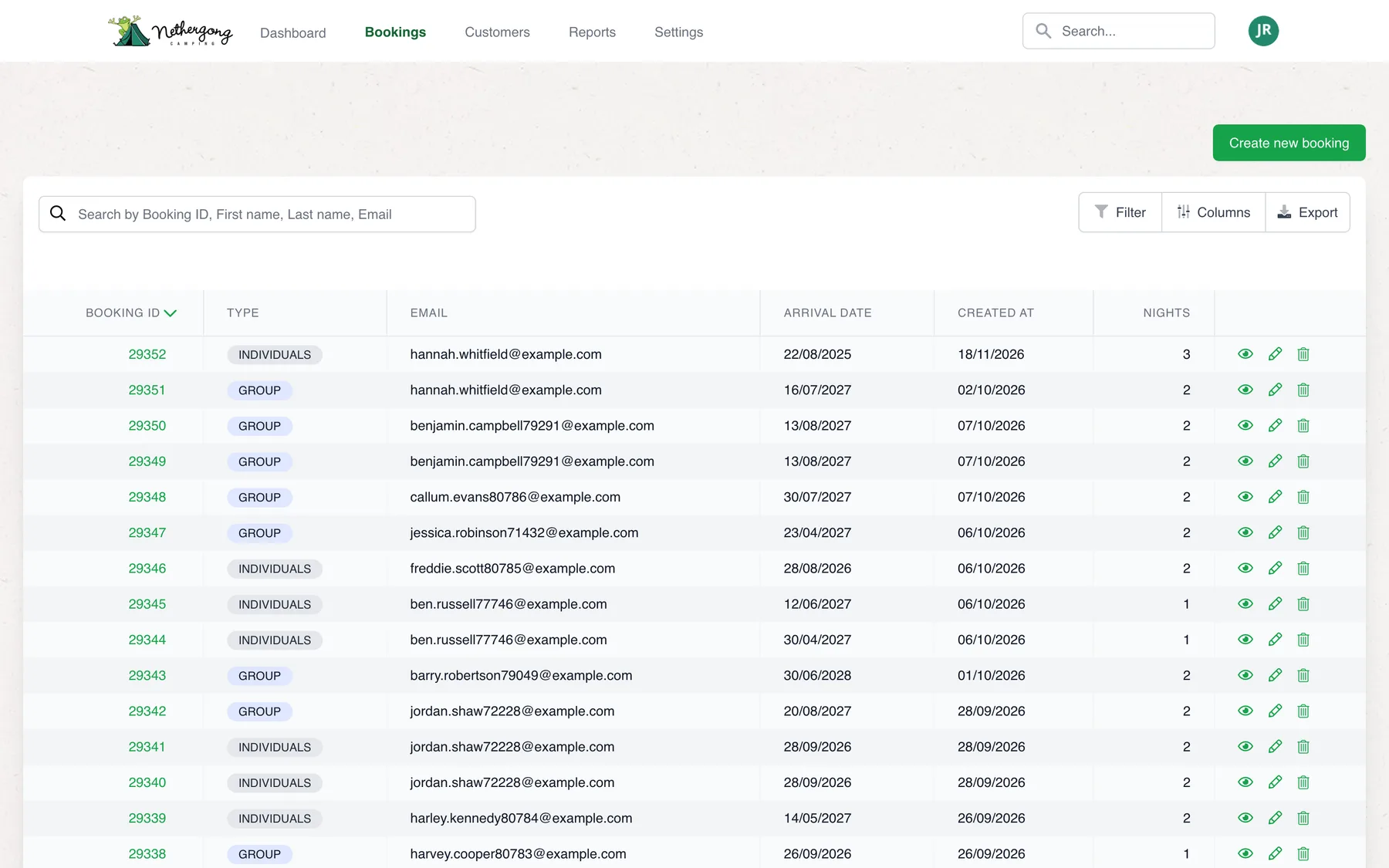
Every booking, searchable -
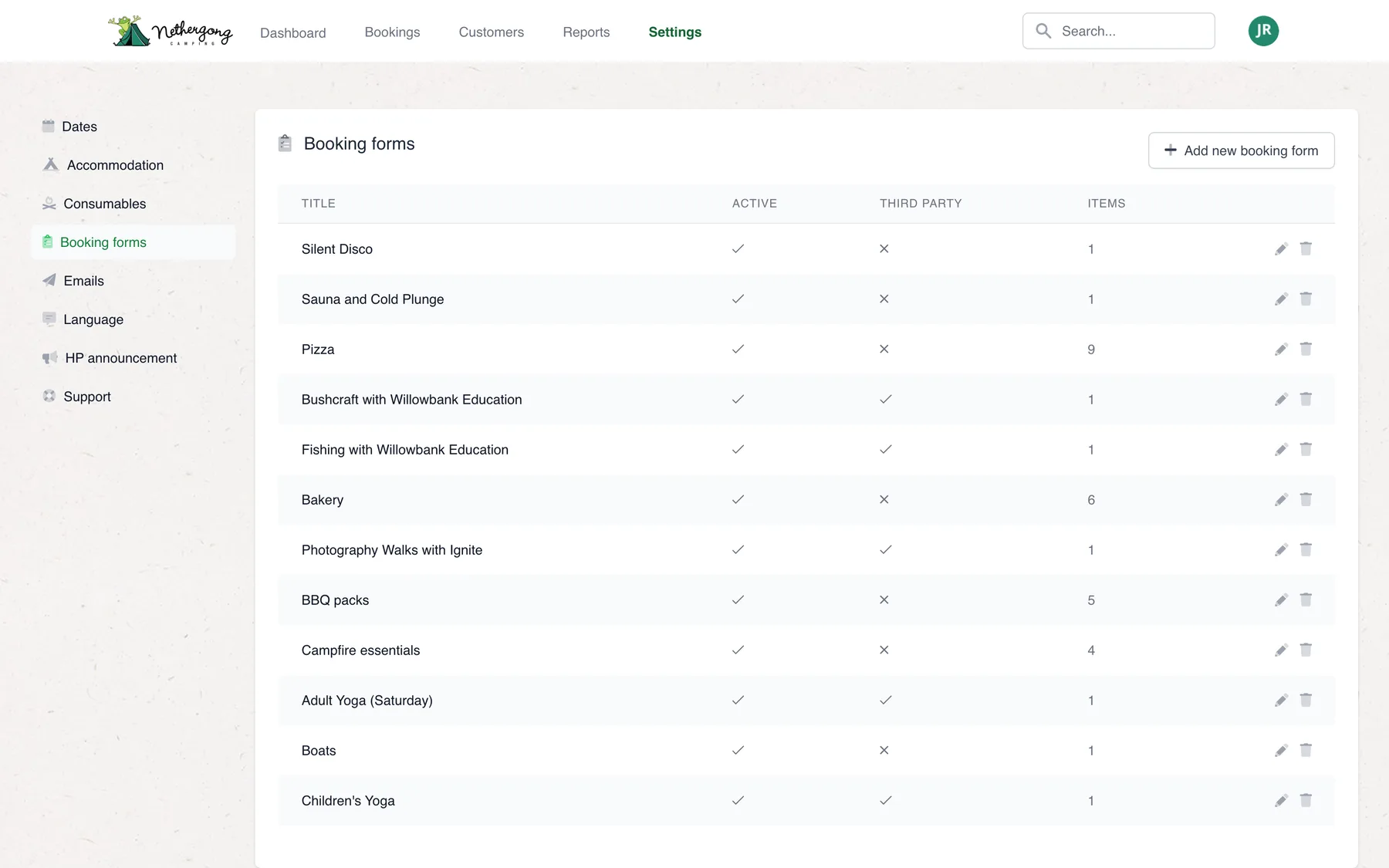
Twelve order forms -
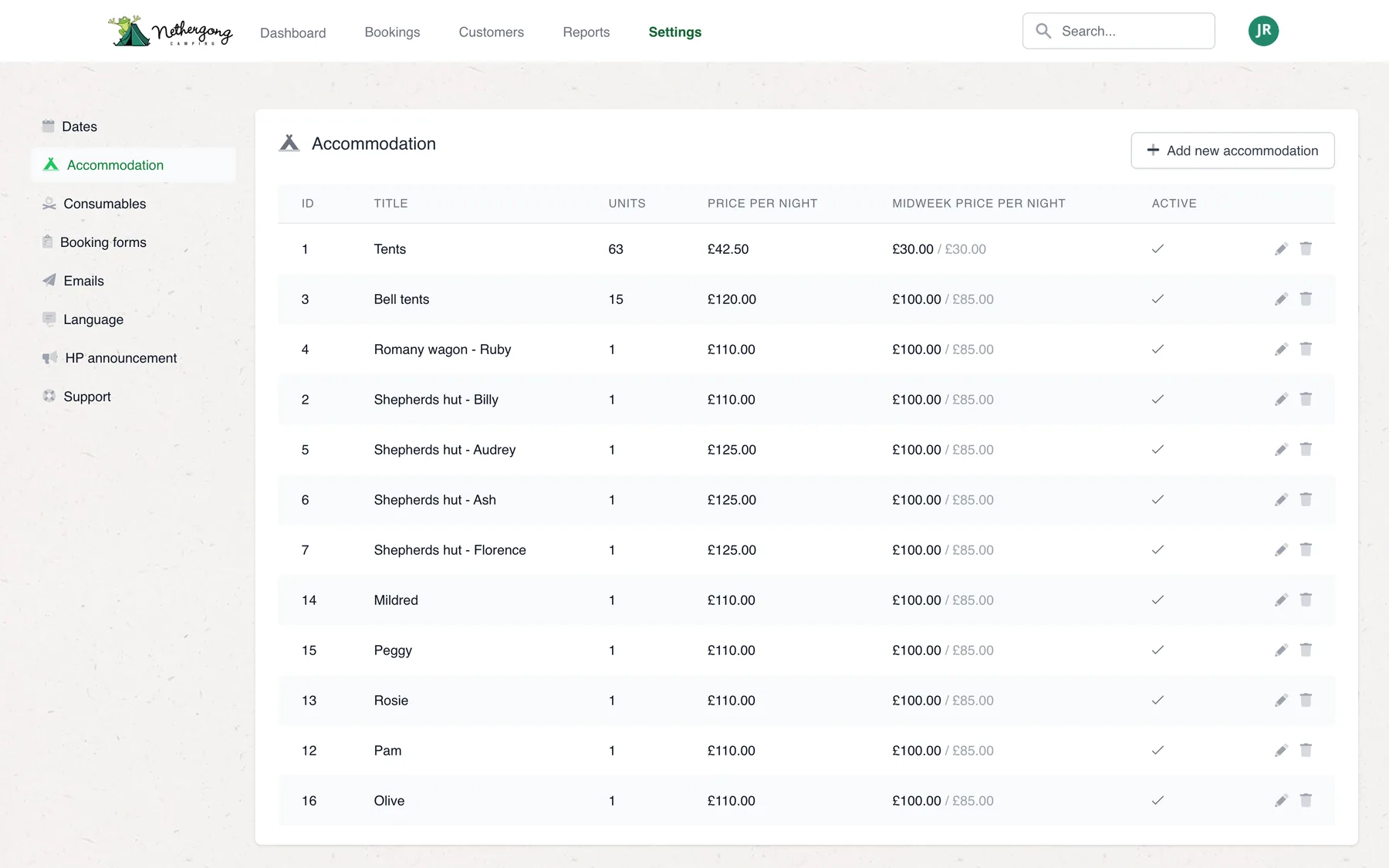
Units and midweek prices -
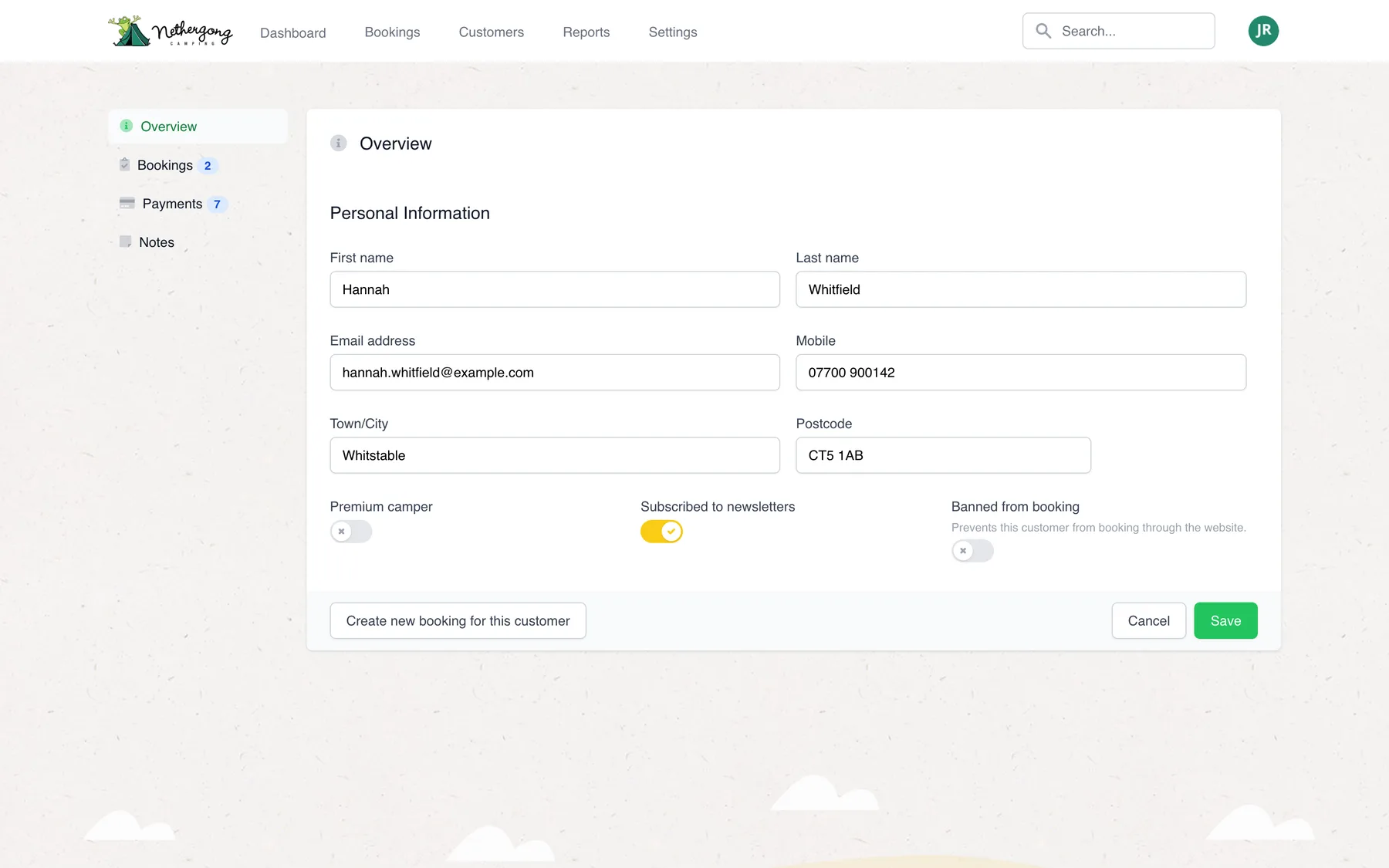
Banned means banned -
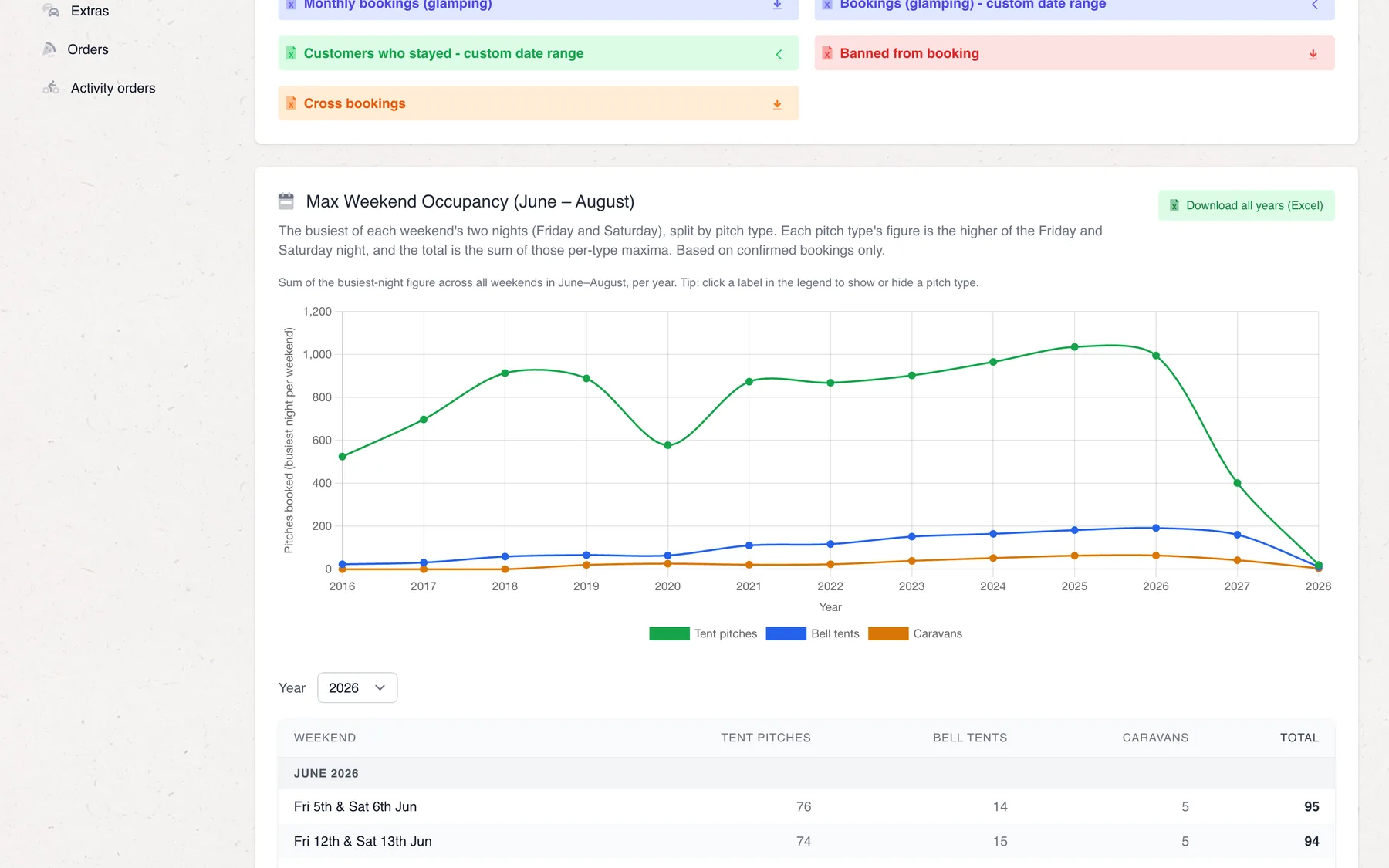
Weekend occupancy report -
Who is staying
Under the bonnet
Small rules, that save big headaches.
Much of the system’s value is in details that only show up on a busy weekend. A few of them.
-
Paid, then booked
A booking stays hidden until its payment clears. Abandoned checkouts never hold a pitch, and never need tidying up.
-
Priced night by night
Each night of a stay is priced on its own, so a stay that runs from a weekend into the midweek offer is charged correctly.
-
Caps checked at every step
A capped date is checked as quantities are chosen, when the basket opens and again at payment, so two guests can’t buy the last slot.
-
Banned means banned
Flag a customer and the booking pages turn them away politely, while the office is emailed with their notes and the dates they tried.
-
See what the guest sees
Staff can log in as any customer to see their account exactly as they do, which settles most support calls in a minute.
-
Reports the owners use
Annual camping and glamping figures, payments, orders, weekend occupancy and a comparison with last season at the same date, all exported to Excel.
Technology
Built to run a season, year after year.
Laravel and Livewire let a small team keep a complex system fast to change. Square takes the booking payments; Stripe sends partners’ money straight to them.
-
Laravel
Framework
-
PHP
Language
-
Livewire
Booking and back office
-
Alpine.js
Interactivity
-
Tailwind CSS
Styling
-
MySQL
Database
-
Stripe
Partner payments
- Square payments
- Stripe Checkout
- SendGrid
- Totem scheduler
- Froala editor
- Laravel Excel
- Spatie Media Library
- Spatie Permission
- User impersonation
- Stackwatch monitoring
Your project
Have a process that should run itself?
If your team spends its days chasing, re-keying and reminding, there is probably software to be built. We’d be glad to talk it through.