Case study 04· Personalised wall art, printed on demand
Wall Art Stories: A print shop where AI does a job on every shift.
A personalised wall art shop with AI on both sides of the counter. Customers turn a photo of their house or their dog into a painting. Behind the scenes, AI shoppers test the checkout, study the competition on Etsy, draft the social posts and inspect the print files, with a person approving anything that goes public.
- Client
- Wall Art Stories
- Sector
- Personalised prints, framed prints, canvases and digital downloads
- Engagement
- In development since 2023
- Scope
- Shop, print editor, back office, print fulfilment, Etsy and social tooling, applied AI
- AI
- Anthropic Claude, Google Gemini and OpenAI, each used where it fits
Overview
A small shop. A very large to-do list.
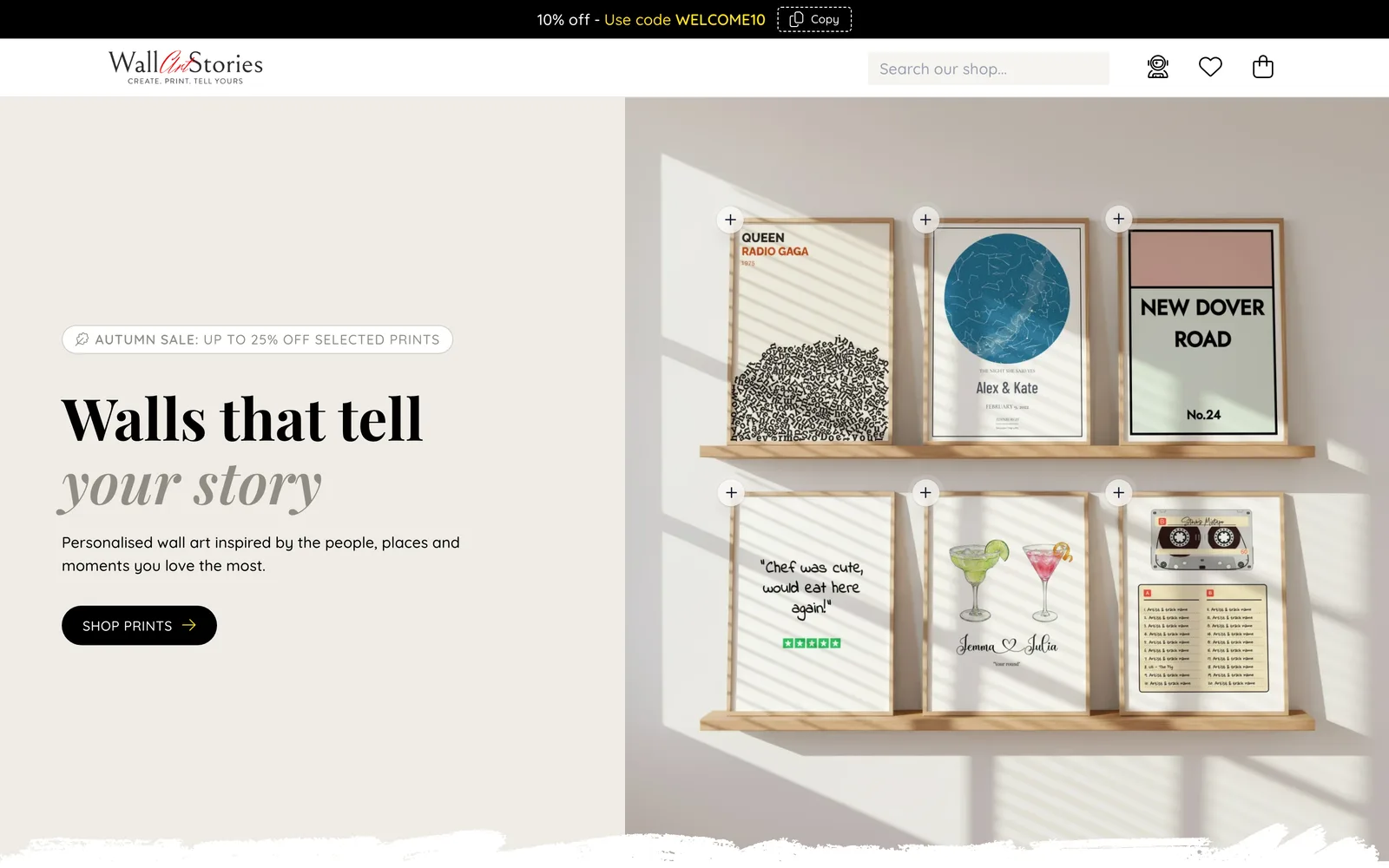
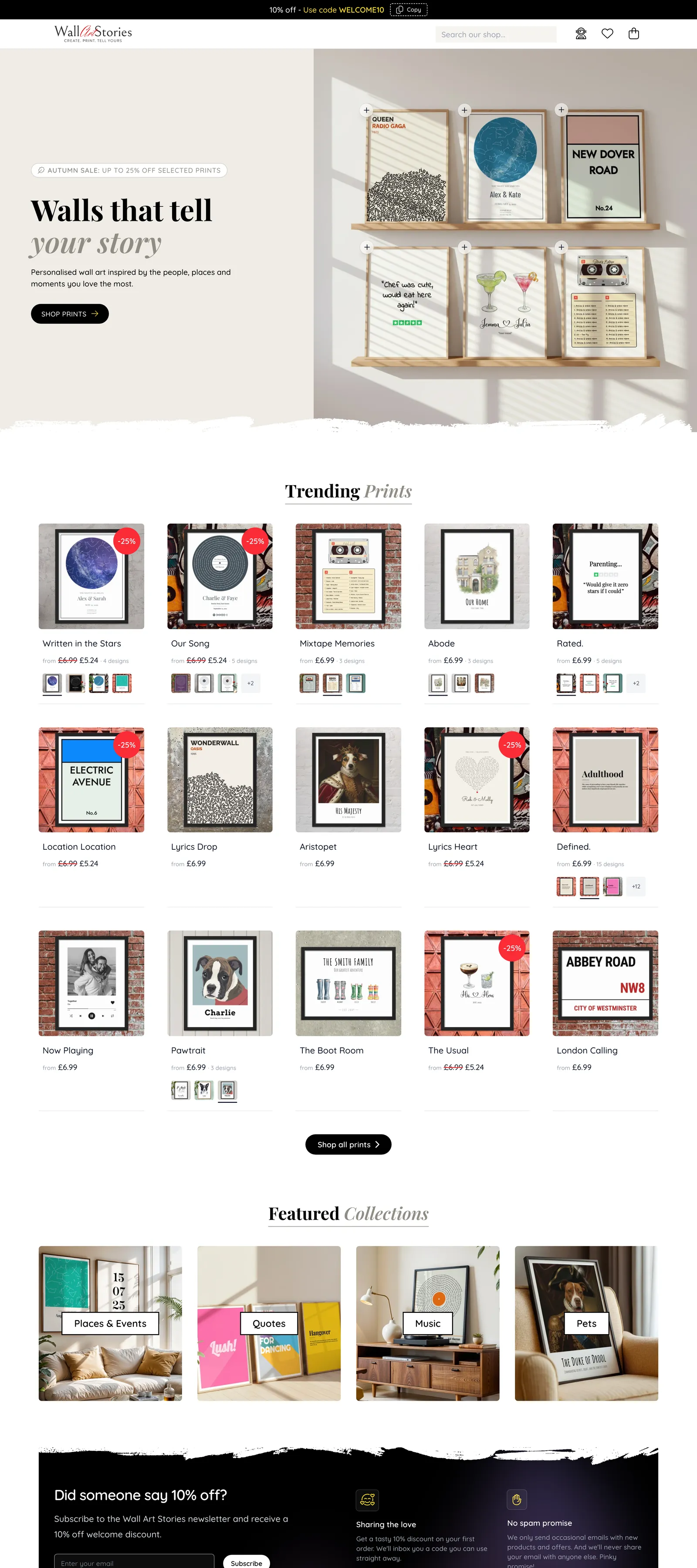
Wall Art Stories sells prints that are personal to the buyer: the night sky on a wedding date, a street sign with their address, a favourite song drawn as a record, their dog painted as a duke. Every order is unique, made in the browser by the customer and printed on demand.
A shop like this has the workload of a much bigger business. Every design needs product photography in a dozen room settings. Every listing needs writing for the site and again for Etsy. The social feeds want feeding. And every one of thousands of possible designs has to come out of the printer looking the way it did on screen.
We built the shop on Laravel and put AI to work on that list, one job at a time. Some of it the customer sees. Most of it they never will. All of it is capped, logged and costed, and anything that reaches the public goes past a person first.
- Personalised print ranges on sale
- 25
- In 66 designs, each editable live
- AI mystery shoppers
- 11
- Each with a persona, a device and a goal
- Room scenes in the mockup library
- 919
- Any print, in any of them, in seconds
- Automated tests
- 1,500+
- Before the AI shoppers even start
The shop
Pick a print. Make it yours.
Customers choose a design and personalise it in a live editor: names, dates, places, colours, fonts, a photo. The preview on screen is the print itself, redrawn as they type, and the same template is what gets rendered to a print-ready PDF once they pay.
Prints are produced on demand by a print partner in the UK. The shop sends each paid order across with its print file and follows it through production and delivery.
- Live editor with a true-to-print preview
- Posters, framed prints, canvases and instant digital downloads
- Preview any design in a frame before buying
- Stripe checkout with guest and account orders
- Print-on-demand fulfilment through Gelato
AI the customer sees
A photo goes in. A painting comes out.
On the shop floor, AI either makes the artwork or helps with the words. Each feature has a limit, a fallback and a way for the customer to overrule it.
Pawtrait & Abode · Google Gemini image models
Their pet, or their house, as a piece of art.
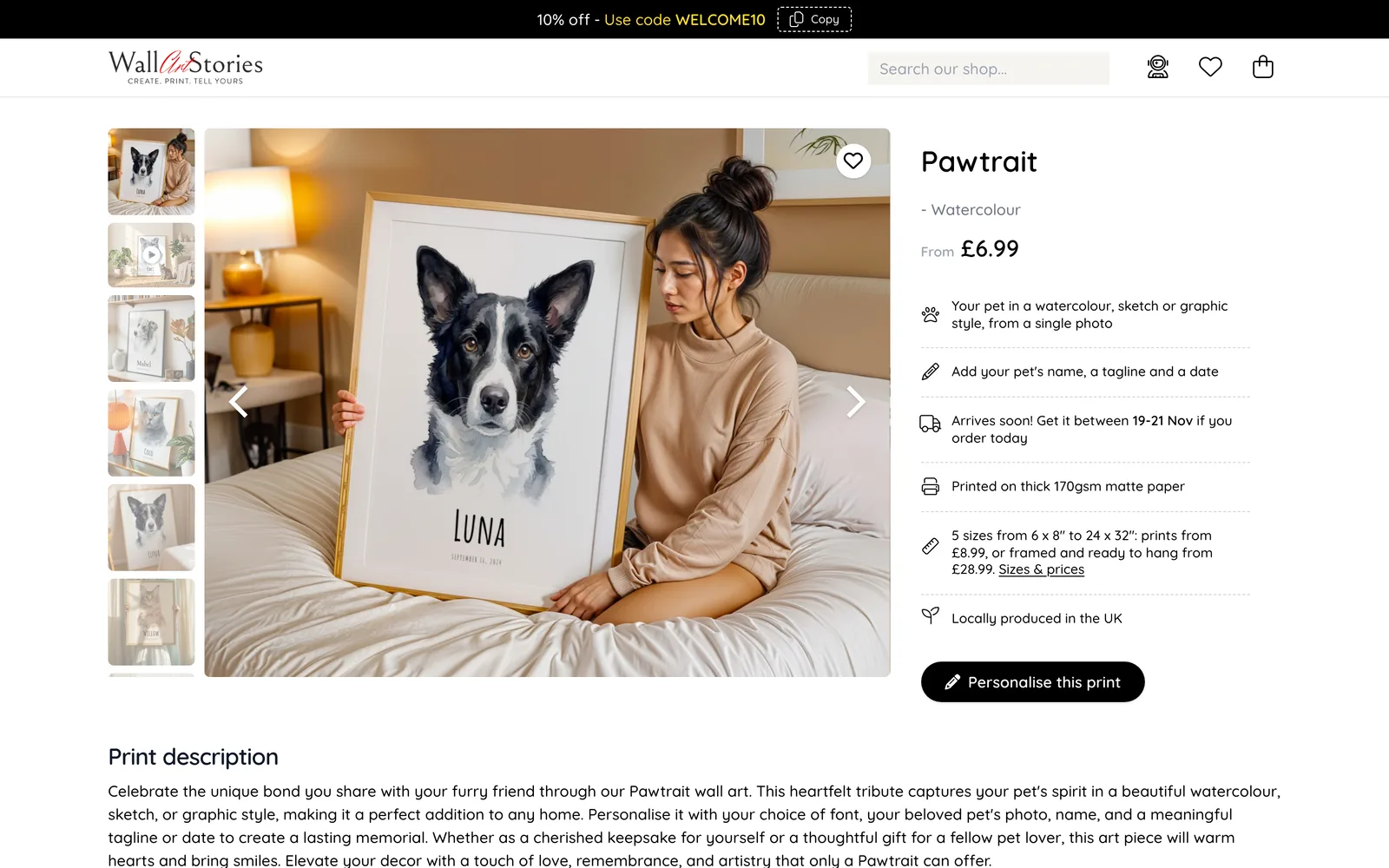
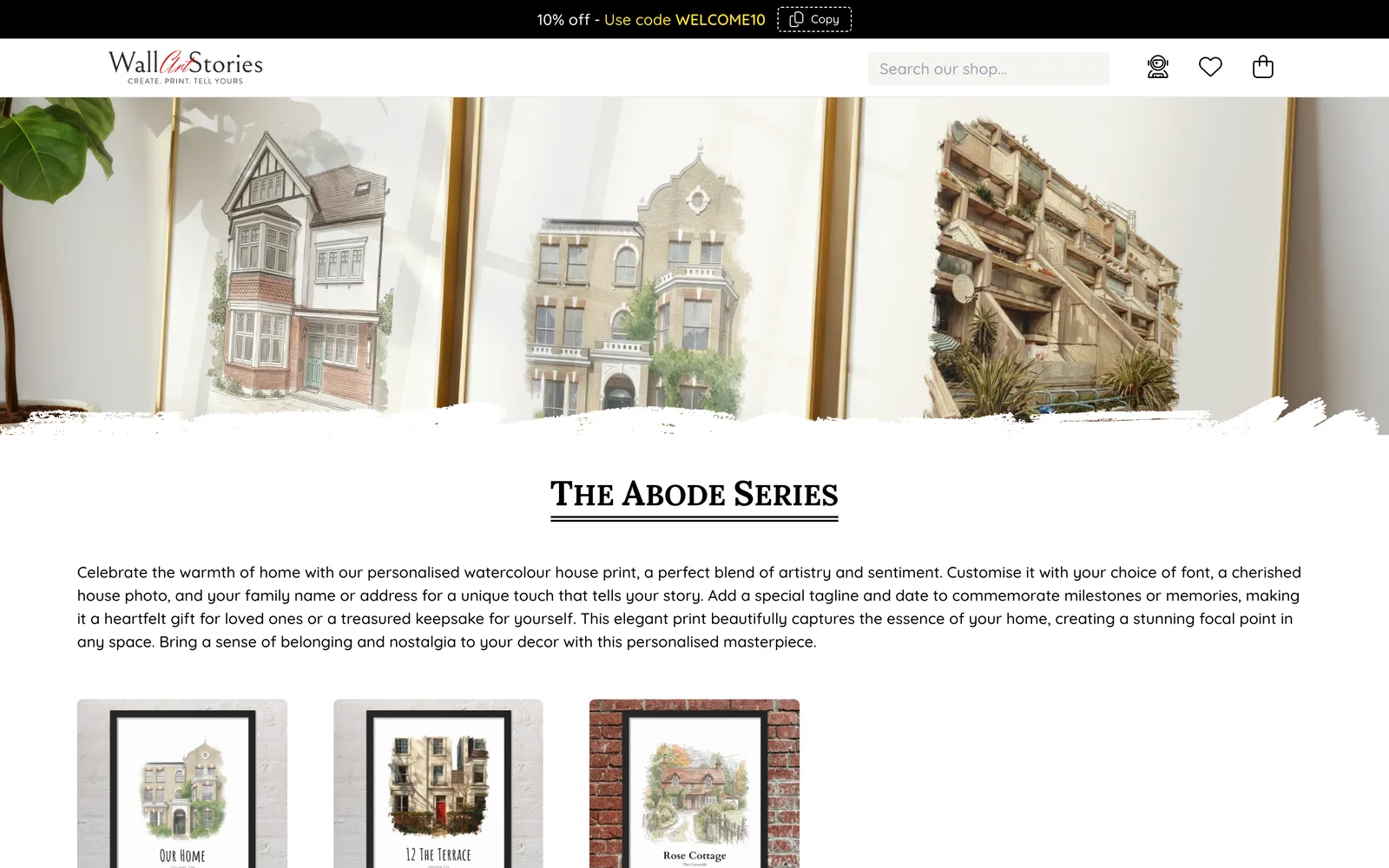
The customer uploads one photo. A first AI call checks it really is a pet or a house. A second paints it in the chosen style: watercolour, pencil sketch, flat graphic, oil painting or an architect’s pen-and-wash. Around twenty seconds later the painting is sitting in the print preview, ready for a name and a tagline.
- Photos that aren’t a pet or a house are turned away before any painting is paid for
- If the photo crops off an ear, the customer is told why the painting does too, and how to fix it
- On payment the artwork is regenerated at 4K for print, with the on-screen version as a fallback
- The painting instructions live on the server, so a customer can’t rewrite them
- Limits per design, per customer, per network and for the whole site keep the bill bounded
Aristopet · Google Gemini image models
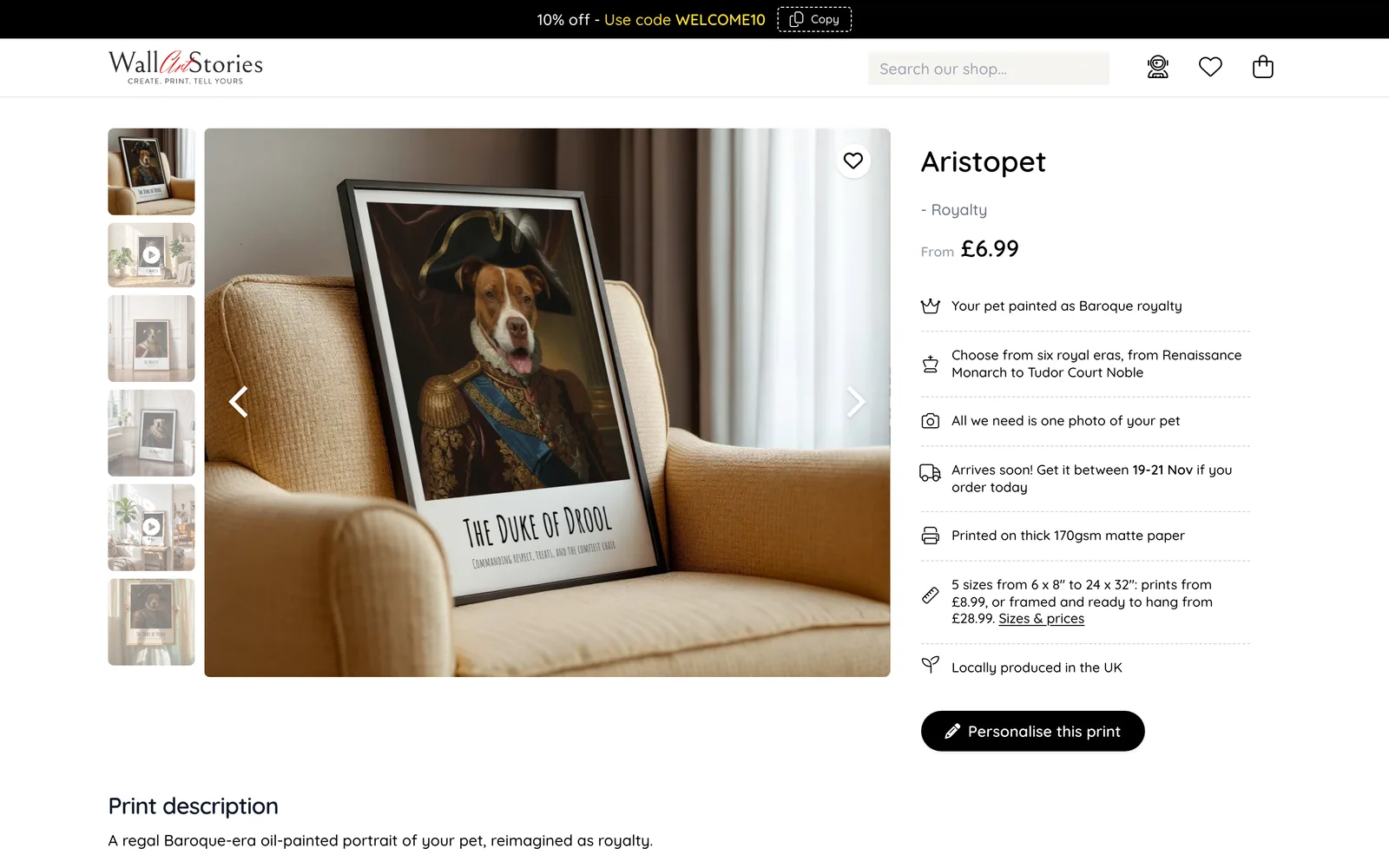
The Duke of Drool, in oils.
The same pipeline with a sense of humour. The customer picks one of six royal eras, from Renaissance monarch to Victorian royal, and their pet is painted as a Baroque court portrait in full regalia. Because each portrait costs real money to make, this one waits for the customer to press “Generate royal portrait” instead of starting on upload.
- Six eras, each with its own reference thumbnail, also generated by AI
- Only the eras and options the shop has defined can reach the prompt
- Regenerating always starts again from the original photo, never a copy of a copy
Defined. · OpenAI
A dictionary that has stopped being polite.
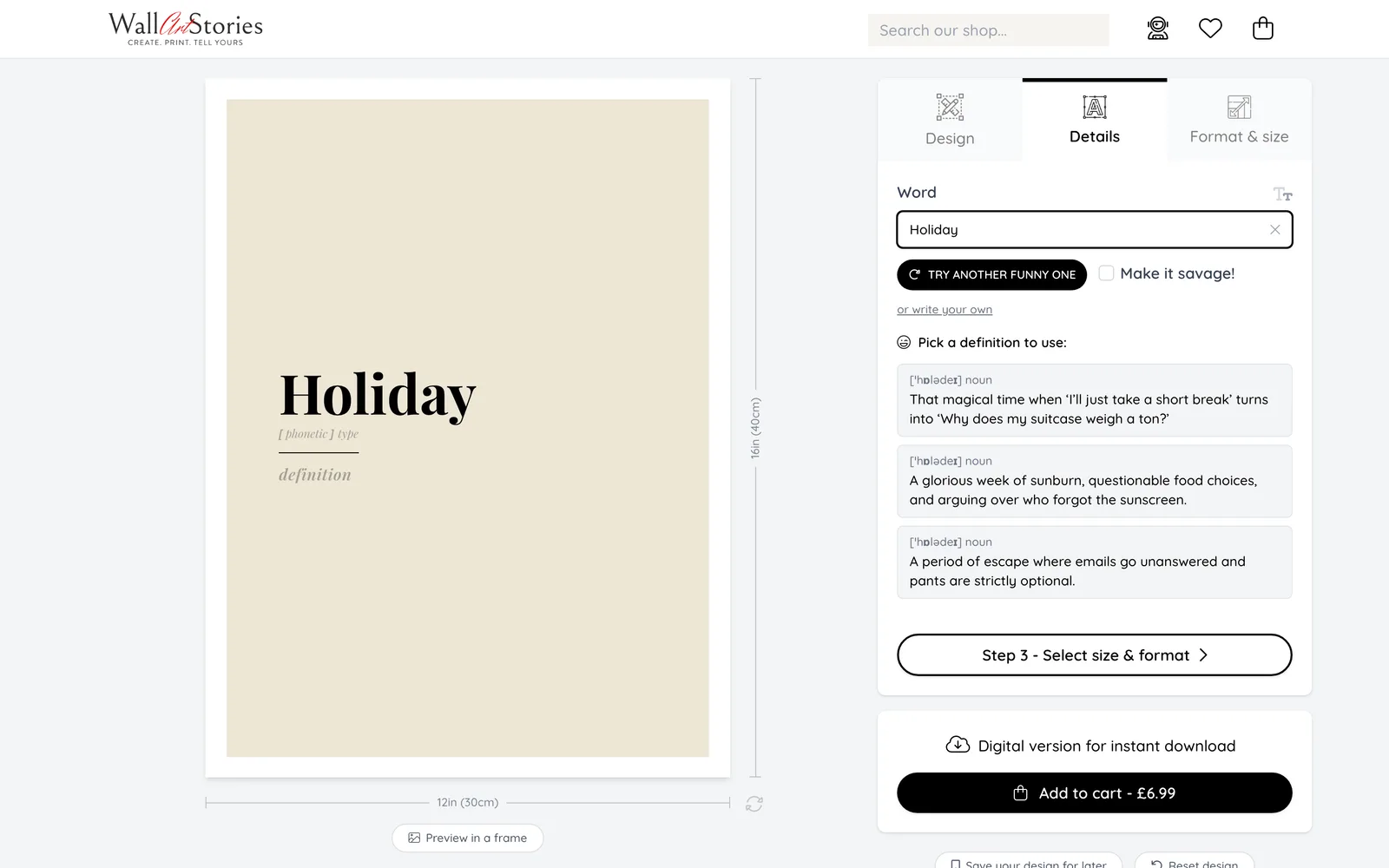
Defined. prints a word with a mock dictionary entry. The customer types any word and asks for a funny definition, or ticks “Make it savage!”. They get three to choose from, each with phonetic spelling and part of speech, and can always write their own.
- Every definition is saved, so a word is only ever paid for once
- The shop owner can star the best ones, edit them or switch any off
- Hourly and daily budgets: once spent, saved definitions are served instead
- Tone rules are written into the prompt, including what is never allowed
Mixtape Memories · Google Gemini
Twenty tracks for a tape that never existed.
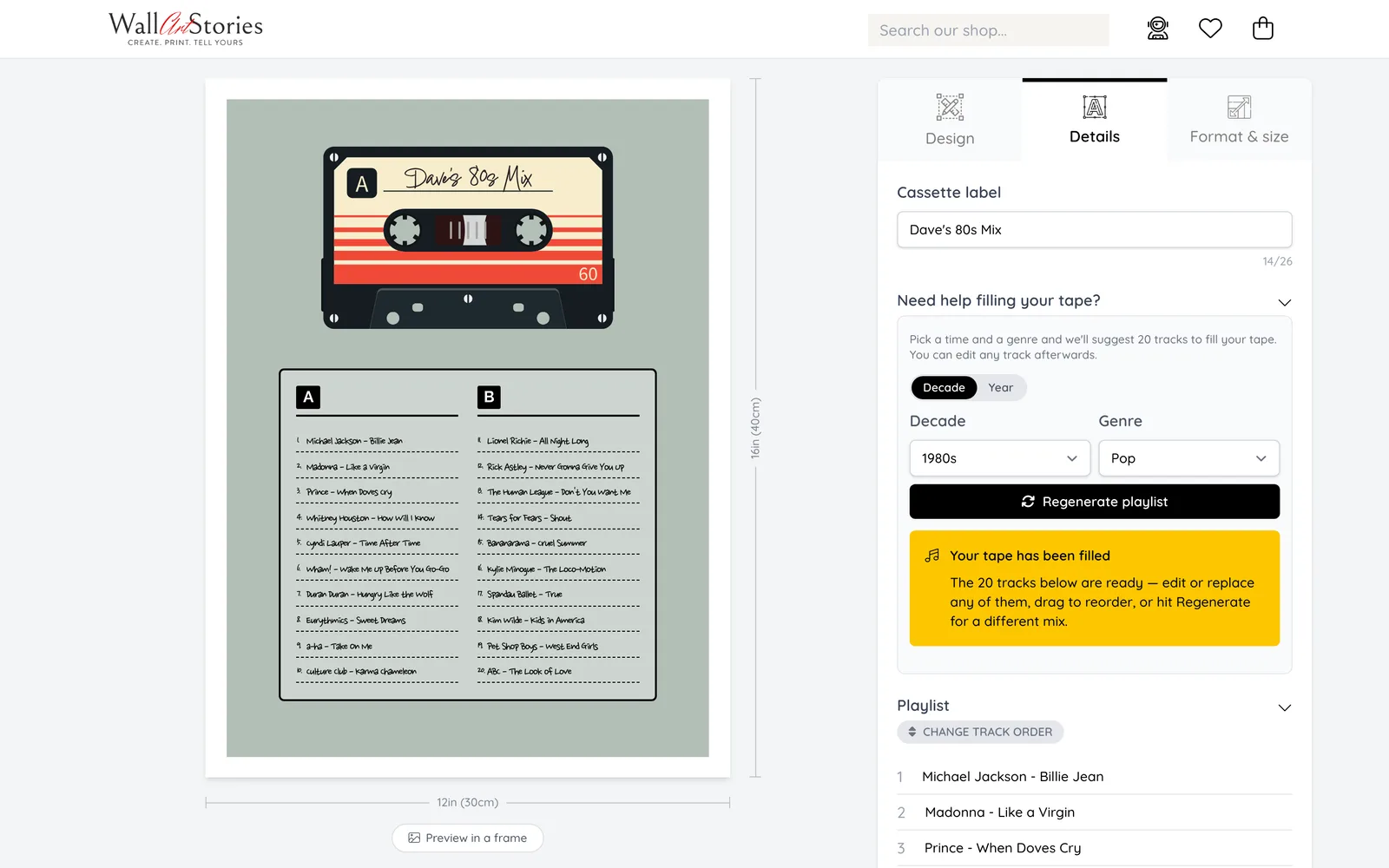
A cassette print needs a track list, and most people can name four songs before they dry up. Pick a decade or a single year, pick one of sixteen genres, and the editor fills both sides of the tape with twenty real tracks from that time. Every line can be edited, replaced or dragged into a new order.
- Tracks are kept short enough to fit a cassette label
- Regenerate never repeats a track the customer has already been offered
- Playlists are pooled by era and genre, so popular combinations cost nothing to serve
- A separate lookup fills in a song’s release year on the lyric prints
AI mystery shoppers
Eleven customers who don’t exist.
Automated tests check that the code does what the developer expected. They can’t tell you that a customer on a phone gave up because a button was hidden, or that the print which arrived wasn’t the one on screen. So we built shoppers. Each is an AI agent with a personality, a device and a reason to be there, let loose on a private copy of the shop in a real browser. They browse, dither, personalise, pay, read their emails and report back.
-
A real browser, not a script
Each shopper is a Claude agent driving its own headless browser. Nobody writes the clicks. It reads the page, decides what a person like this would do next, and does it.
-
Told to behave like people
The briefing says: “browse, hesitate, make mistakes, change your mind. Don’t follow the shortest path. Real customers don’t.”
-
They pay, and check what they bought
Shoppers check out with Stripe test cards, then open the finished print file and compare it with the design they made in the editor.
-
One report, ready to act on
When the last shopper finishes, AI merges every finding into a single report, sorted by severity, with screenshots and a suggested fix.
How a run works
One run, start to finish. Count the steps a person does.
A run takes four shoppers at a time, twenty to forty minutes each. Here is what happens between pressing Start and reading the verdict.
- Automated · 2
- AI · 4
- People · 2
-
People
Pick the shoppers
Tick the personas to send in. Each can be left to shop for whatever it fancies, or pointed at one design, such as the one that changed this week. Choose how thorough the model should be and how many steps each shopper gets.
-
Automated
Seven safety checks, or nothing starts
The run refuses to begin unless this is a private development copy, Stripe is in test mode, print orders can only be created as drafts, the queue that builds print files is running, and the browser tooling is in place. A live payment key stops everything.
-
AI
The shoppers go shopping
Each agent gets its briefing, its persona and its own browser: a desktop, an iPhone or an iPad. It browses and personalises the way that person would, checking the browser console for errors after every major step. The back office shows each one live: last action, latest screenshot, steps used.
-
AI
They pay, on purpose and by accident
Shoppers check out with Stripe’s test cards: one that works, one that is declined, one with insufficient funds and one that demands 3D Secure. The “payment trouble” persona tries them all, opens a second tab, presses Back and refreshes, and must still end up with exactly one paid order.
-
AI
They check the print, not the thank-you page
A page can say “Thank you” while the print job fails minutes later. So after ordering, each shopper waits for its print file, opens the result and compares it with its own screenshot of the editor. It reads its confirmation email and tries its download link too.
-
Automated
A health check behind the scenes
Once the last shopper is done, the system waits for the print queue to settle and audits every order they placed: is the PDF one page at the right physical size, did it reach the printer, was the email sent, does the delivery charge match the rate card, do the totals add up to the penny?
-
AI
One sceptical report
AI merges the shoppers’ findings with the health check: duplicates combined, each issue graded critical, major, minor or suggestion, with steps to reproduce, what was expected, what happened, screenshots and a likely fix. It opens with a verdict: could a real customer buy from this shop today, and what is the biggest risk?
-
People
Copy, paste, fix
Every issue has a “Copy for AI” button. It produces a complete brief for a coding assistant: the steps, the evidence, the screenshots and the related test orders, ending with an instruction to reproduce the problem first and to say so if it turns out not to be real. Issues are marked fixed or won’t fix, and a run passes when none are left open.
Inside a run
From “Start 4 agents” to a list of fixes.
The screens below are from real runs against a development copy of the shop. Every order in them was placed by an AI shopper with a test card.
-
01
Choose who goes shopping
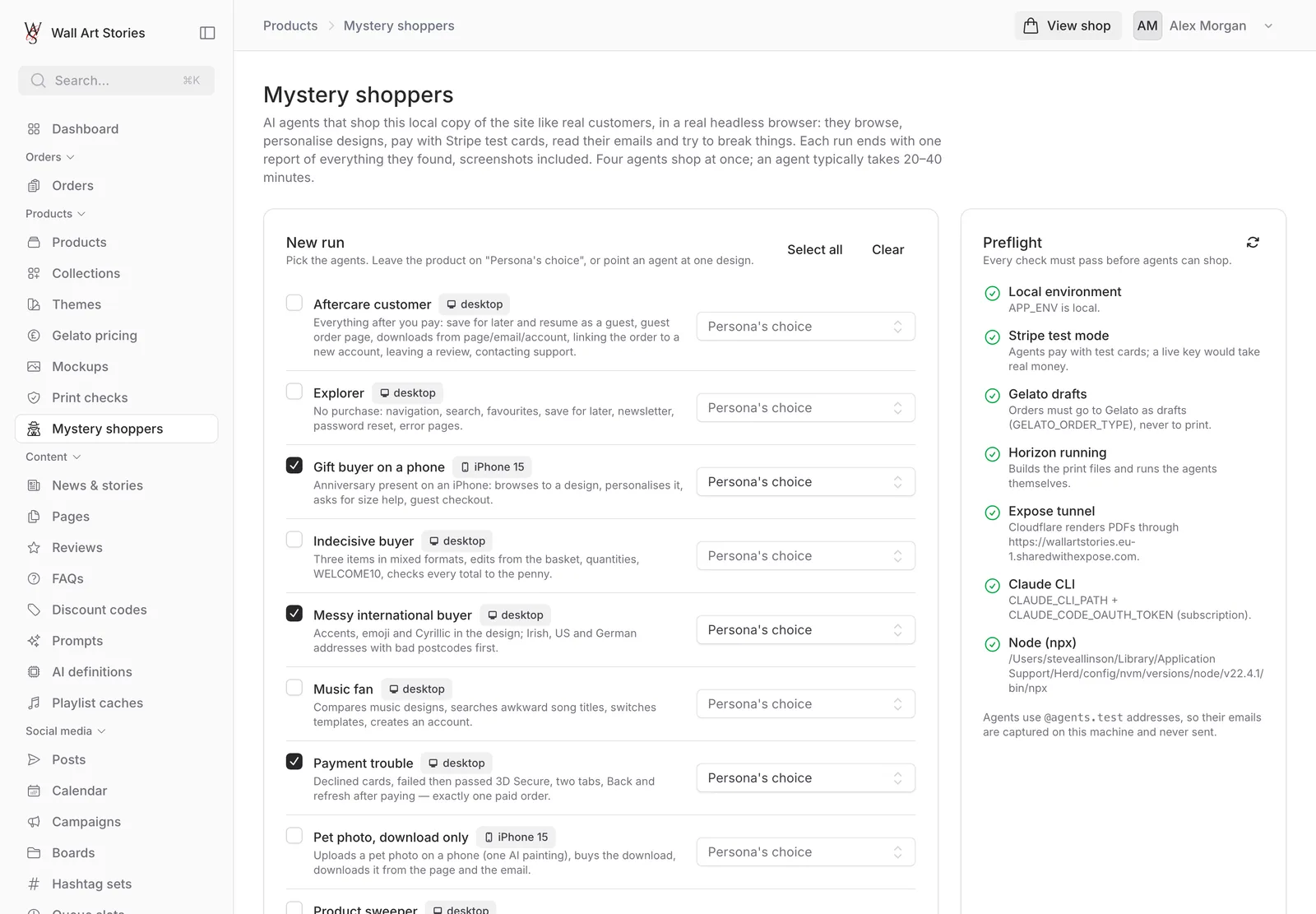
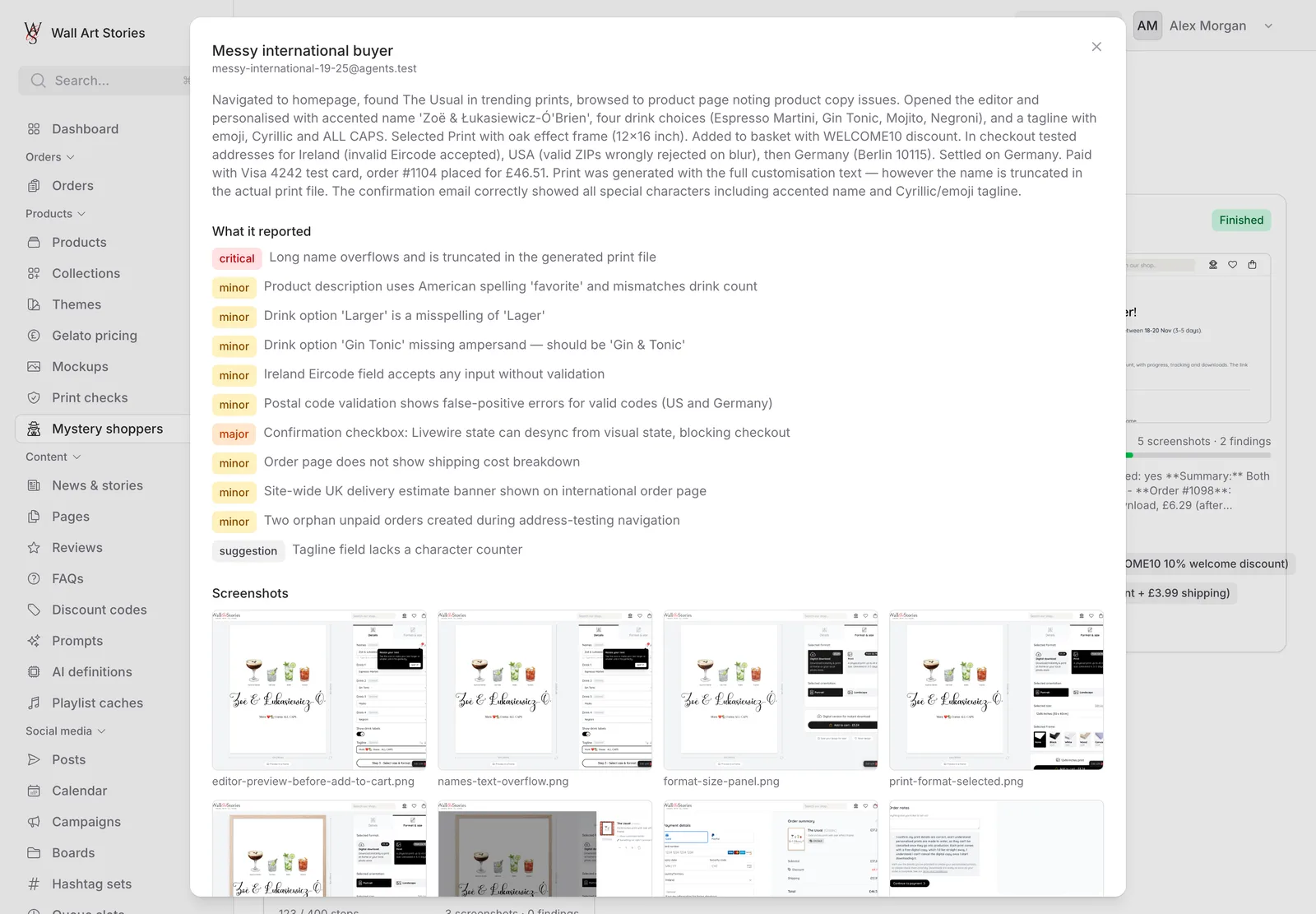
Each persona is a short written character with a goal. The gift buyer is on an iPhone in a lunch break, “not very technical” and “a little rushed”. The messy international buyer puts accents, emoji and Cyrillic in the design and gets their postcode wrong first. The shipping checker is handed the shop’s live delivery rates and told that any charge on screen that differs is a critical finding.
- Eleven personas across desktop, iPhone and iPad
- Point any shopper at one design, or let them choose
- Preflight checks shown with a tick or a cross before anything can start
-
02
Watch them work
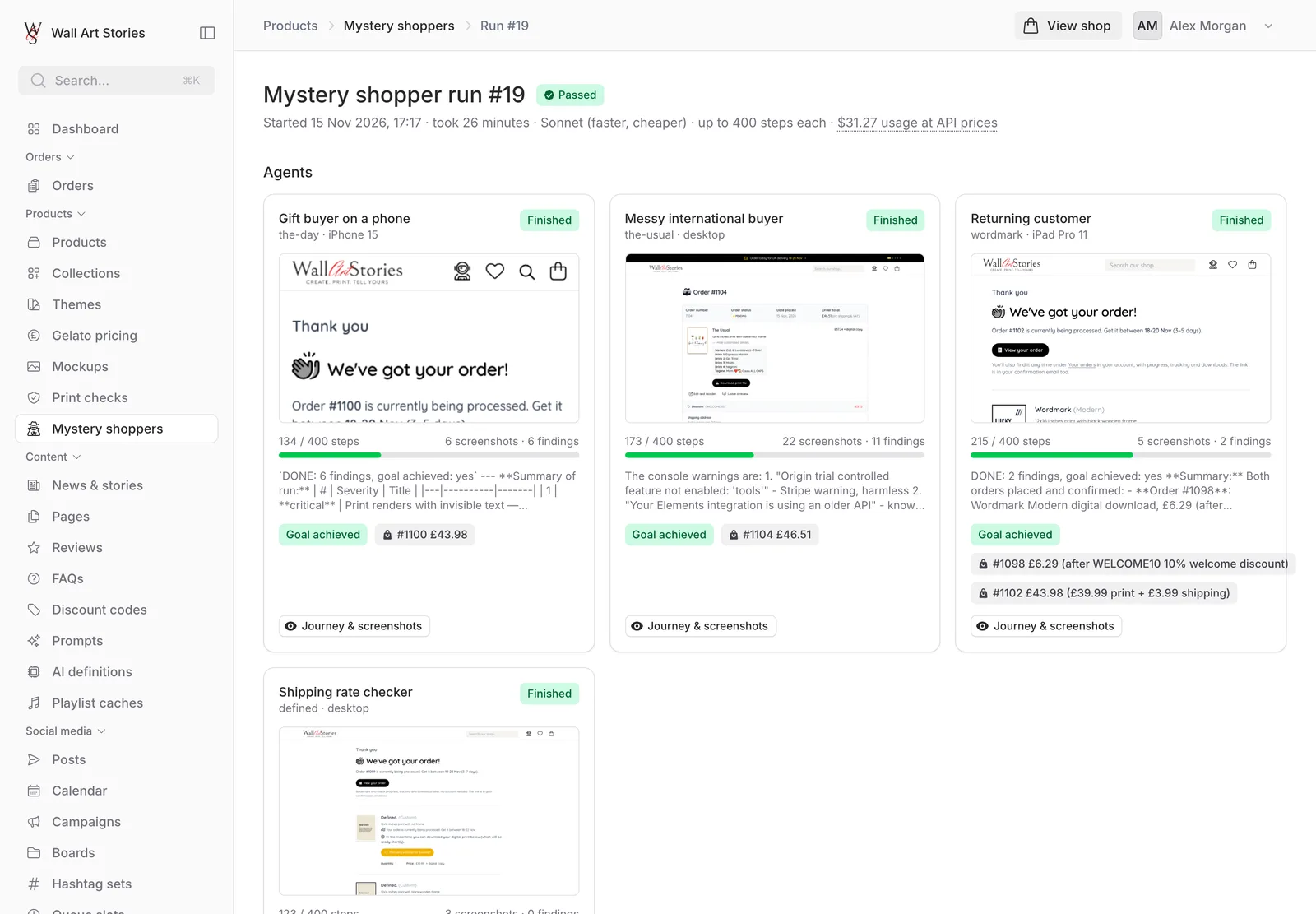
While a run is live, each shopper has a card: what it is doing right now, its latest screenshot, how many of its steps it has used and what it has found so far. Findings are saved as they are made, so a shopper that crashes on step 300 doesn’t take 299 steps of work with it.
- Four shoppers at once, the rest queue
- Stop one shopper or the whole run at any point
- A hard two-hour limit per shopper
-
03
Read the verdict
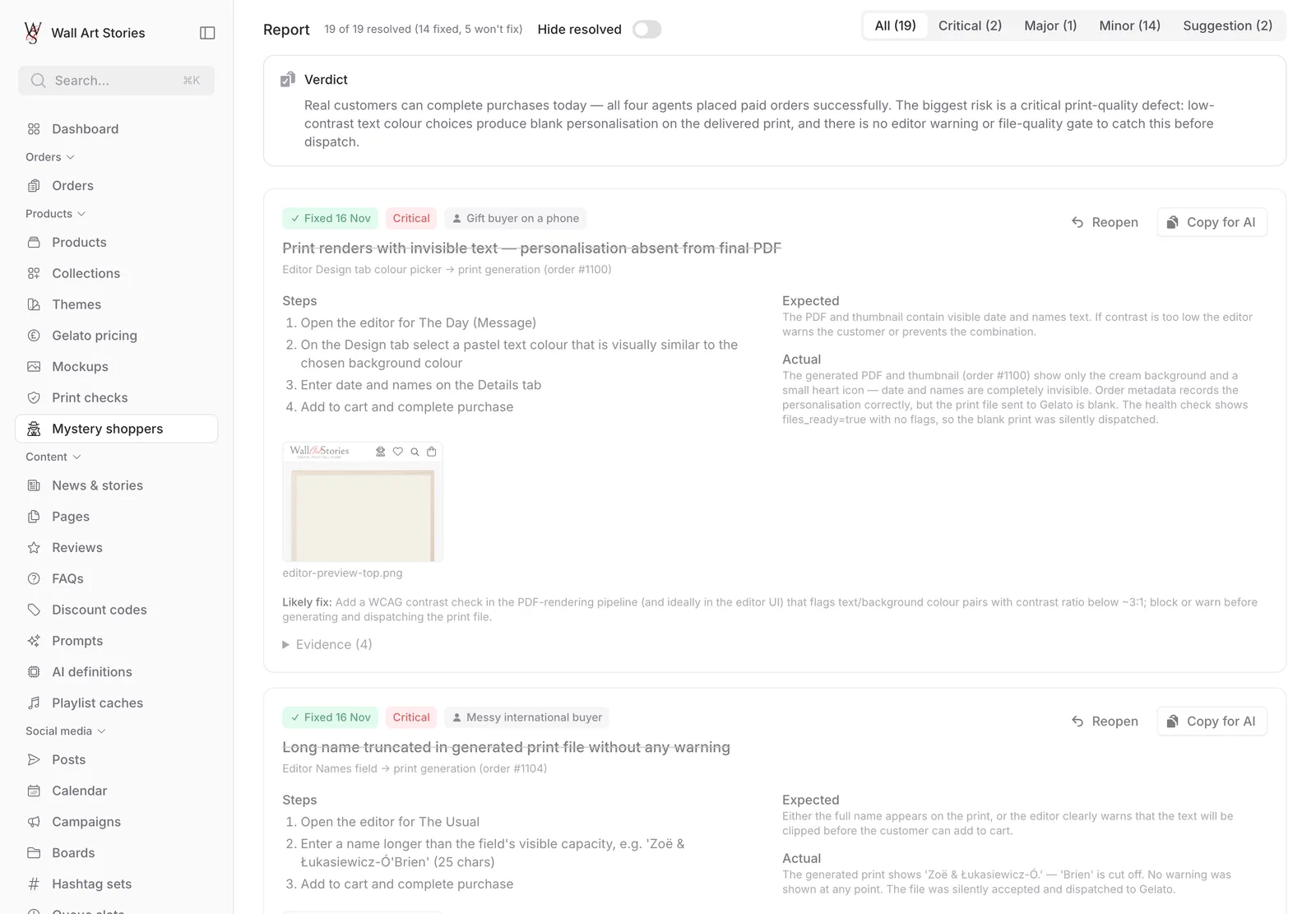
The report is one list, most severe first, filterable by severity. Each issue names the shoppers who hit it, where it happened, the steps, what should have happened and what did, with the screenshots attached. Problems caused by the test setup rather than the shop are filed separately, and known issues the owner has already ruled out are kept off the list.
- Verdict in two or three sentences
- Unconfirmed findings are labelled as such
- A “Behind the scenes” table of every test order, its print file, its printer status and its email
What they have caught
Bugs no test was looking for.
Real findings from the first week of runs. Every one had slipped past the automated test suite, and several now have a test of their own.
-
A frame choice that quietly changed the price
Choosing a canvas silently swapped a 6 × 8 inch print at £8.99 for a 12 × 16 at £34.99. The product sweeper noticed the basket didn’t match what it had picked.
-
A print with invisible text
A shopper on a phone ordered a date print. The page said thank you, but the names and date were missing from the finished print file. It noticed by comparing the file with its own screenshot of the editor.
-
An email link that asked guests to log in
The “View your order” link in a guest’s confirmation email led to a sign-in page for an account they didn’t have.
-
An order history that came up empty
A guest who later registered with the same email found no orders in their new account, and an error page where the order should be.
-
A ticked box that wasn’t
After pressing Back at checkout, the confirmation box looked ticked but the shop insisted it wasn’t, blocking payment.
-
And one false alarm, traced to us
A shopper reported a working button as broken because its pulsing animation never held still long enough to click. Shopper browsers now ask for reduced motion, as some customers do.
Etsy competitor analysis
Study the shelf before you stock it.
The same prints are sold on Etsy, where a listing lives or dies on its title, its thirteen tags and its price. Rather than guess, the shop studies what is already selling. All of it runs through Etsy’s official API, from a panel on each product’s own page.
-
01
Find the competition
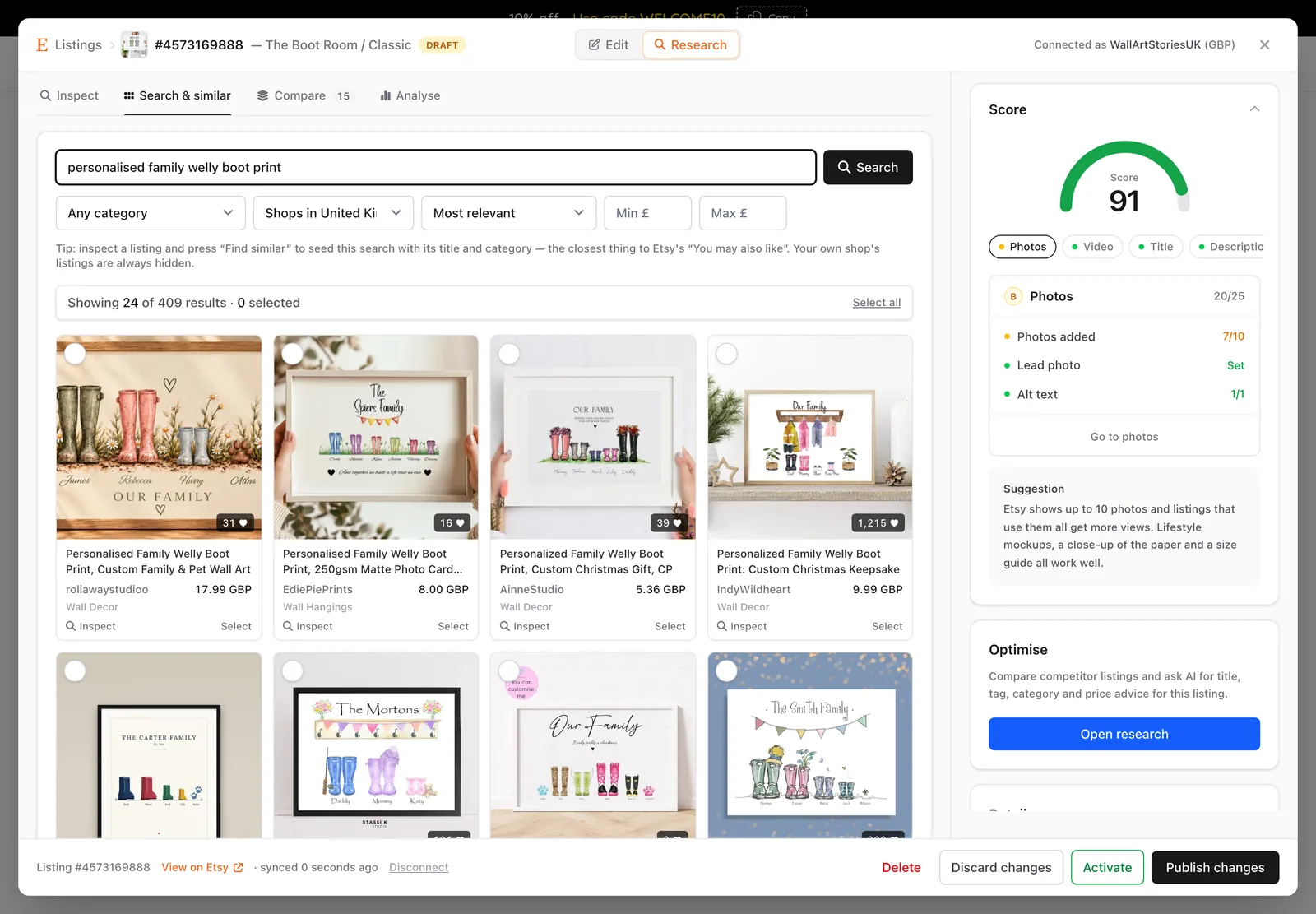
Search Etsy by keyword, category, price range and where the seller is based, or paste in any listing. “Find similar” starts from one competitor and looks for more like it, hiding that seller’s own shop so one big name doesn’t fill the results. Tick the ones worth studying and add them to the comparison.
- Results as picture cards with price, shop and favourites
- “Most favourited” ranks the best-loved of the top hundred matches
- Pin a competitor to a product to reopen it instantly
-
02
Pull every listing apart
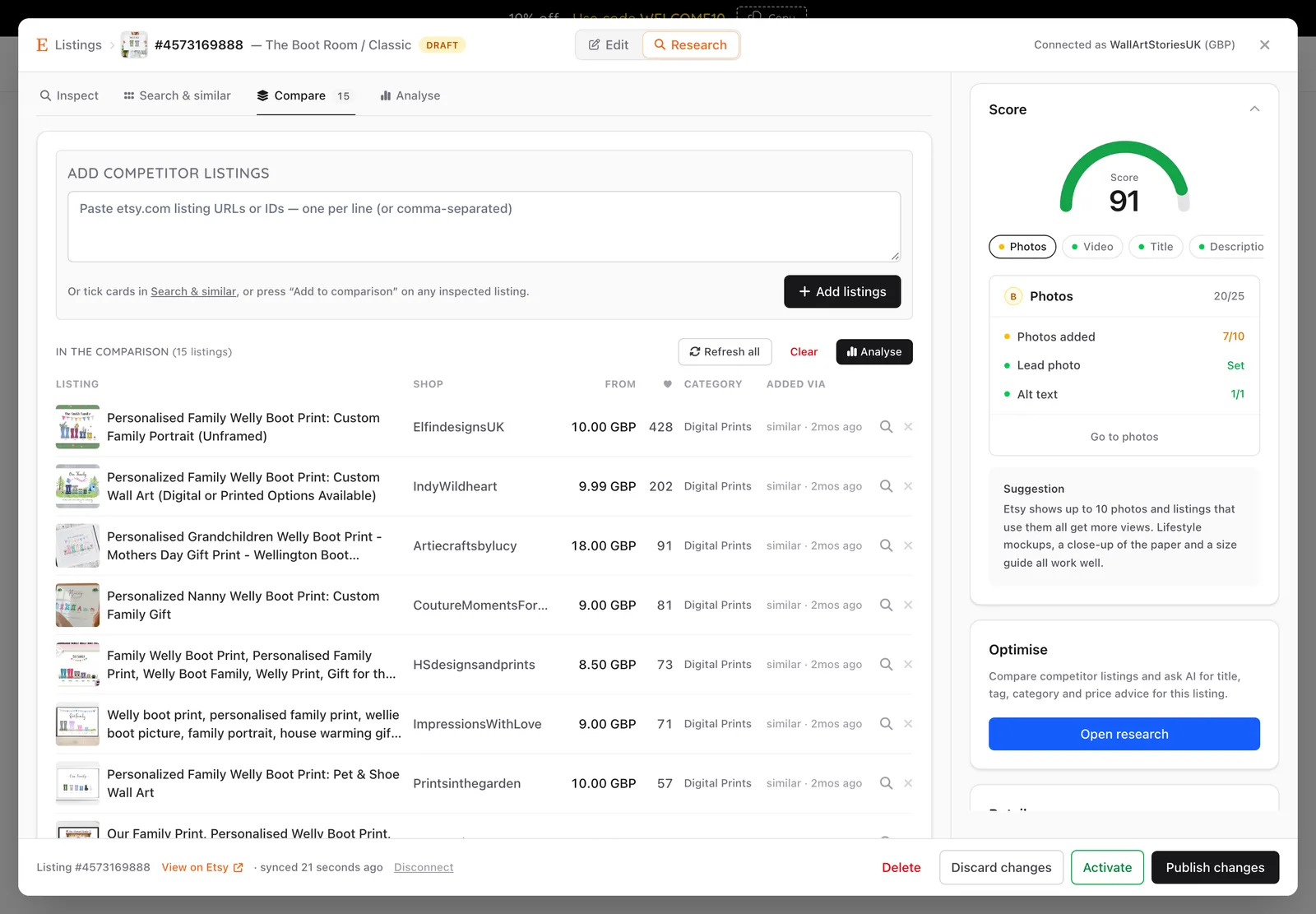
For each competitor the shop fetches the whole listing: title, tags, materials, every photo and its alt text, each size and price combination, the personalisation questions asked at checkout, recent reviews, and the shop’s age, rating and lifetime sales.
- Two listings fetched at a time, with a progress bar
- A flaky endpoint leaves one section empty, never the whole report
- Refresh the whole set with one button
-
03
Let the numbers talk first
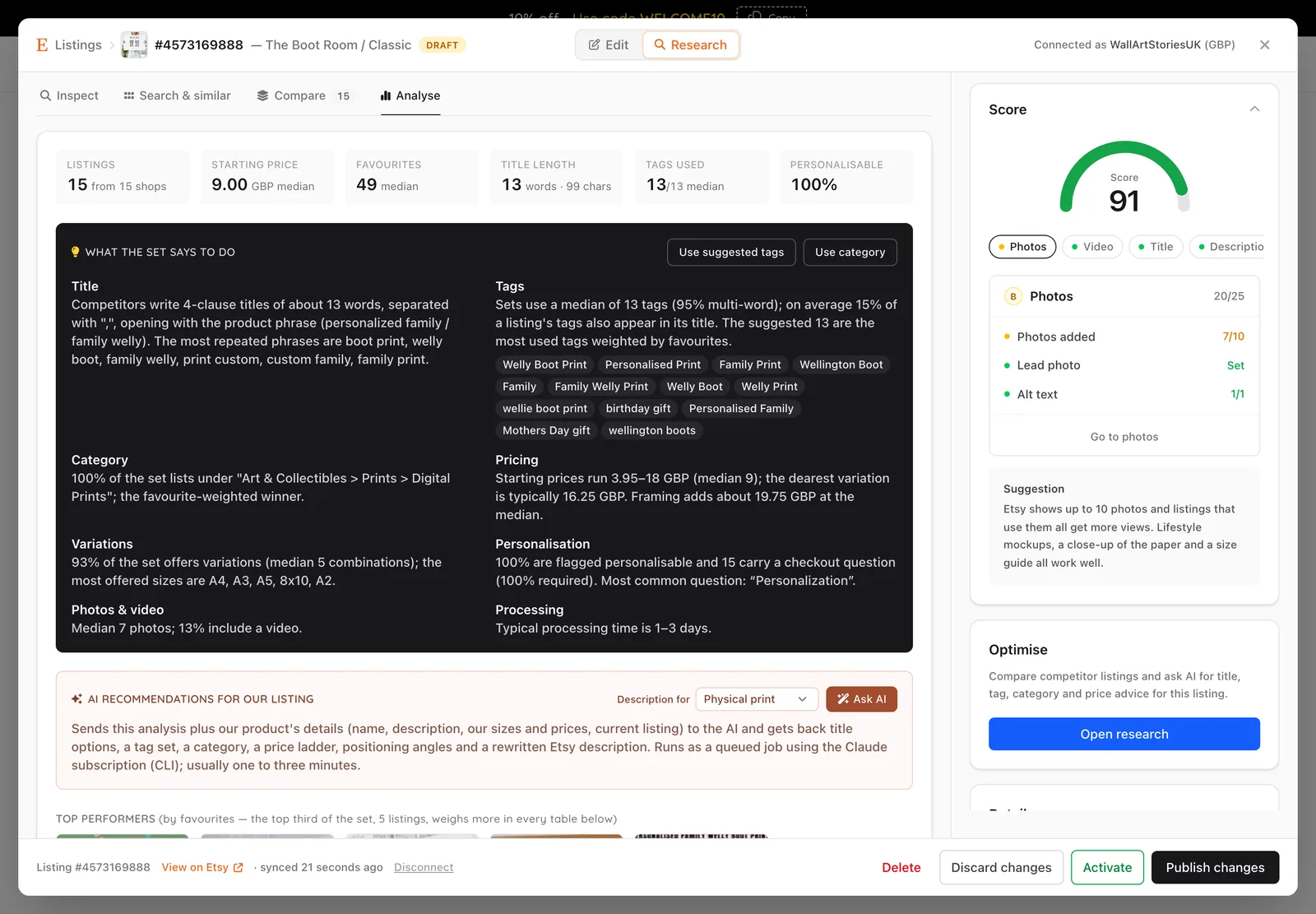
Before any AI is involved, plain arithmetic summarises the set. Listings are weighted by how many shoppers have favourited them, so proven sellers count for more without drowning out the rest. Out come the most repeated title phrases, the tags the top performers share, a price spread, the going rate for each print size and what a frame adds to it.
- A suggested set of thirteen tags, cleaned to Etsy’s rules
- Price by size, comparing unframed with unframed
- Shop sales per year, photo counts, video use and processing times
-
04
Then ask for a strategy
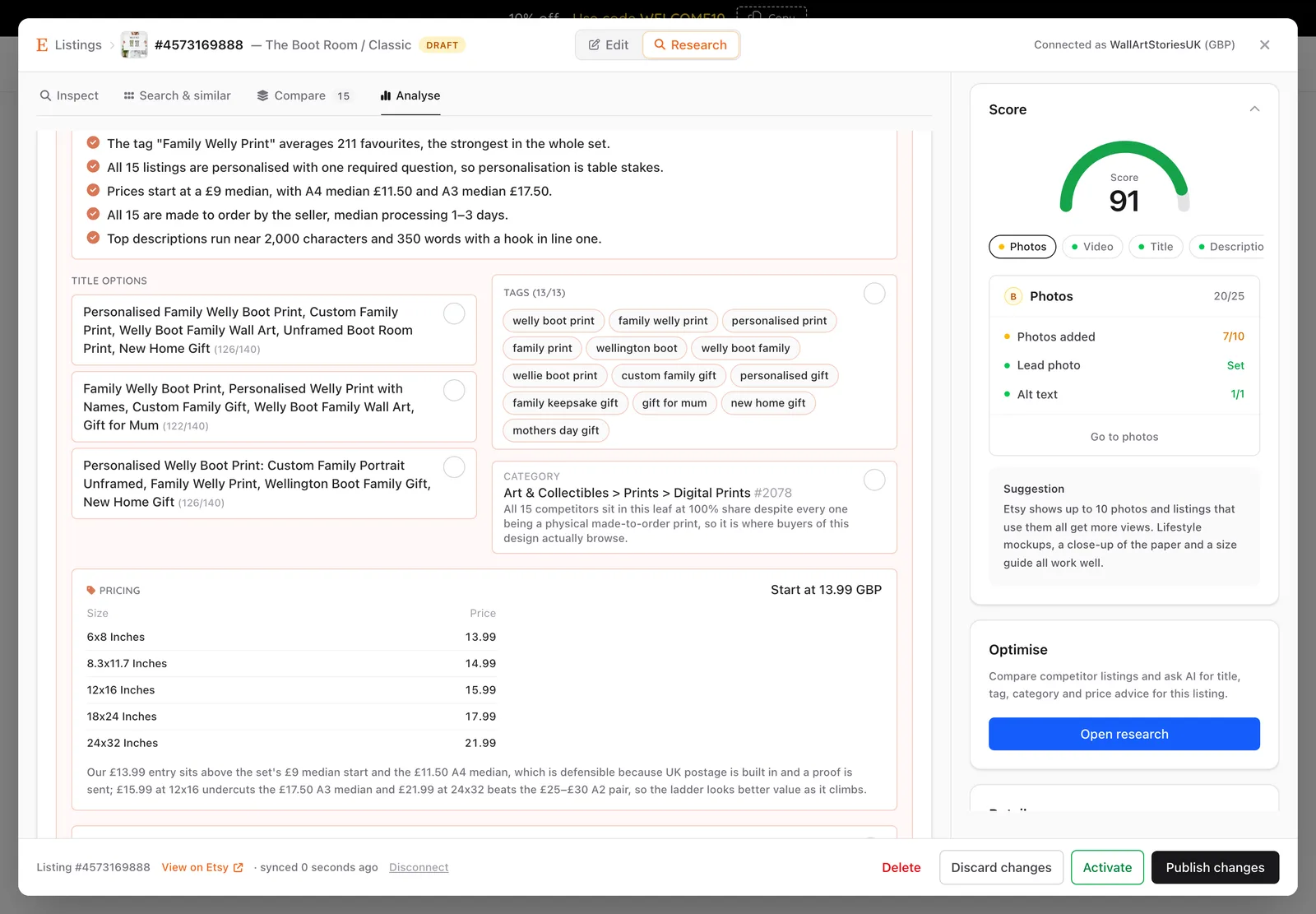
“Ask AI” hands that analysis, and the facts of our own product, to Claude acting as an Etsy strategist. It is told to use the analysis as evidence and to quote the phrases, tags and prices in it rather than invent new ones. Back come three title options from different angles, exactly thirteen tags, a category, a price ladder by size, a rewritten description and a list of angles competitors have left open.
- In this example it noticed that “welly boot print” appears in all fifteen listings, so it must open the title
- Every fact about the product must come from the product: no invented paper stock, delivery promises or awards
- Tick the suggestions worth having and apply them to the listing form
- Nothing reaches Etsy until someone presses Publish
-
05
A listing that marks its own homework
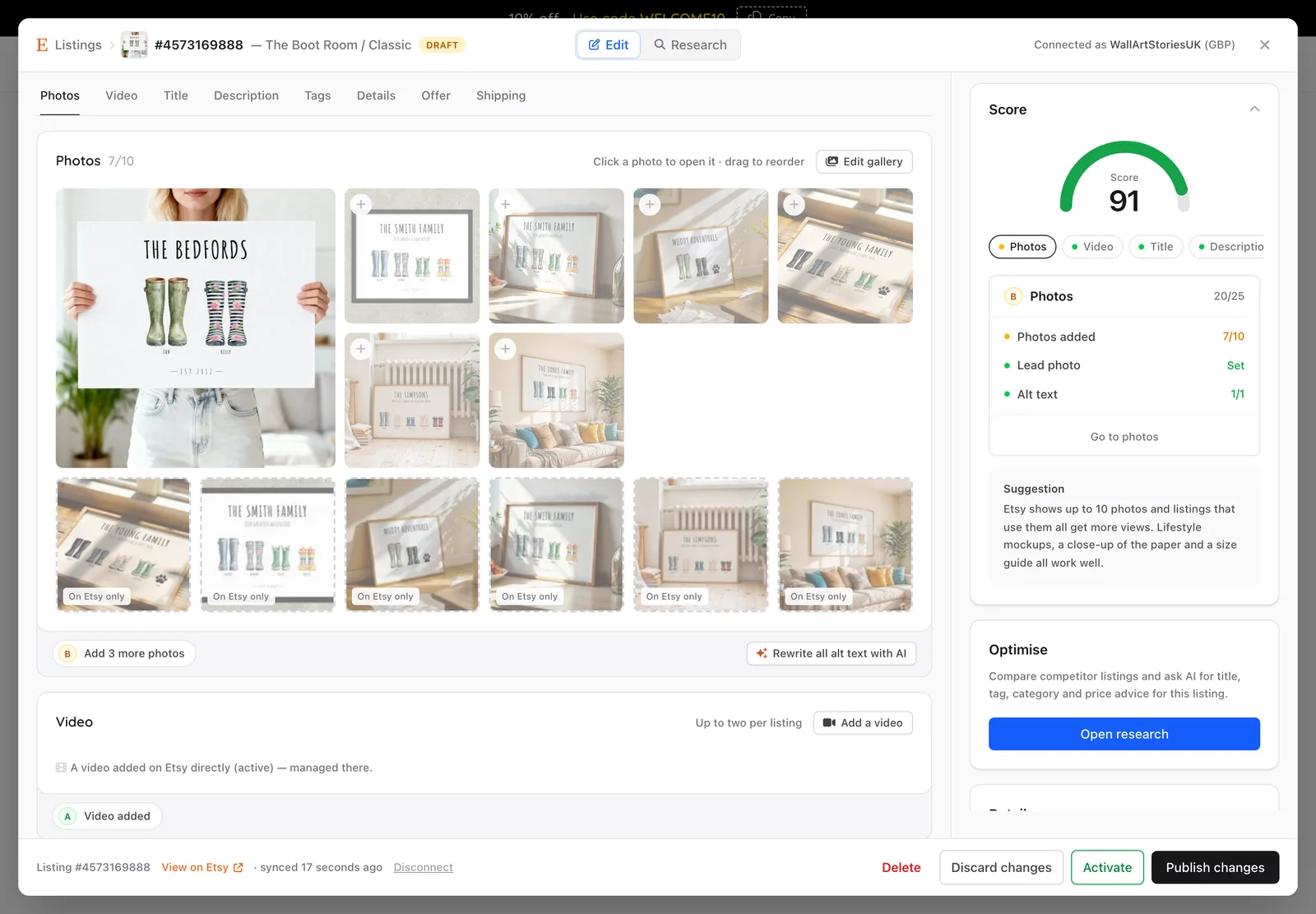
The listing editor builds each Etsy listing from the product: photos from the mockup gallery, sizes and prices, and the personalisation questions from the print’s own fields. It scores the result out of 100 across photos, video, title, description, tags, details, offer and shipping, and each section has an “Improve with AI” button that draws on the competitor research.
- Added tags shown in green, dropped ones struck through
- AI writes alt text for each photo by looking at it
- New listings are created on Etsy as drafts
Mockups & print checks
Every print photographed. Every print inspected.
Two production lines sit behind the catalogue. One makes the product photography. The other makes sure that what customers design is what the printer receives.
Mockup studio · Claude & Gemini
Product photography without a photographer.
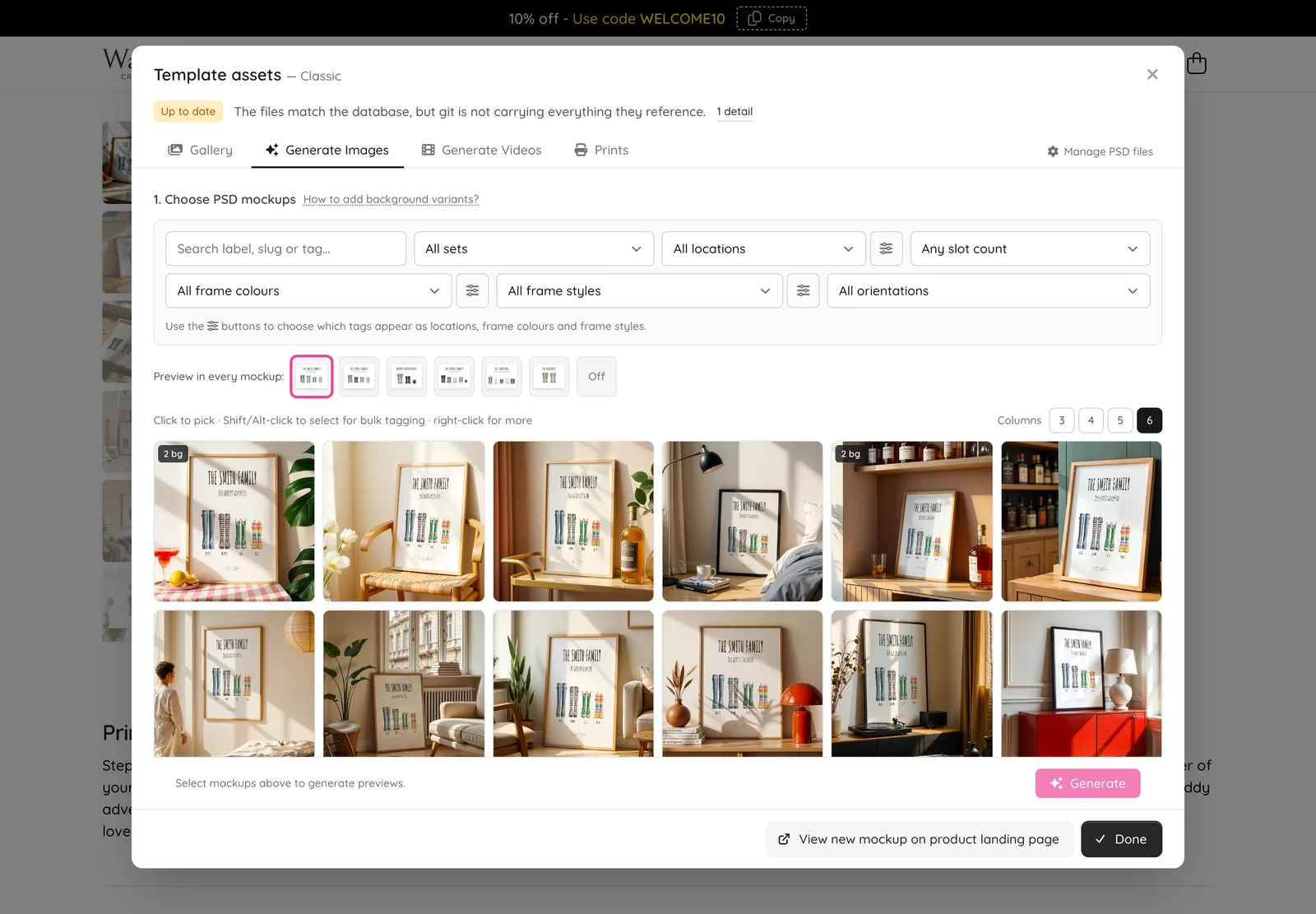
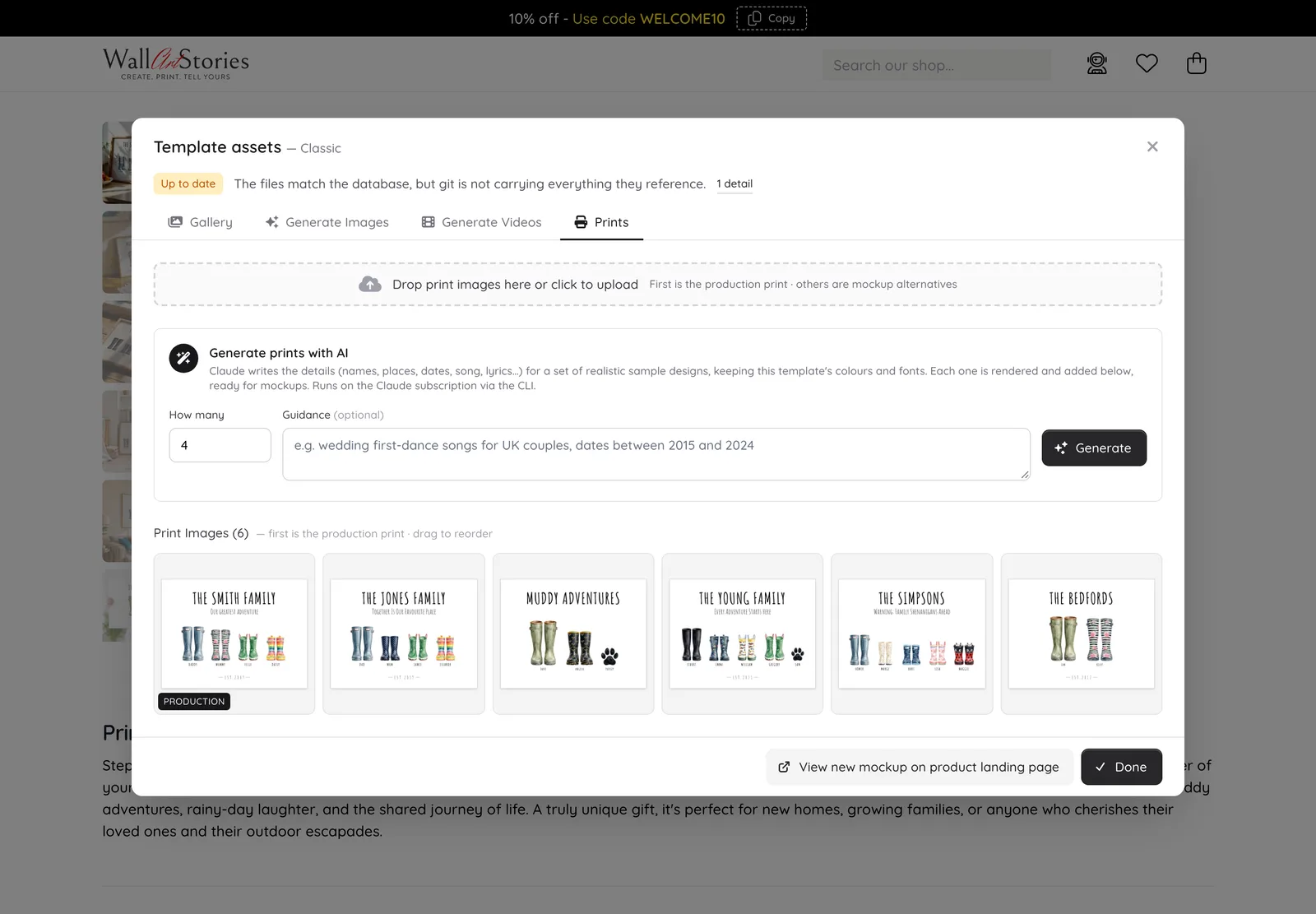
Nobody personalises a print called “Your name here”. So for each design, Claude writes a set of believable examples: names, places, dates, songs, whole playlists, each the right length for its field. The shop renders them as real prints and places them into room scenes from a library of 919, warped into each frame with the scene’s own shadows and reflections laid back on top.
- Sample content is told to use UK names and never to reproduce copyrighted text at length
- The compositing is deterministic: the print in the mockup is the real print, pixel for pixel
- AI can repaint a scene’s wooden frame in matte black, giving a second version of the same room
- Video mockups cycle up to fifteen prints through one filmed scene
- The same generator makes the images for social posts and Etsy listings
Print checks · AI vision
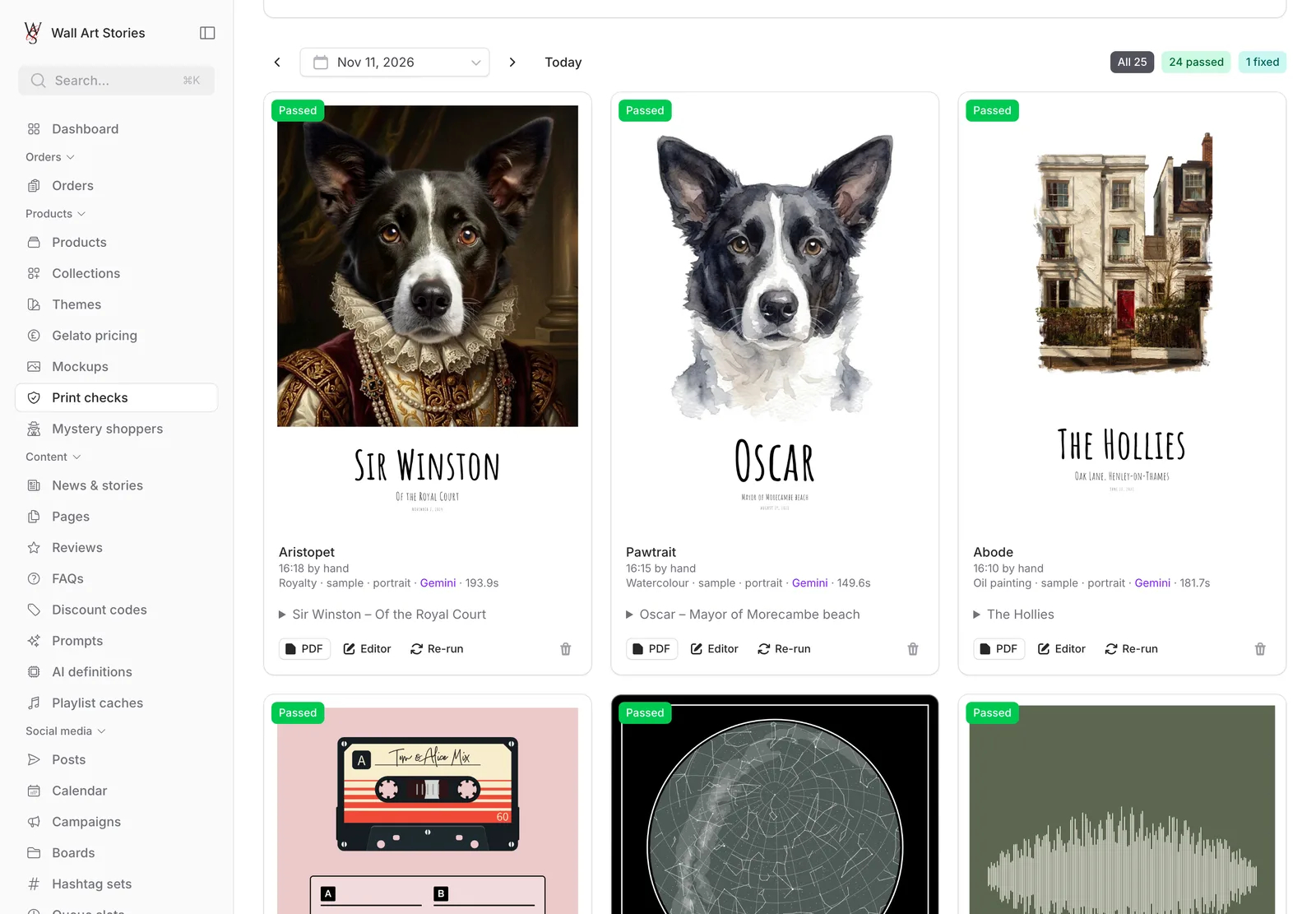
A proofreader that starts at five every morning.
Each morning, one design from every live range is pushed through the same path as a real order: rendered, turned into a full-size PDF and measured. Then an AI model looks at the result the way a customer would, for clipped text, missing images, stray placeholder text and half-drawn prints. One check in four uses deliberately awkward content, the Zoës and Siâns that break layouts.
- A wrong page size or page count is a hard failure
- The AI review can only ever add a warning, never pass or fail a check on its own
- Deliberate effects are explained to it, so a heap of fallen lyrics isn’t reported as a fault
- Photo prints go through the real AI painting pipeline, one range a day, to keep costs down
- A summary email arrives before the working day starts
AI usage
Every call counted. Every penny estimated.
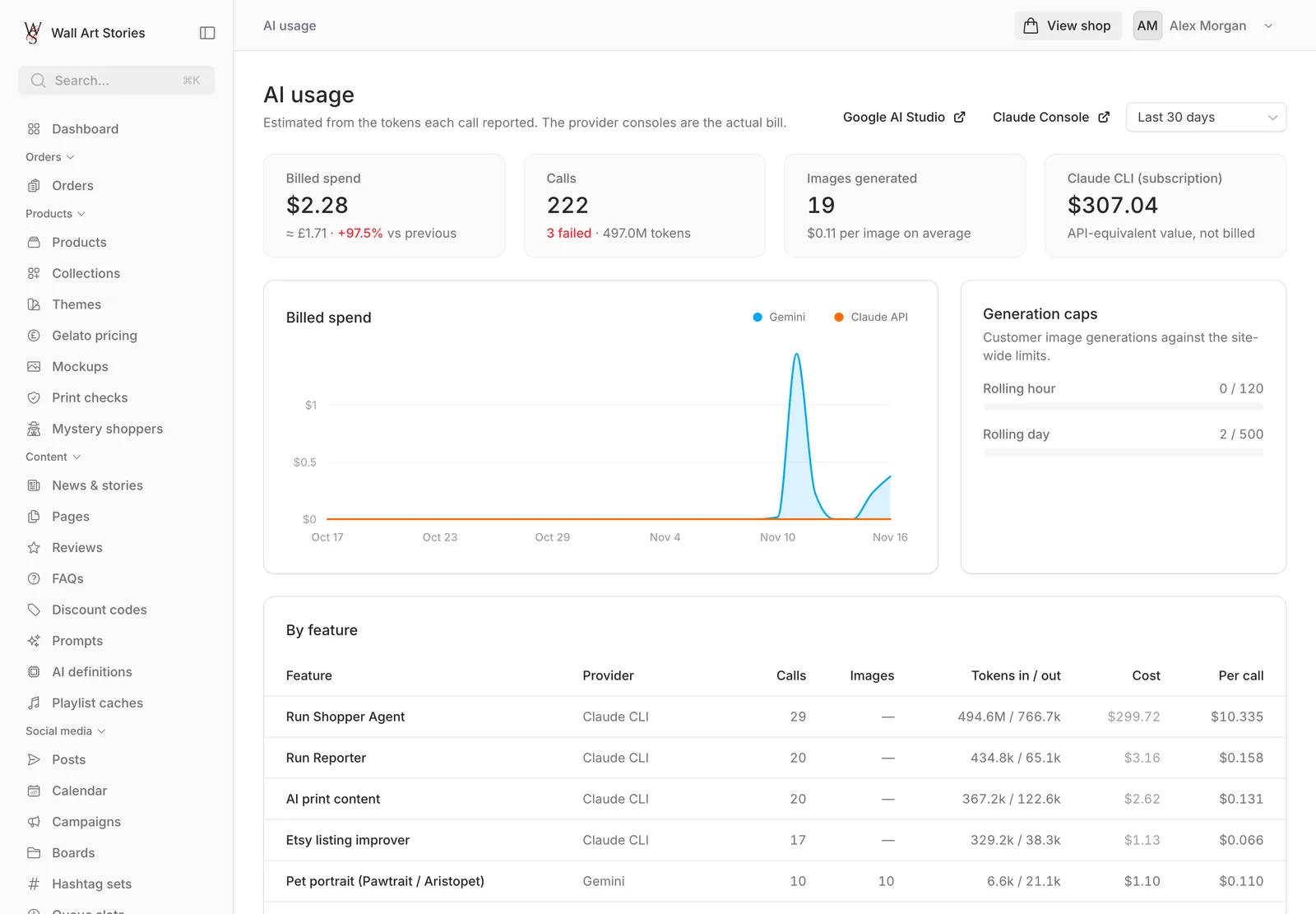
A dozen AI features across three providers is a bill waiting to surprise someone. So every call the shop makes is recorded where it leaves the building: which feature asked, which model answered, how many tokens went each way, how many images came back, how long it took and what it cost.
-
Recorded automatically
Calls are captured at the network level, so a new AI feature shows up on the dashboard without anyone remembering to log it.
-
Cost by feature and by model
Spend is worked out from each call’s tokens at the price on the day, then broken down by feature, by model and call by call.
-
Caps you can see
Customer image generation is shown against its hourly and daily limits, turning amber at 70% and red at 90%.
-
Failures in the same place
Failed calls sit beside the successful ones with their error, the feature that made them and how long they took.
Guardrails
Useful AI is AI on a short lead.
None of this is left to run itself. The same handful of rules shows up in every feature.
-
A person approves anything public
Social posts wait for approval. Etsy suggestions are ticked, applied and then published by hand. Descriptions come as three candidates to choose from and edit.
-
Budgets, not hope
Every customer-facing feature has limits per visitor and for the whole site. When a budget is spent, saved results are served and the customer is told plainly.
-
Paid for once
Definitions, playlists, release years and photo descriptions are all saved and reused. The second customer to ask gets the answer free.
-
Prompts the owner can edit
The instructions behind descriptions and social captions are records in the back office, with the house style in them, not text buried in code.
-
Nothing to act with
Where AI reads text from strangers, such as Etsy listings and customer reviews, it runs with no tools, no files and no network, so a planted instruction has nothing to work with.
-
Test mode or nothing
The mystery shoppers only run on a private copy, with test payments, draft print orders and email addresses that can’t be delivered to.
On the clock
The shop, while everyone’s asleep.
An ordinary day, as the server sees it.
-
03:00
Housekeeping
Temporary designs are cleared out and old records, AI usage logs included, are pruned.
-
04:30
Pinterest
Access tokens close to expiry are renewed and the list of boards is refreshed.
-
05:00
Print checks
One design from every live range is rendered, measured and reviewed by AI.
-
06:00
Security audit
A scheduled audit of the application runs before the day starts.
-
09:00
Artwork reminders
Customers with saved designs about to expire are reminded to finish them.
-
Hourly
Fill the queue
Approved social posts with no date are given the next free slot in the weekly timetable.
-
Hourly
Service checks
Every outside service the prints rely on is tested, from maps and fonts to the AI models.
-
15 min
Printer sync
Order statuses are fetched from the print partner, so the shop knows where every print is.
-
1 min
Publish
Any social post whose time has come is sent to its platforms.
Gallery
More of the build
-
Abode: house portraits -
AI-written sample prints -
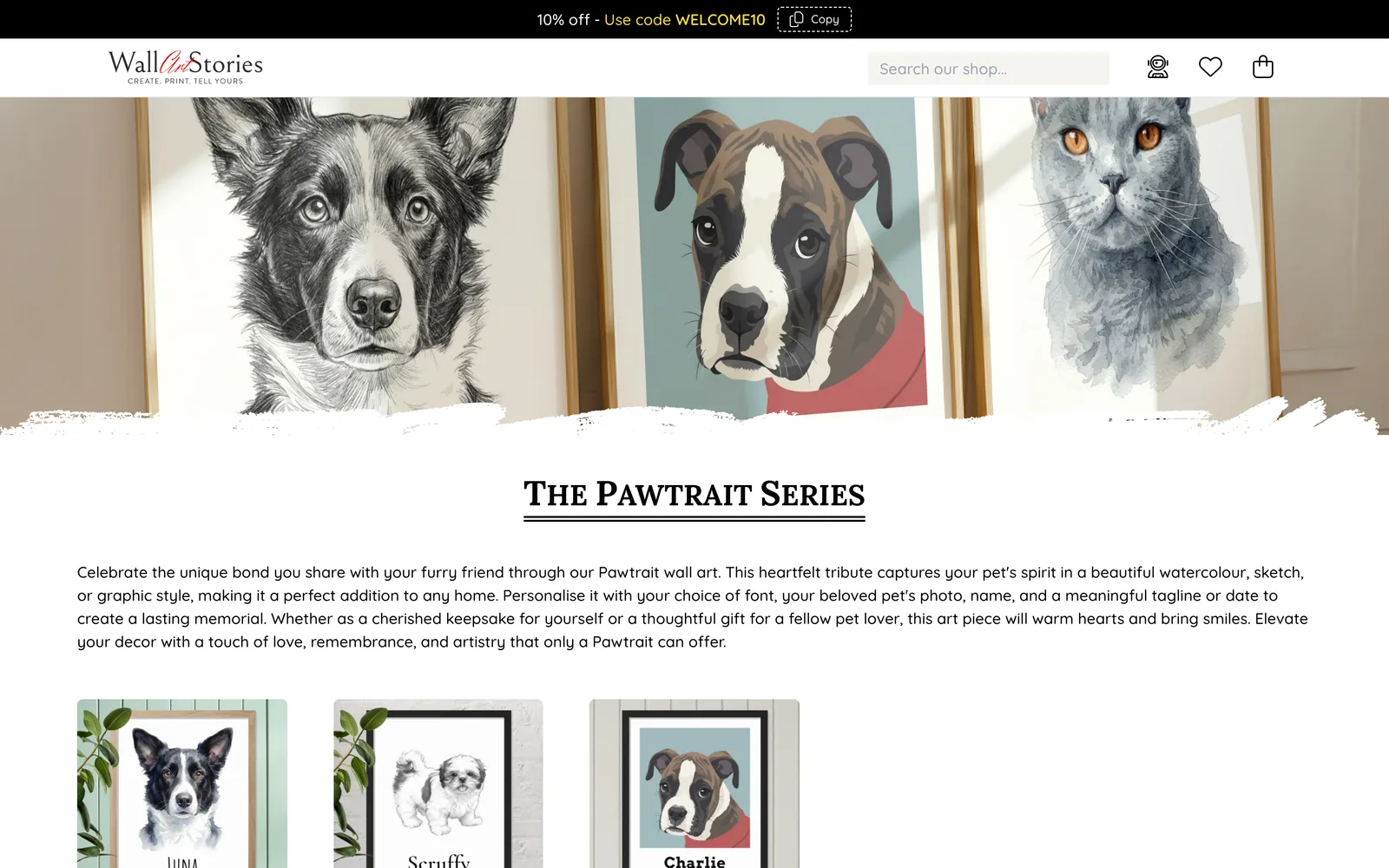
Pawtrait: three styles -
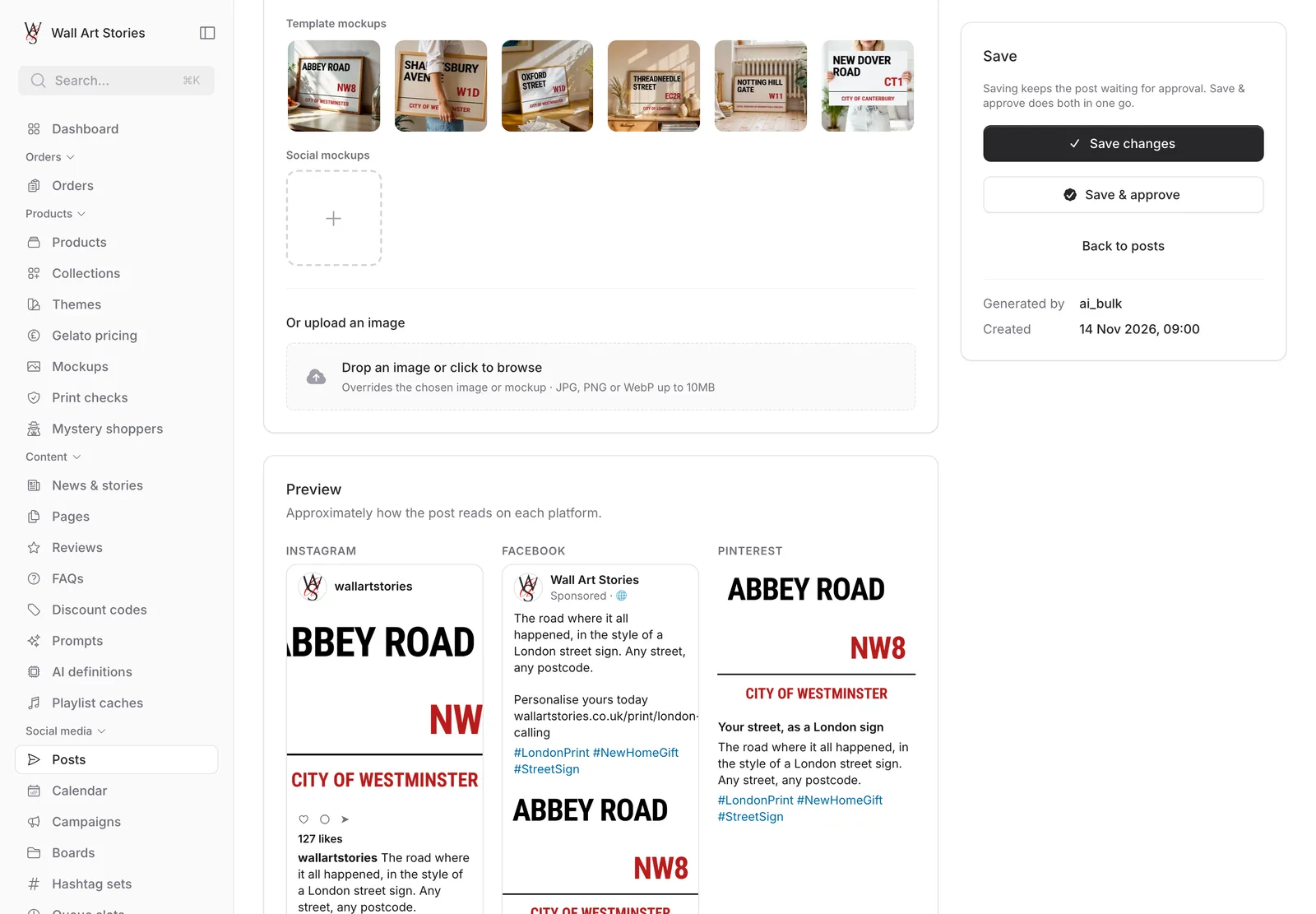
One post, three platforms -
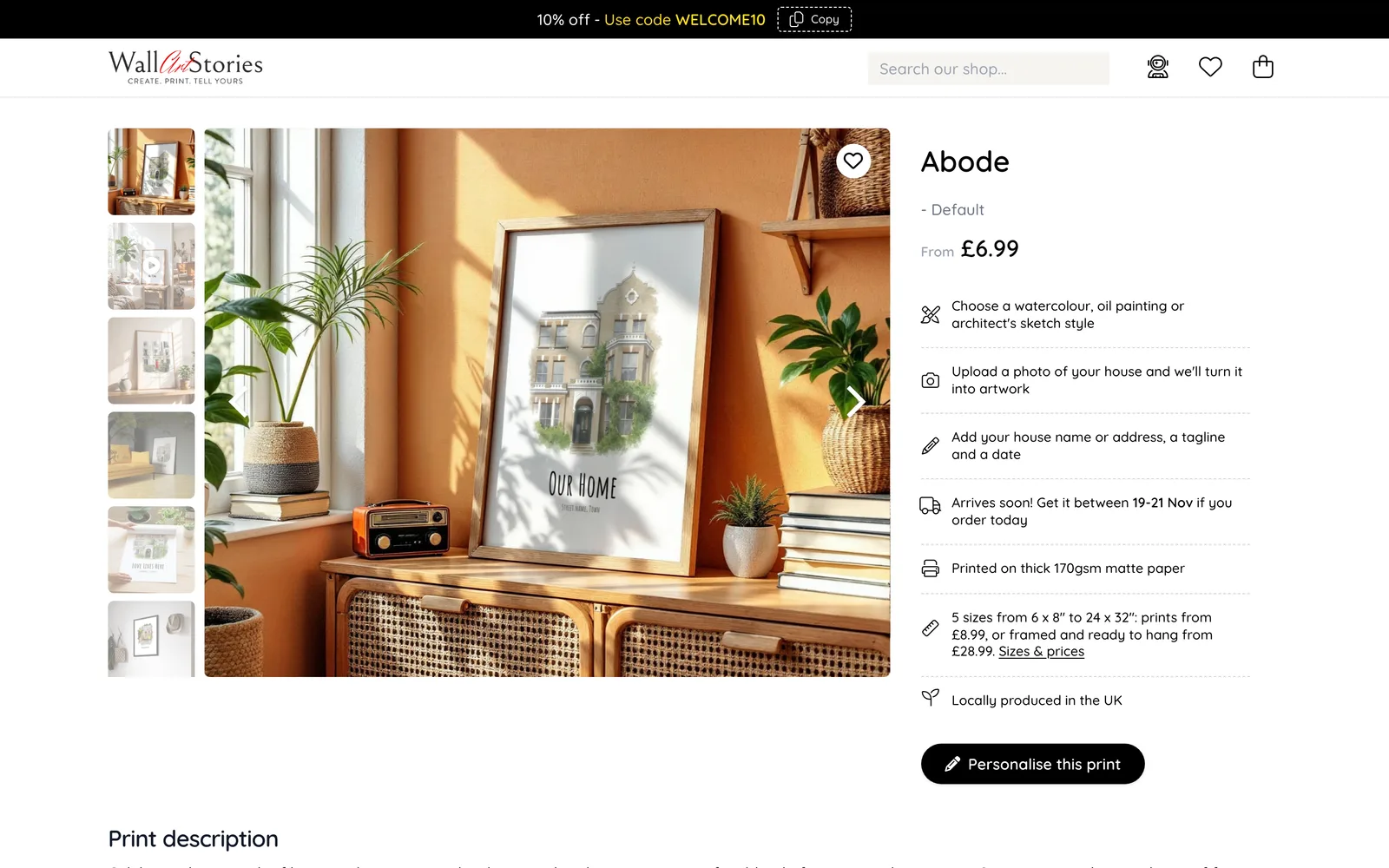
A product page
Technology
One Laravel application. Three AI providers.
The shop, the editor, the back office and every AI feature are one Laravel codebase with more than 1,500 automated tests. Each AI job uses the model that suits it: Gemini for images and quick lookups, Claude for writing, strategy and agents, OpenAI for jokes.
-
Laravel
Application
-
PHP
Language
-
Livewire
Editor & back office
-
Alpine.js
Live preview
-
Tailwind CSS
Styling
-
MySQL
Database
-
Claude
Writing & agents
-
Gemini
Images & vision
-
OpenAI
Definitions
-
Stripe
Payments
-
Etsy API
Listings & research
-
Meta & Pinterest
Social publishing
- Gelato print on demand
- Stripe
- Etsy Open API
- Facebook & Instagram Graph API
- Pinterest API
- Cloudflare Browser Rendering
- Playwright
- Laravel Horizon
- Spotify
- Mapbox
- Mailcoach
Your project
Have a process that should run itself?
If your team spends its days chasing, re-keying and reminding, there is probably software to be built. We’d be glad to talk it through.
Social media
A month of posts before the kettle boils.
Facebook, Instagram, Pinterest and X each want a different voice, a different shape of picture and a steady supply of posts. The back office drafts, schedules and publishes them from one place.
Campaigns give the AI its brief
A campaign is a theme with dates: Mother’s Day, new home, Christmas. Its brief describes the audience, the sentiment and the phrases to lean into or avoid, and that brief goes into every post written for it. The dashboard flags campaigns starting in the next sixty days and how many posts each has, with a button to generate more.
Draft one post, or a whole campaign
Choose a print and press “Generate with AI”, and Claude writes a title, caption and hashtags in the house style. “Bulk generate” does the same across any mix of products and platforms in the background, with the tone set per platform: warm and conversational for Facebook, emotive for Instagram, search-minded for Pinterest. A finished post can be respun in one click: funnier, shorter, more sentimental, aimed at pet owners.
Nothing goes out unapproved
Everything the AI writes arrives as “Pending approval”. A person reads it, edits it, approves or rejects it, and the editor says so bluntly: setting a delivery time alone is not enough. Change the caption of an approved post and it goes back to pending.
A calendar you can drag things around
Approved posts land on a month, week or list calendar, coloured by whether they are scheduled, going out, published or failed. Hover for a preview; drag a post to another day to reschedule it. A weekly timetable of slots does the rest: every hour, approved posts with no date are dropped into the next free slot.
01 / 04 Social media